PLAYBACK
E-104
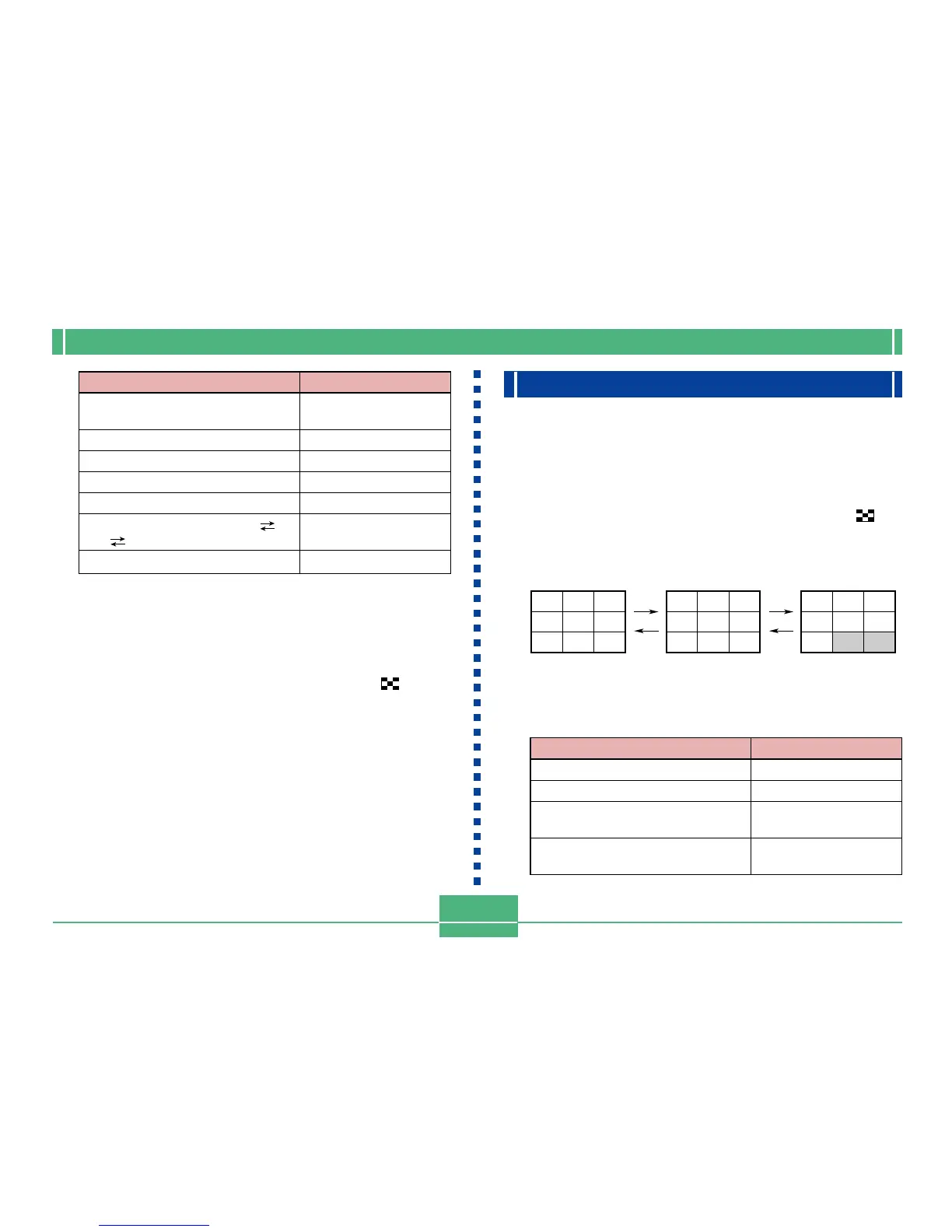
If you want to do this
Display on-screen guidance
messages
Shift the view right
Shift the view left
Shift the view upwards
Shift the view downwards
Change the zoom factor: 1X
2X 4X
Return the image to normal size
Do this
Press SET/DISP
Press [].
Press [].
Press [].
Press [].
Operate the zoom
slider.
Press MENU.
IMPORTANT!
• You cannot enlarge movie or panorama images.
NOTE
• Sliding the zoom slider towards W (WIDE) while a
normal size (1X) image is on the display switches to
the 9-image view.
Displaying the 9-image View
The following procedure displays nine images on the monitor
screen at the same time.
1.
Align the POWER/Function Switch with PLAY.
2.
Slide the zoom slider towards W (WIDE) .
• This displays the 9-image view, starting with the last
image you recorded.
26 27
123
456
789
10 11 12
13 14 15
16 17 18
19 20 21
22 23 24
25
[]
[]
[]
[]
To do this
Scroll forward
Scroll backward
Display the selection pointer (See
following section.)
Exit the 9-image view
Press this button
[]
[]
SET/DISP
Any button other than
the above three.
• The following describes operations that are available
while the 9-image view is on the monitor screen.



 To Next Page