44
Field Descriptions for the Advanced Options Section
Field Description
UPnP Enable
Turns on the Universal Plug and Play protocol
(UPnP) agent in the configuration manager. If you
are running a CPE (client) application that requires
UPnP, select this box.
Checkmark
Enable
to turn on this option.
PassThrough Mac
Addresses
Specifies up to 32 computers as pass-through
clients not subject to NAT, using their MAC
addresses.
To enable this feature, your cable operator may
need to provide additional public IP addresses.
When done, click
Apply
to save your changes.
Advanced IP Filtering Section
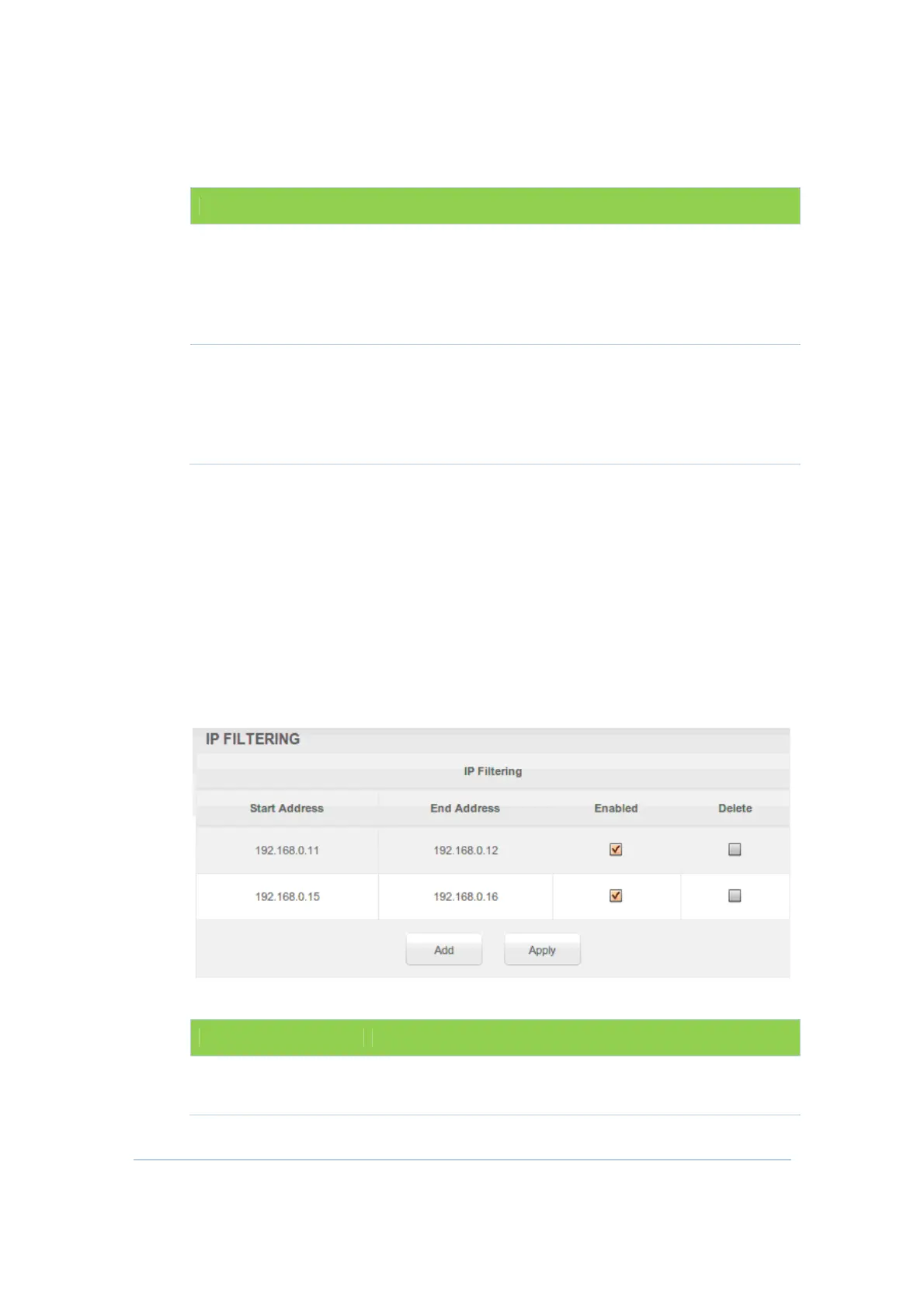
This section allows you to define which local PCs will be denied access to the
CH6643E WAN. You can configure IP address filters to block Internet traffic to
specific network devices on the LAN by entering start and end IP address ranges.
Note that you only need to enter the LSB (Least-significant byte) of the IP address;
the upper bytes of the IP address are set automatically from the CH6643E
Configuration Manager’s IP address.
The Enabled option allows you to store filter settings commonly used but not have
them active.
Field Descriptions for the Advanced IP Filtering Section
Field Description
Start Address
Enter the start IP address range of the computers for
which you want to deny access to the CH6643E WAN.


 To Next Page