Steps to
connect print server on windows client:
1.
Printers and Faxes, or by opening Print
a
2.
After clicking "Add Printer", click the next button and configure this as
a network printer. Click Next.
3.
network" and set the address to
"http://print:631/printers/myprinter".Click Next.
4.
The wizard will prompt you to select a driver for your printer.
5.
If all went well, you should see complete window. Click F
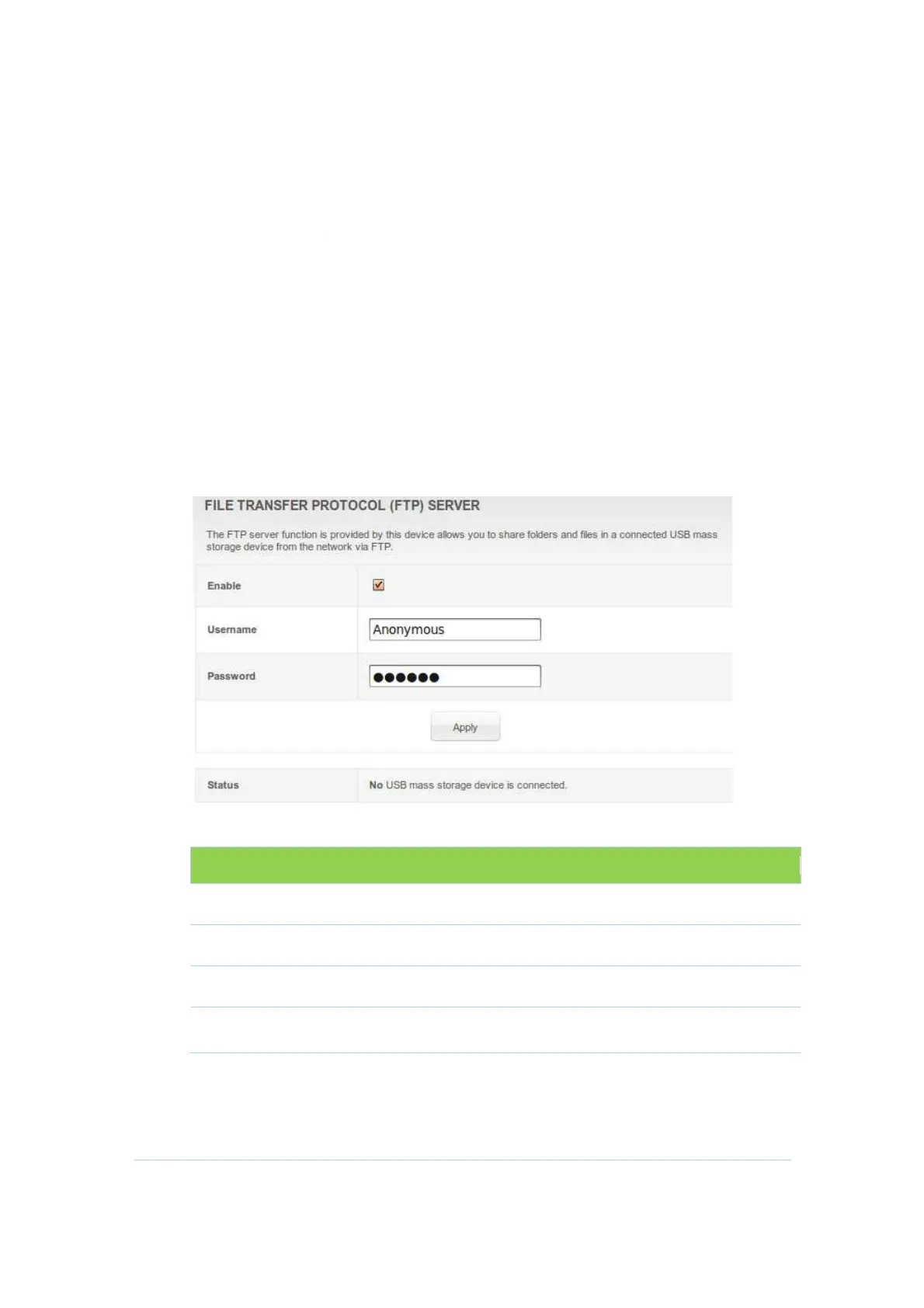
FTP Server
CH6643E
support USB storage and share it based on FTP
that allows
users can login and manage it.
Field Descriptions for the
Field
Enable
Username
Password
Status
connect print server on windows client:
Wizard either by going via Start > Settings >
Printers and Faxes, or by opening Print
ers and Faxes and clicking the
After clicking "Add Printer", click the next button and configure this as
a network printer. Click Next.
to a printer on the Internet or on a home or office
network" and set the address to
"http://print:631/printers/myprinter".Click Next.
The wizard will prompt you to select a driver for your printer.
If all went well, you should see complete window. Click F
support USB storage and share it based on FTP
users can login and manage it.
Field Descriptions for the
FTP Server Section
Description
Enable or disable FTP server.
The login username of FTP server.
The login password of FTP server.
Show vender and model info of the USB stick.
54
Wizard either by going via Start > Settings >
ers and Faxes and clicking the
After clicking "Add Printer", click the next button and configure this as
to a printer on the Internet or on a home or office
The wizard will prompt you to select a driver for your printer.
If all went well, you should see complete window. Click F
inish.
Show vender and model info of the USB stick.


 To Next Page