51/60
Accessories
USING MACHINE ACCESSORIES
Cooling unit
The cooling unit is supplied with approx. 4 litres of coolant. To ll the tank completely, unscrew the cap and top up
the uid.
Connect the water hoses emerging from the welding torch to the ttings on the bottom of the wire feeder and the water
hoses connecting the power source to the wire feeder. When the cooling unit is switched on, check the uid level. It
must always be near the MAX mark. It is important to keep the tank constantly topped up to MAX level during use for
maximum performance, checking the level through the uid check slot.
The coolant used should consist of 70% distilled water and the remaining 30% ethylene glycol. This mixture is used
not only to keep the coolant uid at low temperatures but also to prevent limescale deposits due to hard water, which
would affect system durability and in particular the proper operation of the pump.
A pressure switch on the delivery circuit safeguards the welding torch by monitoring the coolant outlet pressure. When
a pressure drop occurs due to a lack of uid or a blocked pump, the pressure switch reports the anomaly to the power
source and the power source automatically stops welding, showing an error on the wire feeder display.
Maintenance
Daily maintenance
It is good practice to carry out the following maintenance operations every day:
- Check the water level, adding uid as necessary.
- Check there are no leaks in the cooling water pipes.
Six-monthly maintenance
It is good practice to carry out the following maintenance operations every six months:
- Remove dust and dirt. Change the coolant and ush the cooling system with clean water before adding new coo-
lant.
- Check the tightness of ttings, cables and connectors.
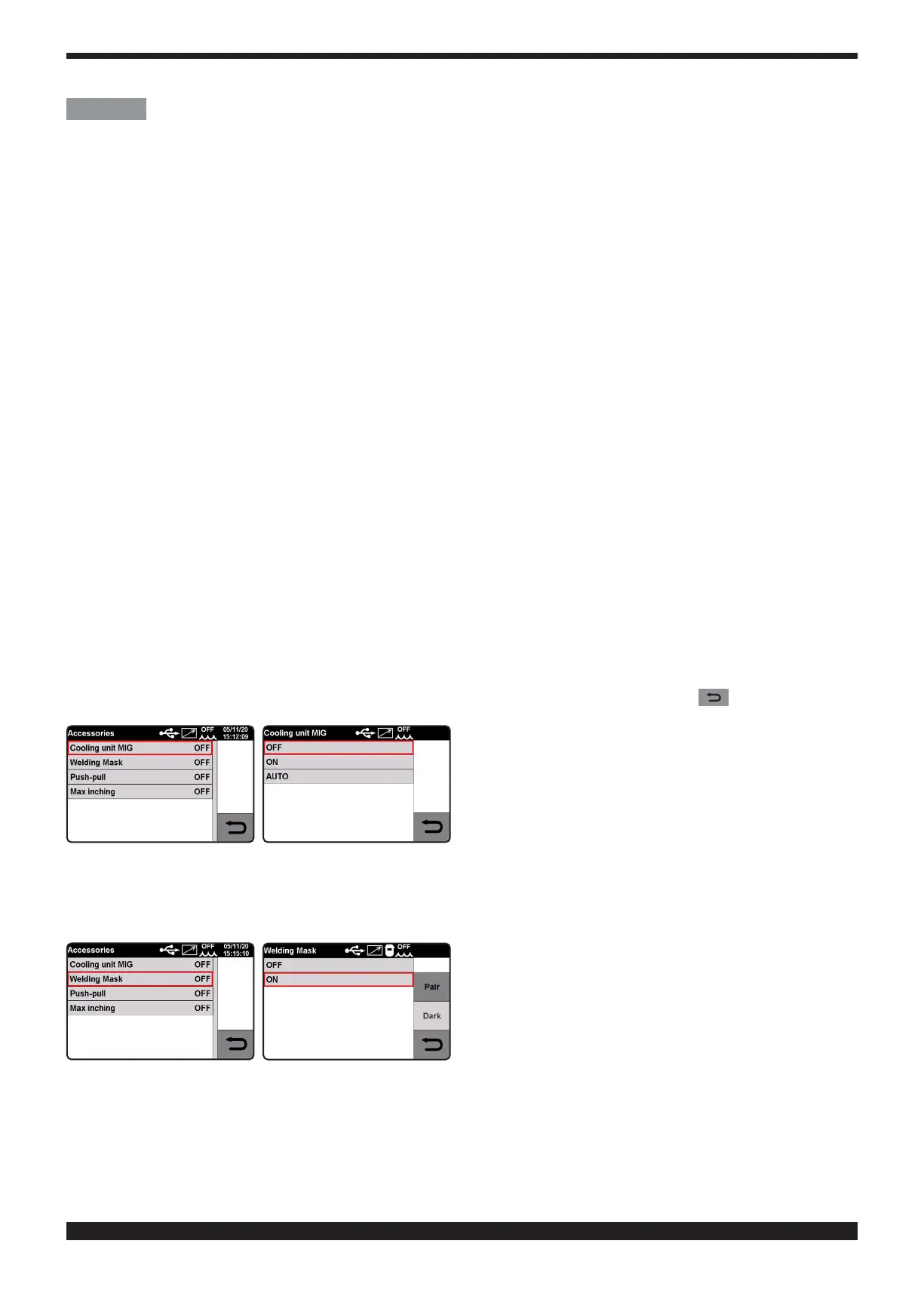
• Cooling unit use instructions.
This function is used to set cooling unit start-up.
Selections are OFF – ON – AUTO, default value is OFF. If "AUTO" is selected, when the machine is switched on, the
cooling unit starts; if the torch trigger is not pressed after 30 seconds, it shuts off. Pressing the torch trigger starts
the unit again and it shuts off 3 minutes after releasing the trigger
Turn knob 2 to select the parameter and conrm the selection by pressing the knob or key .
• Bluetooth controlled welding mask� (optional)�
To use the mask (after installing the kit in the power source) turn on the welding mask, activate the function on the
power source display by turning it ON and pair the welding mask to the power source via Bluetooth by selecting
“PAIR”. To check the function, press the “DARKEN” key on the display and ensure the mask glass goes dark.







 To Next Page