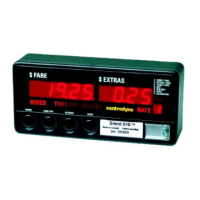
The device described in this manual is the Centrodyne S610/620 Taximeter, a sophisticated electronic device designed for use in taxis to calculate fares, manage extras, and provide various operational and statistical data. It also supports credit card transactions, including sales, returns, and pre-authorizations, with or without wireless communication. The manual covers installation, operation, programming, and maintenance aspects of the taximeter.
Function Description
The primary function of the S610/620 Taximeter is to accurately calculate taxi fares based on distance traveled and time elapsed. It features multiple programmable rates (up to 8, with 16-rate versions available), allowing for flexible tariff structures. The taximeter displays the current fare, extras, and the selected rate. It can operate in different modes: "HIRED" (fare accumulation), "TIME OFF" (time charges suspended), and "VACANT" (ready for a new trip).
Beyond basic fare calculation, the taximeter offers extensive programming capabilities for various operational parameters. These include:
- Calibration: Essential for accurate distance-based fare calculation, allowing the meter to be calibrated to the vehicle's specific distance per pulse.
- Rate Programming: Detailed configuration of up to 8 (or 16) different rates, including flag drop amounts, drop distances, distance rates, time rates, fare increments, and extra increments.
- Control Options: Settings for automatic receipt printing, display of total fare and extras, unit selection (kilometers or miles), statistics reset permissions, and rate change restrictions.
- Specialty Options: Advanced settings such as tax rate calculation (Method A or B), auto rate change based on dollar or distance amounts, critical speed (to stop accumulating charges above a certain speed), statistics reset password protection, and tip increment values.
- Clock/Calendar: Allows for setting and editing the current time, date, and year/day of the week, which is crucial for time-based charges and record-keeping.
- Printer Text: Programmable text lines for customer receipts and statistics printouts, enabling customization of information such as cab company name, merchant ID, and custom messages.
The taximeter also supports credit card operations, facilitating secure transactions. It can process credit card sales, returns, and pre-authorizations. For credit card transactions, it can print detailed receipts with transaction information, including tip, total amount, payment method, and approval numbers.
Statistical Data Management: The device accumulates and displays various statistics, including total fares, total extras, total tax, total distance, paid distance, and number of trips. These statistics can be viewed in "DAILY STATS" (resettable daily) and "TOTAL STATS" (cumulative) formats. The S620 model, when programmed for DAILY STATS, can print both customer and totals receipts.
Important Technical Specifications
While specific numerical technical specifications like power consumption or dimensions are not explicitly detailed in the provided excerpts, the manual highlights several key technical aspects:
- Speed Signal Input: The taximeter supports two types of speed signals:
- Digital (on/off, high/low signal): Typically from mechanical transducers on speedo cables or vehicle computer (ECM), common in vehicles like Caprice and most GM models.
- Analog (varying amplitude and frequency): Usually from magnetic speed sensors in the transmission, found in vehicles like Crown Victoria and most Ford models.
- Jumper Selection: Internal jumpers on the circuit board allow selection between digital and analog speed signal inputs, ensuring compatibility with different vehicle types.
- Memory: The manual mentions "32K EPROM" and "64K EPROM" for older and newer meter styles, respectively, indicating the type and size of memory used for storing programming and statistical data.
- Printer Compatibility: The S610/620 is designed to work with a printer, with specific instructions for the "Silent 620" High Speed Printing Meter and the "Silent 150" Remote Printer.
- Connectivity: The installation diagram shows a DB-15 connector for various connections, including speed signal input/output, power (12 VDC), ground, and optional dome/top light relay drive.
- Push Button Interface: The device is programmed and operated using four push-button switches (SW1, SW2, SW3, SW4) on the front panel, along with a programming switch (SW5) for entering programming mode.
Usage Features
- User-Friendly Interface: The taximeter uses a clear display for fare, extras, and rate information, with blinking digits to indicate editable values during programming.
- Multiple Rates: The ability to program and switch between multiple rates (up to 8 or 16) allows for adapting to different tariffs based on time of day, location, or passenger count.
- Extras Management: Drivers can easily add extras to the fare using a dedicated button, with pre-programmed increments.
- Passenger Count Entry: Some meter versions allow the driver to enter the number of passengers, which might influence fare calculation or record-keeping.
- Credit Card Integration: Seamless processing of credit card transactions, including swiping cards through a reader and printing receipts.
- Pre-Authorization: Supports pre-authorization of credit cards for a fixed dollar amount before a trip starts, where approved.
- Statistics Viewing: Drivers can view daily and total statistics directly on the meter display, providing insights into their performance.
- Receipt Printing: Capability to print customer fare receipts, statistics receipts, and credit card transaction receipts, enhancing transparency and record-keeping.
- Paper Feed Mechanism: Easy paper roll replacement for both integrated and remote printers, with automatic paper detection and feeding.
Maintenance Features
- Calibration: Regular calibration (Group 0) to a measured mile (km) is a key maintenance procedure to ensure the accuracy of fare calculation.
- Password Protection: Group 9 allows for setting a password to protect programming data and statistics reset functions, preventing unauthorized changes.
- Statistics Reset: Both daily and total statistics can be reset, with password protection as an option, which is important for driver shifts or periodic reporting.
- Error Codes: The S600 ERROR CODES section (Appendix II) provides diagnostic information for various internal failures, such as programming errors, internal/external memory issues, printer problems, and ROM failures, aiding in troubleshooting and repair.
- Jumper Selection for Speed Signal: The ability to change speed signal jumpers (on the circuit board) allows for adapting the taximeter to different vehicle types or sensor replacements without requiring a new unit.
- Ribbon Replacement (for Silent 150 Remote Printer): Instructions are provided for replacing the printer ribbon, a routine maintenance task for impact printers.
- Modular Design (implied): The instructions for sliding out the front face and printed circuit boards suggest a design that facilitates internal access for maintenance and jumper changes.

 Need help?
 General

 To Next Page