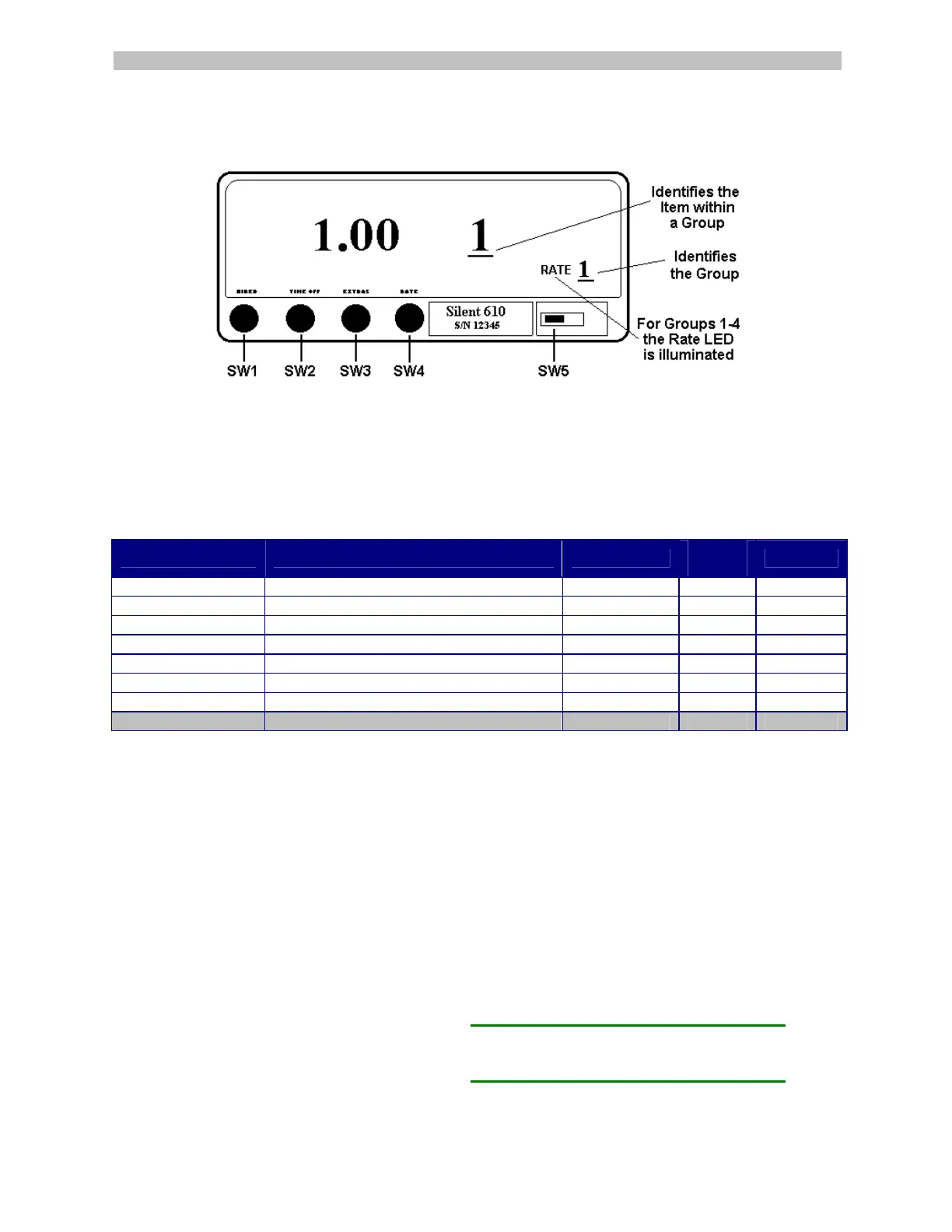
Switch Config: SW1 Select Group SW2 Select Item & Move Character left SW3 Change Character Value SW4 Enter SW5 Programming Switch
Groups 1-4 Rate Programming (and optional Rates 5-8)
When in Groups 1 to 4, the RATE legend is illuminated and flashes on and off. Taximeters with the optional 8
RATE feature will illuminate and flash the RATE legend when stepping through all 8 rates.
To program a Fare or Tariff:
1) Slide SW5 to the left to enter programming mode.
2) Press SW1 until RATE 1 is displayed on the meter.
3) Press SW2 to select the Item. The flag drop amount is displayed in the Fare window and Item "1" is
displayed in the Extras window.
Pressing SW2 steps through the list of Items in the Group.
The Item number, 1 through 8, is shown in the Extras window and the amount or value is shown in the Fare window.
Item Description Example
Meter
Display
Your Fare
1. Flag Drop Initial dollar charge $ 1.25 001.25
2. Drop Distance Fraction of mile (km) fare increments 1/10 mile (km) 00.100
3. Distance Rate Dollar amount charged per mile (km) $ 1.00 001.00
4. Time Rate Dollar amount charged per hour $12.00 012.00
5. Fare Increment Amount charged per fraction of mile (km) $ .10 000.10
6. Extra Increment Amount charged for extras $ .50 000.50
7. Maximum Extras Max charge allowed for extras $99.99 099.99
8. DO NOT USE DO NOT USE-LEAVE AT 000.00 000.00 000.00
To change (Item 1) Flag Drop:
4) Press SW4 (to confirm Item selection). The last number in the Fare window will flash (if the
number is not flashing, the meter has "Password" option, see page 9).
5) Press SW3 to change the value of the flashing digit.
6) Press SW2 to move to the next digit to the left (the number to the left will begin to flash).
7) Repeat this sequence (SW3 and SW2) until the Flag Drop you want is displayed.
8) Press SW4 to save.
To change Items 2 through 7:
Press SW2 to step through and select the Item number to edit. The Item number is displayed in the Extras
window and the amount or value of that Item is displayed in the Fare window. Continue using the same
sequence (steps 4 through 8) as above to change the rest of the Items for Rate 1. Use the same procedures
to program each of Rates 2, 3 ,4, (and optional rates 5, 6, 7 and 8).
1/10 = .100 1/7 = .143 1/4 = .250
1/9 = .111 1/6 = .167 1/3 = .333
1/8 = .125 1/5 = .200 1/2 = .500
The table contains a few examples of drop
distances in decimal value.
3



 To Next Page