SW1 Select Group SW2 Select Item / Move Digit Left SW3 Select Character Position / Change Character Value SW4 Confirm / Save
Group 8 Printer Text
Eight text lines may be programmed for the customer receipt and statistics printouts. Items 1, 2, 3 and 4 are
printed at the top of the receipt while items 5, 6, 7 and 8 are printed as the last 4 lines of the receipt. For the
statistics printout only items 1 to 4 are printed at the top of the printout. Before you edit these text lines, first
see the ASCII table and text programming sheets on pages 4 & 5 for organizing the text lines to be printed.
Item or line "9" is the title for the statistics receipt (factory set as "TOTALS") and may be changed if required.
1. Slide SW5 to the left,
2. Press SW1 until Group "8" is displayed in the
Rate window on the right.
3. Press SW2 until the printer Line you want to
change, “1” through “8”, is displayed in the
Extras window.
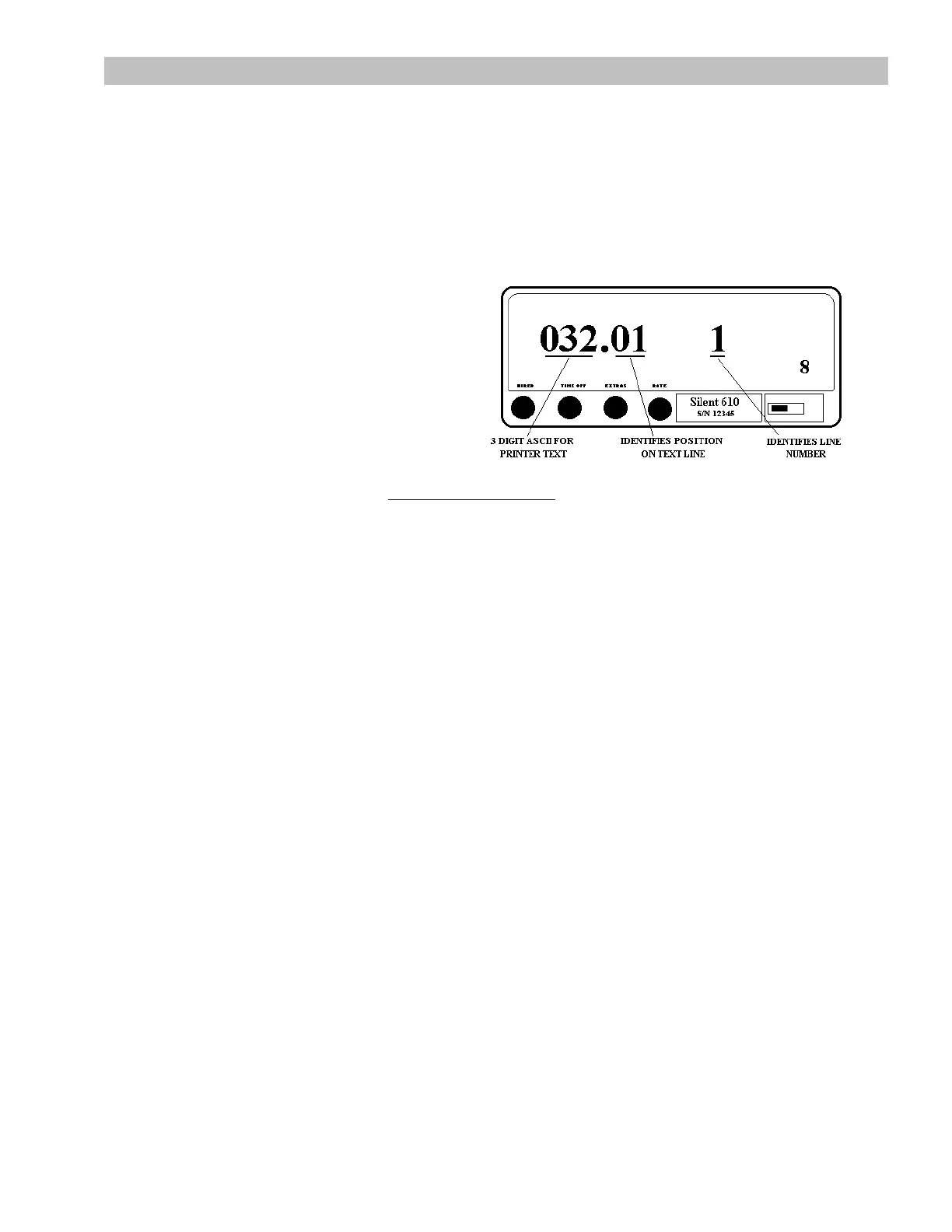
4. Press SW3 to step through and select the 16
character positions in a printed line, shown on
the right side of the Fare window, after the
decimal point.
5. Press SW4 to confirm selection. The digit to the left of the decimal point will flash.
6. Referring to your duly completed Text Programming Sheet
, press SW3 to change the value of the
flashing digit.
7. Press SW2 to move to the next digit (the digit to the left will now flash).
8. Press SW3 to change the value of the flashing digit.
9. Continue using the same button sequence (SW3, SW2) until the correct value is displayed.
10. Press SW4 to record the value into memory.
11. Press SW3 to select the next character position, (1 through 16) and use the same push button
sequence as above (SW4, SW3, SW2) to change the values.
12. Repeat this procedure (from Step 3) to enter all eight lines of printed text.
If a line is not required, ensure 000 is entered for the ASCII value for all 16 positions in the line.
FORMAT: CCC.LL. CCC is an ASCII decimal code for the required letter (refer to ASCII table) and LL is the
position in the line for the letter. There are 16 positions in a line.
RANGE OF CCC: 032.01 - 127.16, RANGE OF LL: 1 -16.
7



 To Next Page