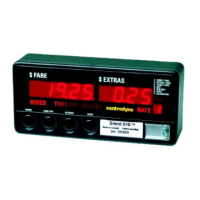
RESETTING STATISTICS
There are two different versions of the statistics reset function in use;
1 older style meter with a 32K EPROM and 2 newer meters with a 64K EPROM.
Newer Meters (64K) Old Style Meters (32K)
Taximeter Totals or Statistics:
The option to reset Meter Totals must be turned on and
off in programming mode. Password protection for
Meter Totals is not provided. To reset Meter Totals:
1. First perform steps # 1 to # 7 for older style meters
(right column).
2. Slide the program switch to the right to return to
taximeter operation.
3. To reset statistics, press the statistics button (extras
Button) once, then immediately press switch # 1
(hired button) and then switch # 4 (rate button). The
statistics have now been reset.
4. Remember to go back and disable the ability to reset
statistics performed in step # 1 above, if desired.
Daily Totals or Statistics:
Perform the following steps to reset the DAILY STATS:
1) ensure the meter is VACANT,
2) press the Time-Off button (SW2) to view the DAILY
STATS
3) immediately press the Hired button (SW1), followed
by the Rate button (SW4).
The DAILY STATS should now be reset, except if the
taximeter has been programmed with Password
protection (see step # 8 for old style meters to the
right). Perform the following to reset DAILY STATS if
the taximeter has Password protection;
1) after performing the above three steps, the Fare
window will display 00000 and the Extras window will
display 00. The Extras display is a counter showing
the number of times the DAILY STATS has been
reset. A five-digit password must now be entered
into the Fare window.
2) using the standard programming button sequence,
enter the five digit password to reset the DAILY
STATS.
Meter Totals or Statistics:
1. To enable the reset statistics feature, first slide the
programming switch to the left.
2. Press switch # 1 (hired button) until “ 5 “ is
displayed on far right of meter.
3. Press switch # 2 (time button) once. You should
have a “ 1 “ in the Extras display and 5 digits in the
Fare display, example “ 01001 ”.
4. The first zero from the right in the Fare display
(underlined above) needs to be changed. To do
this, press switch # 4 (rate button) once and the
first digit on the right will start to flash on and off.
5. Press switch # 2 and the second digit from the right
will flash on and off.
6. Press switch # 3 to change the digit to a “1“. A “1“
in this position enables statistics reset and a “0“
disables statistics reset.
7. Press switch # 4 to record changes (digit stops
flashing).
8. If you wish to protect the statistics reset with a
password, press switch # 1 until a “ 6 “ is shown on
the far right of the meter. Press switch # 2 until a “
5 “ is shown in the Extras display. Enter a 5-digit
password into the fare display using the normal
button procedure.
9. Slide the program switch to the right to return to
taximeter operation.
10. To reset statistics, press the statistics button
(extras Button) once, then immediately press switch
# 1 (hired button) and then switch # 4 (rate button).
Statistics should now be reset, unless a password
is required, in which case the fare display will
shown “ 00000 “. Enter correct password to reset
statistics.
11. Remember to go back and disable the ability to
reset statistics performed in step # 1 above, if
desired.
11



 To Next Page