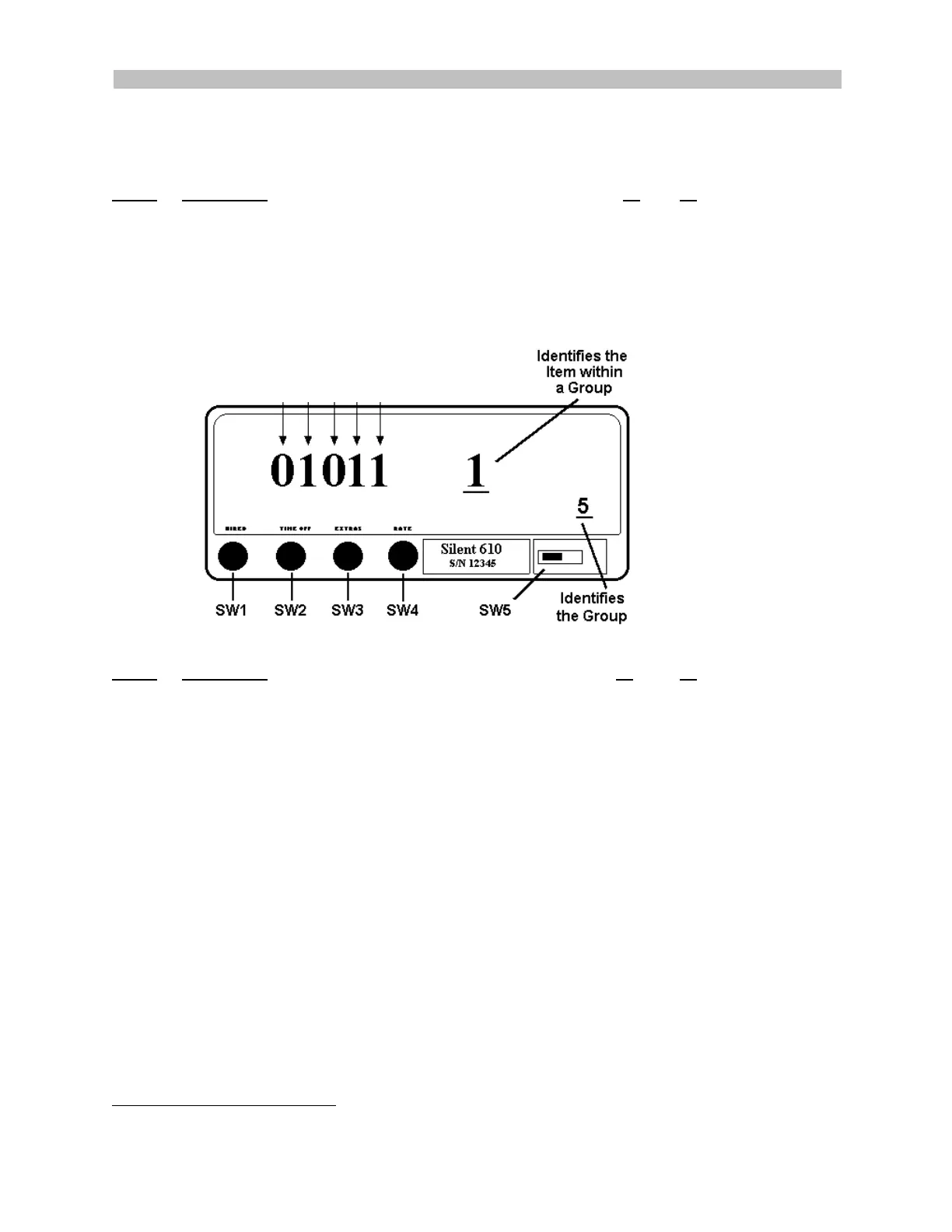
Switch Config: SW1 Select Group SW2 Select Item & Move Character left SW3 Change Character Value SW4 Enter SW5 Programming Switch
Group 5 Control Options
Control Options are factory set and, in most cases, do not require additional programming.
Program
Item 1
Description 1 0
A
1
Automatically print receipt upon going “Vacant” Yes No
B Sum fare and extras and display total in fare display Yes No
C
1
Print kilometers or miles on receipts and statistics Km Miles
D Allow statistics reset while in “Stats” display mode Yes No
E Prohibit rate change when in “Hired” state Y
ES NO
Group 5 Control Options
Item 1: A B C D E
Item 2: F G H I J
Program
Item 2
Description 1 0
F Tax Method A or Tax Method B B A
(A=Tax included in rate) or (B=Tax calculated at end of trip)
G
2
Inhibit Extras at time of day (Extras are not permitted Yes No
between times programmed in Items 6 and 7 of Group 7
H Total Units (increments) or Fares (monies) Units Fares
I
2
Date format Day/Month or Month/Day DD/MM MM/DD
J
2
Clock format 12 or 24 hour 12hr 24hr
1
23
To change the Control Options factory settings:
1. Slide SW5 to the left to enter programming mode.
2. Press SW1 to select Group 5. The group number displays in the Rate window, (above SW5).
3. Press SW2 to step through and select Item 1 or 2.
4. Press SW4 to (to confirm Item selection). The last digit in the Fare window will flash.
5. Press SW3 to change the character value.
6. Press SW2 to move one character position to the left.
7. Repeat Steps 5 and 6 (SW3, SW2) until the correct value is displayed.
8. Press SW4 to save.
1
For use with Printer option.
2
Requires RTC option.
4
3
Requires Auto Rate Change option.



 To Next Page