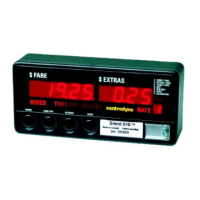
THE "SILENT 610/620/150"* TAXIMETER & PRINTER
OPERATING INSTRUCTIONS
Operation of the taximeter is controlled by the 4 push buttons on the face of the unit.
HIRED
When the taximeter is off or
“VACANT”, you may hire the meter
by pressing the HIRED button once.
The meter will display the initial or
drop charge in the fare display and
the word HIRED will be displayed.
When the taximeter is HIRED the
meter will automatically be in TIME
ON.
Some versions of meter require the
driver to enter the number of
passengers in the car prior to going
HIRED. To do this:
Press the HIRED (SW1) button.
A blinking “1” appears in the FARE
window.
Press SW3 to increment the
number of passengers.
Press SW4 to accept the number in
the FARE window as the number of
passengers. The meter goes into
HIRED mode.
If no buttons are pressed for a
period of 10 seconds (may vary by
meter configuration) the meter will
automatically switch to HIRED
mode, saving the current value in
the FARE window as the number of
passengers.
While in the HIRED state it will not be
possible to change to any other state
except HIRED TIME OFF.
HIRED - TIME OFF
After the taximeter has been HIRED
you may place the meter in TIME
OFF by pressing the TIME OFF
button once. The meter will now
display TIME OFF. Time charges
will not be accumulated in this state.
To resume accumulating time
charges, press the TIME OFF button
once.
While in the HIRED TIME-OFF state
it is only possible to change to
HIRED Time On or VACANT states.
EXTRAS
If EXTRAS are programmed into
your meter, ensure the meter is
HIRED Time On and press the
EXTRAS button once. The extras
amount will appear in the EXTRAS
display. Continue to press the
EXTRAS button to add to the amount
currently displayed (the extras
increment is pre-programmed).
While in the HIRED Time On state it
is only possible to change to HIRED
TIME OFF.
SUMMING FARE AND EXTRAS
To add the FARE and EXTRAS
amount, ensure the meter is HIRED
TIME OFF, and press the EXTRAS
button once. The meter will now
display the total of the Fare and
Extras in the Fare display, for five
seconds.
VACANT
To place the meter in VACANT or off
state, ensure the meter is HIRED
TIME OFF, and press the HIRED
button once. The meter will display
the word VACANT.
RATE
If more than one rate is programmed
into the taximeter (maximum of 4),
you may change RATES when the
meter is VACANT. To change rates,
ensure meter is VACANT, and press
the RATE button to select Rates 1
through 4.
16-Rate Meter
Some meter versions may have
more than 10 rates. If this is the case
then rates greater than 9 are
displayed as follows:
In VACANT mode the tens digit is
displayed in the rightmost digit of the
EXTRAS window, while the ones
digit is displayed in the RATE
window.
In HIRED mode the tens digit is not
displayed in the EXTRAS window.
Only the ones digit of the rate is
displayed in the rate window. To
differentiate between rates 1-9 and
10-19 the ones digit is blinking for
rates greater than 9. So a 2 in the
RATE window indicates rate 2 while
a blinking 2 in the RATE window
indicates rate 12.
STATISTICS DISPLAY
The STATISTICS or TOTALS may
be viewed when the meter is
VACANT. Press the EXTRAS button
in succession to display the following
on the taximeter:
ITEM DESCRIPTION
1 Total Fares
2 Total Extras
3 Total Tax
(if applicable)
4 Total Miles (km)
5 Total Paid Miles (km)
6 Number of Trips
7 Calibration
1
1
Time of Day
2
1
Date
3
1
Year - Day of Week
Note 1: Requires RTC (real time clock)
factory option and these item numbers
flash to identify clock/calendar.
STATISTICS RECEIPT
To print a statistics receipt, ensure
the meter is VACANT, press the
EXTRAS button once to enter
statistics, and then press the TIME
OFF button to print the receipt.
FARE RECEIPT
The customer fare receipt is printed
from the VACANT state, except
when meter is programmed for
DAILY STATISTICS (see page 13
DAILY DRIVER STATS) . At the
end of the trip, after the meter has
been placed in VACANT, press the
TIME OFF button once to print the
fare receipt. The total fare will be
displayed on the meter.
PAPER FEED
Paper should be loaded into the
meter when VACANT. See next
page for instructions.
14



 To Next Page