WIRELESS CREDIT CARD OPERATING INSTRUCTIONS
CREDIT CARD SALE
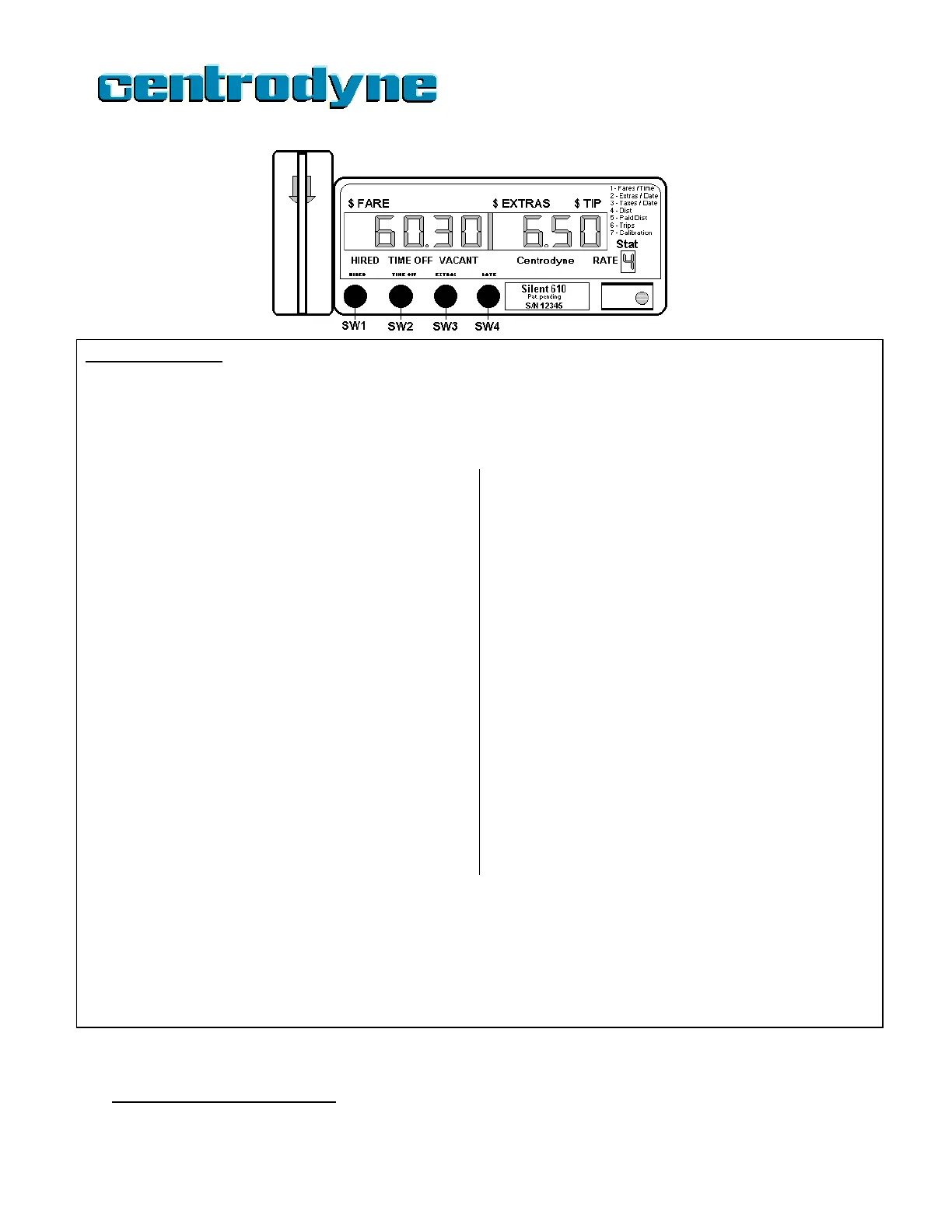
1. Press SW1 “HIRED” to HIRE the meter.
2. Press SW3 “EXTRAS” to enter EXTRAS, if any.
3. Press SW2 “TIME-OFF” to go TIME-OFF.
4. Swipe credit card through card reader in the direction of the arrow imprinted on the card reader. TIME-OFF light flashes, indicating
card read successfully.
Option 1: Driver does not know the $Tip amount in advance.
5. Hold down SW4 “RATE” for 3-4 seconds until receipt starts
printing.
1
6. Receipt is passed to passenger who enters tip, signs receipt
and passes receipt back to driver.
7. Press SW4 “RATE” to start $TIP entry. “00.00” is displayed.
The first “0” flashes on and off, indicating the number may be
edited (using SW3).
8. Press SW2 “TIME-OFF” to move flashing number to desired
position.
9. Press SW3 “EXTRAS” to enter the amount in the position.
10. When correct amount is displayed, press SW4 “RATE” to end
the $Tip entry.
Option 2: Passenger tells $Tip amount before printing receipt.
5. Press SW4 ”RATE” to start $TIP entry. “00.00” is displayed.
The first “0” flashes on and off, indicating the number may
be edited (using SW3).
6. Press SW2 “TIME-OFF” to move flashing number to desired
position.
7. Press SW3 “EXTRAS” to enter the amount in the position.
8. When correct amount is displayed, press SW4 “RATE” to
end the $Tip entry.
9. Hold down SW4 “RATE” for 3-4 seconds to print driver
receipt.
1
10. Receipt is passed to passenger for signature and returned
to driver.
11. Press SW2 “TIME-OFF” to send the transaction. “TIME-
OFF” light flashes fast.
12.
When approval or declined is received, the meter
will print the passenger receipt.
2
Tear off receipt and
pass to passenger. Press SW1 to go VACANT.
NOTE: If the Taximeter does not receive a response within 50 seconds of sending a Sale, it will print
a message stating that there was a communication problem and return to the HIRED-TIME-
OFF
state. You may try again or accept cash payment.
* If an error message is received or card is DECLINED you may try again, use another card or
accept cash payment. To try again, press SW1, TIME-OFF
stops flashing. Repeat steps 4-7.
19
1
If paper runs out, press SW1 to restart. Replace paper roll and swipe card again.
1
If paper runs out, press SW1 to restart. Replace paper roll and swipe card again.
2
If paper runs out, replace paper roll and press SW2 to print a duplicate receipt.



 To Next Page