WIRELESS CREDIT CARD OPERATING INSTRUCTIONS with TRANSACTION CREDITS
CREDIT CARD SALE
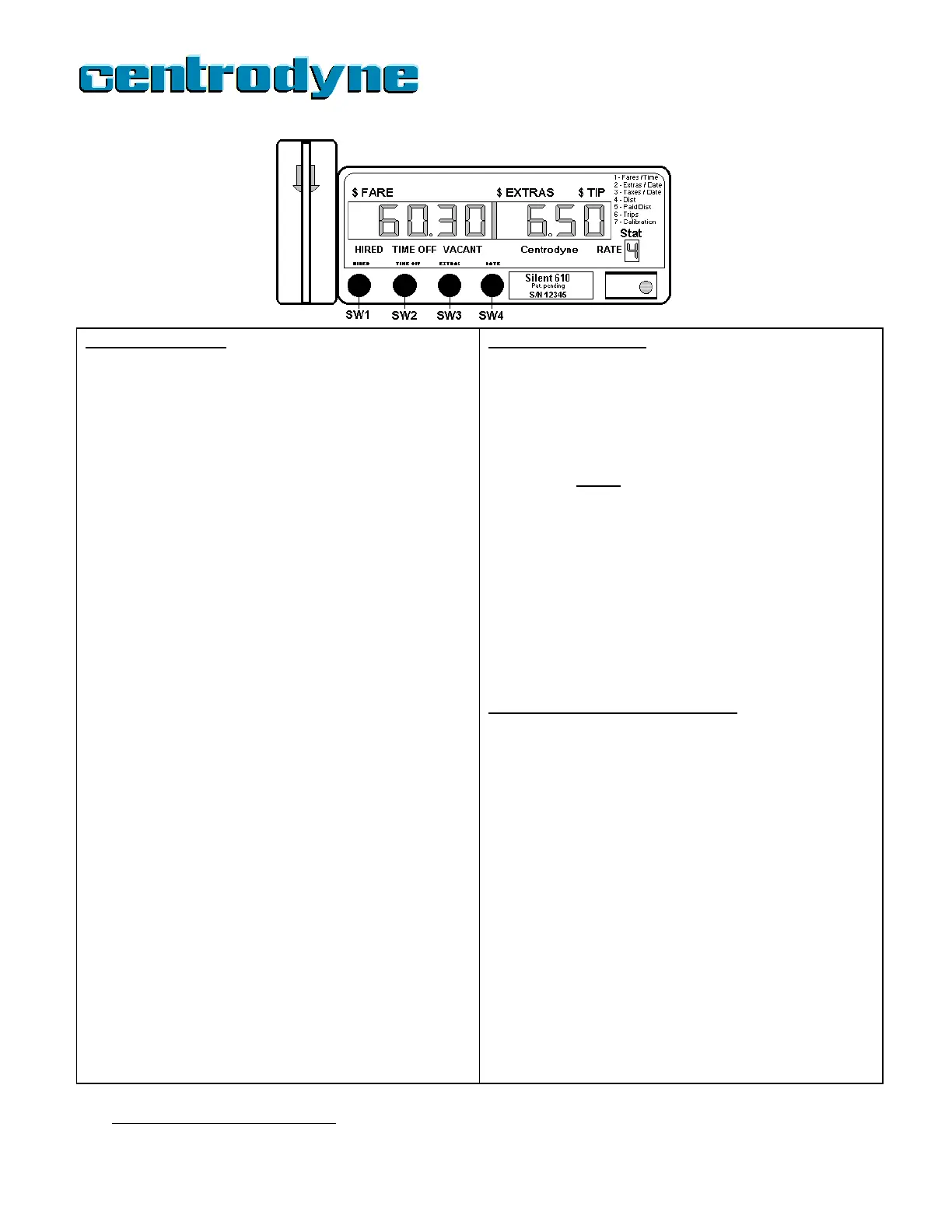
1. Press SW1 “HIRED” to HIRE the meter.
2. Press SW3 “EXTRAS” to enter EXTRAS, if any.
3. Press SW2 “TIME-OFF” to go TIME-OFF.
4. Swipe credit card through card reader in the direction of the
arrow imprinted on the card reader. TIME-OFF light flashes,
indicating card read successfully.
Option 1: Driver does not know the $Tip amount in advance.
5. Hold down SW4 “RATE” for 3-4 seconds until receipt starts
printing
3
.
6. Receipt is passed to passenger who enters tip, signs receipt
and passes receipt back to driver.
7. Press SW4 “RATE” to start $TIP entry. “00.00” is displayed.
The first “0” flashes on and off, indicating the number may be
edited (using SW3).
8. Press SW2 “TIME-OFF” to move flashing number to desired
position.
9. Press SW3 “EXTRAS” to enter the amount in the position.
10. When correct amount is displayed, press SW4 “RATE” to end
the $Tip entry.
Option 2: Passenger tells $Tip amount before printing receipt.
5. Press SW4 ”RATE” to start $TIP entry. “00.00” is displayed.
The first “0” flashes on and off, indicating the number may be
edited (using SW3).
6. Press SW2 “TIME-OFF” to move flashing number to desired
position.
7. Press SW3 “EXTRAS” to enter the amount in the position.
8. When correct amount is displayed, press SW4 “RATE” to end
the $Tip entry.
9. Hold down SW4 “RATE” for 3-4 seconds to print driver
receipt1.
10. Receipt is passed to passenger for signature and returned to
driver.
11. Press SW2 “TIME-OFF” to send the transaction. “TIME-OFF”
light flashes fast.
12. When approval or declined is received, the meter will print the
passenger receipt
4
. Tear off receipt and pass to passenger.
Press SW1 to go VACANT.
CREDIT CARD RETURN
If an error was made on a completed (approved) transaction,
such as an incorrect $Tip amount being charged, a Credit
Return may be performed
5
. The taximeter MUST continue to
display the credit sale amount with the TIME-OFF flashing.
1. Press SW3 “EXTRAS”. Returns the meter to TIME-OFF
not flashing.
2. Swipe the original
credit card as before. The TIME-OFF
light flashes and the driver’s **CREDIT** receipt is
automatically printed. Pass receipt to the passenger, who
signs receipt and returns receipt to driver.
3. Press SW3 “EXTRAS” to send the Credit Return
transaction. The TIME-OFF light flashes fast.
4. When approval is received, the meter will print passenger
receipt
2
. Tear off receipt and pass to passenger. The
APPROVAL or DECLINED number appears on the
receipt.
5. The Taximeter returns to TIME-OFF not flashing state and
the driver may repeat steps 4 to 7 under CREDIT CARD
SALE to the left.
CREDIT CARD PRE-AUTHORIZATION
1. When VACANT, press and hold down SW4 “RATE” for 3-4
seconds until the TIME-OFF light flashes.
2. Swipe credit card through card reader in the direction of
the arrow imprinted on the card reader. TIME-OFF light
flashes fast.
3. When approval or declined message is received, the
meter will print the appropriate receipt with amount for the
driver.
NOTE: If the Taximeter does not receive a response
within 50 seconds of sending a Sale, Credit or Pre-Auth
transaction, it will print a message stating that there was
a communication problem and return to the HIRED-
TIME-OFF
state. You may try again or accept cash
payment.
* If an error message is received or card is DECLINED you
may try again, use another card or accept cash payment.
To try again, press SW1, TIME-OFF
stops flashing.
Repeat steps 4-7.
20
3
If paper runs out, press SW1 to restart. Replace paper roll and swipe card again.
4
If paper runs out, replace paper roll and press SW2 to print a duplicate receipt.
5
Where permitted.



 To Next Page