- 12 -
13. Operational interface
MAIN DISPLAY
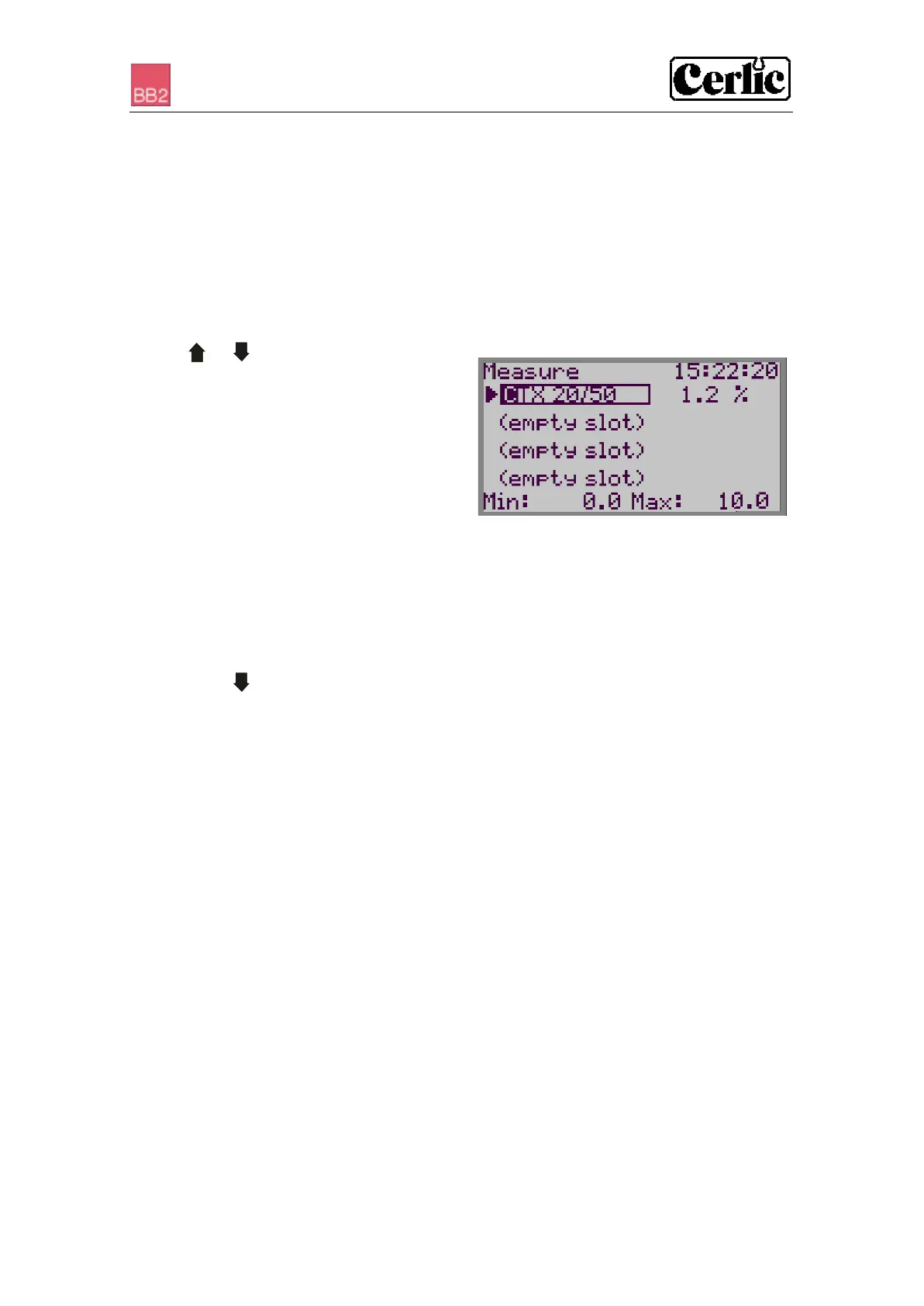
Most of the sensors installed will display a bar indicating percent of full scale over the
sensor name, and a measured value to the right of the sensor name. If contact with the
sensor is lost, the text “No transmitter” is displayed in the slot where the sensor is
configured. The different sensor slots are listed from top to bottom as slots 1 - 4.
At the bottom of the screen, the min and max values for selected sensor are displayed.
An arrow to the left of the sensor name indicates active sensor.
• Use or to select a sensor in the
main display.
• An empty slot, (the text says empty slot)
cannot be chosen for display.
• If communication with the sensor is lost
(indicated by No transmitter), then the
slot may still be chosen for display. The
arrow returns to the first active sensor after five seconds.
SENSOR INFORMATION MENU
Many (not all) sensors have their own full screen info menu. The information in this
menu is different for different types of sensors, please refer to the sensor manual for
further details.
To change between the main menu and the sensor information menu for the selected
sensor, press and ENTER
MENUS AND DIALOGS
There are different menus to configure BB2 and its sensors. There is one menu for
parameters in the central unit, and one menu for each type of sensor. This manual only
describes the menus used to configure the BB2 central unit, for information regarding
the different sensor menus, please refer to the sensor manual.
When a menu is open the value of both analog outputs are frozen in order to avoid
unnecessary alarms in the control system when parameters are changed, and during
calibration. This functionality can also be used if a sensor shall be temporary removed,
e.g. to be inspected or cleaned. Just remember that an open menu will time out if not
used for 5-10 minutes.
“TIME-OUT” FOR MENUS
Menus that are inactive for more than five minutes are automatically closed and the
BB2 control box returns to the Main Menu. A menu is not considered to be inactive if a
value is being edited or a function, e.g. calibration, is carried out. The back-light of the
display is switched off at the same time, it is switched back on by pressing any button.


 To Next Page