(3) List of items in the current menu. Navigate from one item to the other by pressing the UP [N] and DOWN [O] buttons. To enter the highlighted
menu item, press the OK [R] button. To return to the previous menu level press the CANCEL [Q] button. In this example, the CANCEL [Q]
button exits the Menu mode and sets the unit back to Normal mode.
Once a menu item is selected by a push of the OK [R] button, parameters for the corresponding menu item can be navigated and
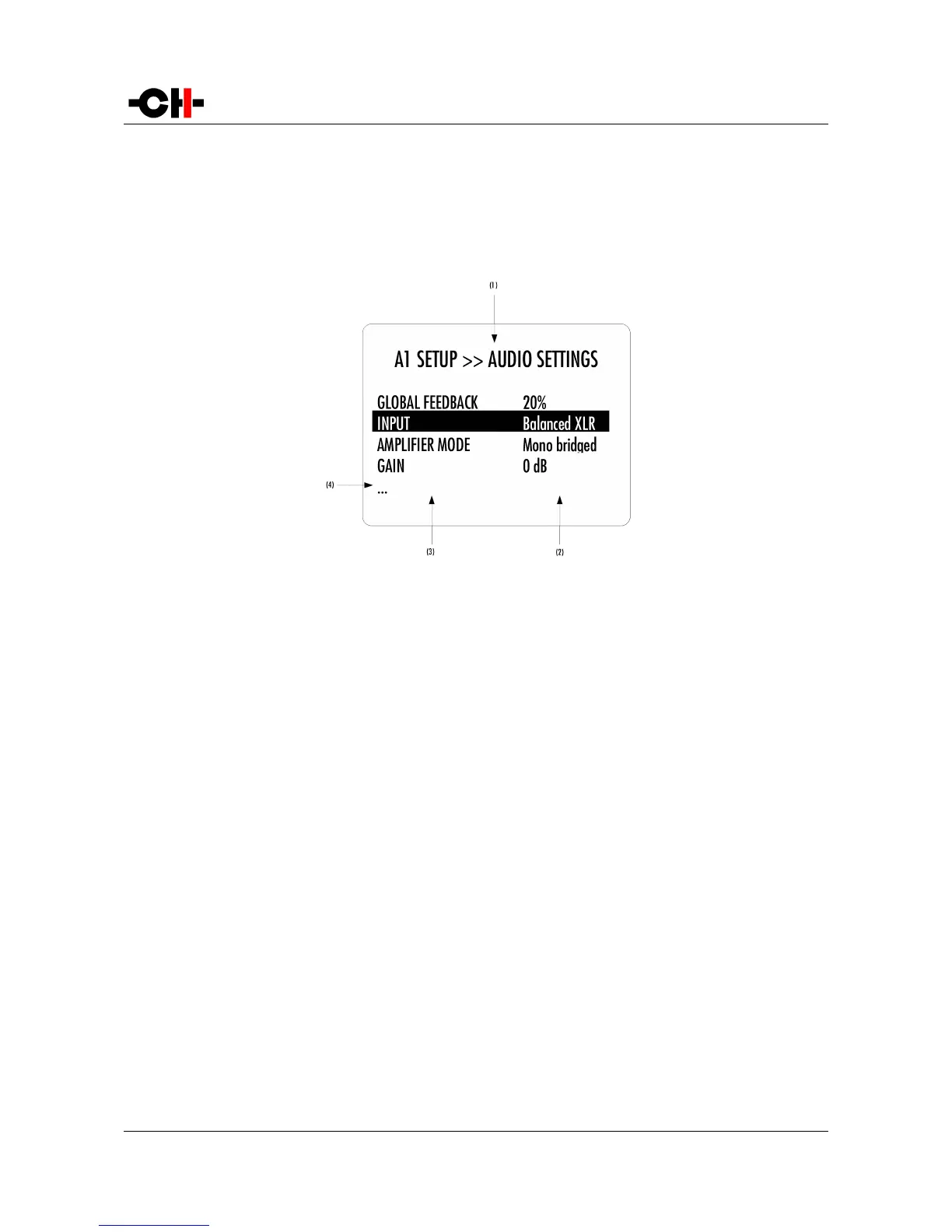
accessed. As an example, the following drawing shows the display elements of the A1 SETUP >> AUDIO SETTINGS sub-menu.
A1 SETUP >> AUDIO SETTINGS menu display elements
(1) Menu title. A1 SETUP >> AUDIO SETTINGS shows that the parent menu is A1 SETUP. By pushing the CANCEL [Q] button, the unit returns to the
parent menu.
(2) This is the Parameter Value column. For each item in the Parameter column, the Parameter Value item on the same line indicates the current
value of the Parameter.
(3) This is the Parameter column. The currently active Parameter is highlighted. Use the UP [N] and DOWN [O] buttons to navigate from
Parameter to Parameter, and the OK [R] button to enter the edition mode of that parameter.
(4) If the first or last item in the Parameter column is indicated by '...' it means that there are additional Parameters not displayed currently on-
screen. Use the UP [N] and DOWN [O] buttons to navigate towards the '...' to make the corresponding Parameters appear on screen.
Once a terminal Parameter (e.g. a Parameter not giving access to a further sub-menu) is selected by pushing the OK [R] button,
the A1 displays the corresponding Parameter adjustment screen. Following example shows the AUDIO SETTINGS >> AMPLIFIER
MODE Parameter adjustment screen. Other Parameters are similar but may show more (or less) choices for the Parameter value.
Once a Parameter is set to the desired value, an OK [R] button push saves the new Parameter Value and gets back to the parent
level (save and exit). On the other hand, a CANCEL [Q] button push gets back to the parent menu (in the case of this example:
AUDIO SETTINGS), but possible modifications of the Parameter Value are discarded (exit without saving).
Rev 2.0 A1 User Manual 29



 To Next Page