26
To reduce the riskof FIRE or INJURY to persons:
• Disconnect ALL electric and battery power
BEFORE performing ANY service or
maintenance.
• Use ONLY LiftMaster part# 485LM for
replacement battery.
• Do NOT dispose ofbatteryin fire. Battery may
explode.Check with local codes for disposal
instructions.
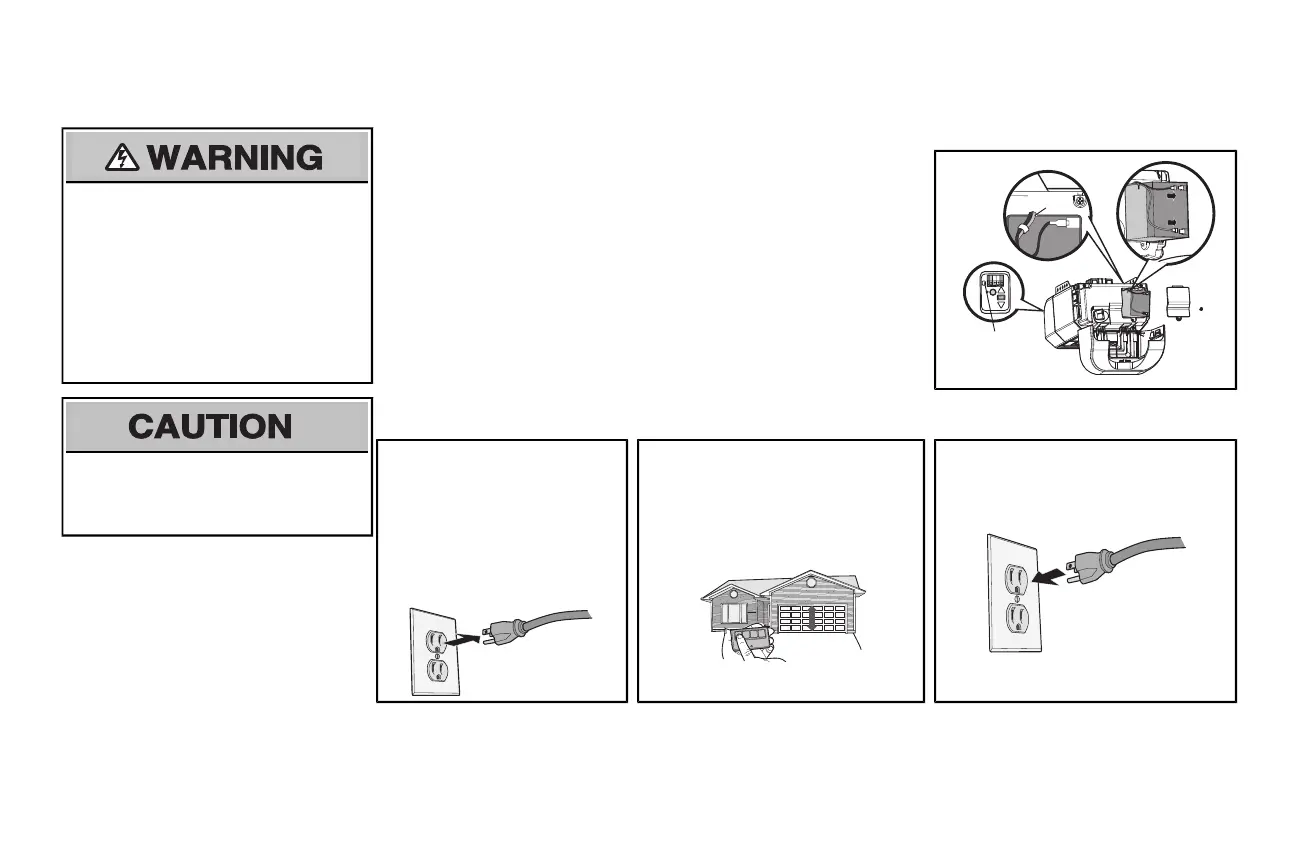
1 Install the battery
1.1 Unplug the garage door opener.
1.2 Open the lightlenson the right side panel ofthe garage door opener. Use a Phillips
head screwdriver to remove the battery cover on the garage door opener.
1.3 Partially insert the battery into the batterycompartment with the terminalsfacing out.
1.4 Connectred (+) and black (-) wires from the garage door opener to the
corresponding terminalson the battery.
1.5 Verify the battery wires are seated in the channel and replace the battery cover.
1.6 Plug in the garage door opener.
1.7 Wait for the green BatteryStatus LEDto startflashing before proceeding to testthe
battery.
Channel
Battery
Status LED
ALWAYS wear protective gloves and eye
protection when changing the battery or working
around the battery compartment.
2 Test the battery
2.1
Unplug the garage door
opener. The battery status LED
will either glow solid orange
indicating opener is operating
on battery power or will flash
indicating low batterypower.
NOTE: Make sure the garage
door opener is unplugged.
2.2
Open and close the door using the
remote control or door control.
NOTE: The garage door opener may
run slower if the battery is not fully
charged. The battery will take 24 hours
to fully charge.
2.3 Plug in the garage door opener. Verify
the batterystatus LED flashing green,
indicating the batteryis charging.
Battery Backup






 To Next Page