33
AUX RELAY
SETTING
SWITCH
SETTINGS
AUX RELAY 1 AUX RELAY 2
123
Off (no feature
selected)
OFF OFF OFF
Relay always off. Use this Aux Relay setting to conserve battery power.
Open Limit Switch
OFF OFF ON
Energizes at open limit. Use with SAMS (Sequenced Access Management System, jointly with barrier gate).
Close Limit Switch
OFF ON OFF
Energizes when not at close limit. For an additional audible or visual display, connect an external light (low voltage).
Gate Motion
OFF ON ON
Energizes when motor is on (gate in motion). For an additional audible or visual display, connect an external buzzer or light (low voltage).
Pre-Motion Delay
ON OFF OFF
Energizes 3 seconds before gate motion and remains energized during
gate motion. The onboard alarm will sound. For an additional audible
or visual display, connect an external buzzer or light (low voltage).
Energizes 3 seconds before gate motion and remains
energized during gate motion. For an additional audible or
visual display, connect an external buzzer or light (low voltage).
Power
ON ON OFF
Energizes when AC power or solar power is present. There is
approximately a 10-12 second delay before relay cutoff, after AC
shutdown.
Energizes when on battery power. There is approximately
a 10-12 second delay before relay cutoff, after AC
shutdown.
Tamper
ON OFF ON
Energizes if gate is manually tampered with by being pushed off of
close limit. For an additional audible or visual display, connect an
external buzzer or light (low voltage).
Energizes if gate is manually tampered with by being pushed
off of close limit. For an additional audible or visual display,
connect an external buzzer or light (low voltage).
Cycle Quantity
Feedback*
ON ON ON
The 1, 2, and 3 LEDs will blink out the cycle count (cycle count is
stored on the control board). See below.
Red/green light functionality, see below.
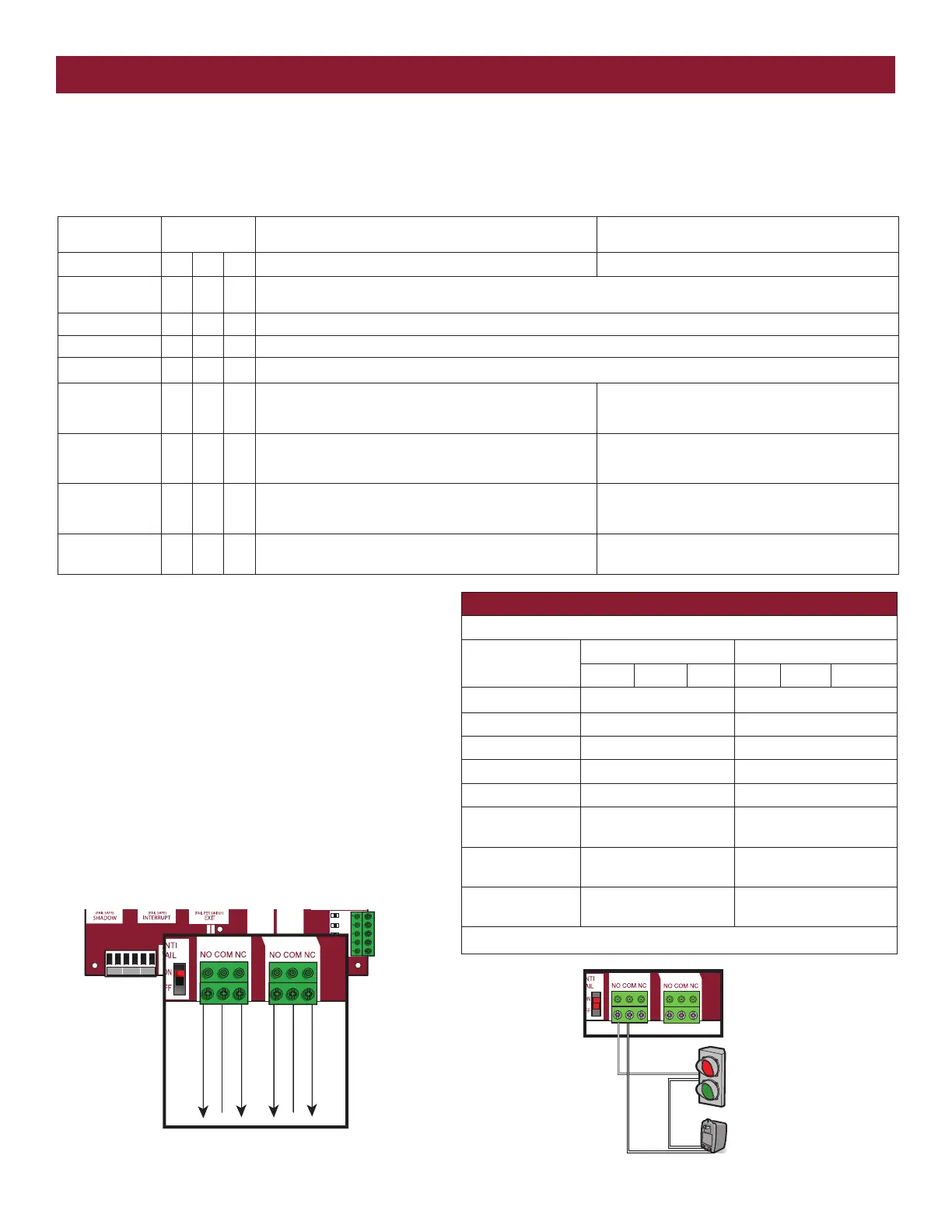
AUX RELAY 1 AND 2
Normally Open (N.O.) and Normally Closed (N.C.) relay contacts to control external devices, for connection of Class 2, low voltage (42 Vdc [34 Vac] max
5 Amps) power sources only. Function of relay contact activation determined by switch settings.
SHADOW INTERUPT EXIT
SBC
OPN
CLS
STP
COM
SHADOW
INTERRUPT
EXIT
AUX RELAY 1 AUX RELAY 2
A
UX Relay 2 N.C.
Com
AUX Relay 2 N.O.
AUX Relay 1 N.C.
Com
AUX Relay 1 N.O.
+
–
Traffic Light
Class 2 Power Source
(42 Vdc [34 Vac], 5 A maximum)
CYCLE COUNT
* First, note the current Aux Relay switch positions. To determine
the actual cycles that the gate operator has run (in thousands),
set all three Aux Relay switches to the ON setting for Aux Relay
1. The Expansion Board’s 1, 2, and 3 LEDs will blink out the
cycle count, with 1 LED blinking 1000’s, 2 LED blinking
10,000’s, 3 LED blinking 100,000’s, and simultaneously all
three LED’s blink 1,000,000’s (e.g. 1 LED blinks 3 times, 2 LED
blinks 6 times, and 3 LED blinks once. Cycle count is 163,000.).
Cycle count displayed is between 1,000 and 9,999,000 cycles.
After servicing, set Aux Relay switches back to their appropriate
positions. Cycle count cannot be reset or changed. If under
1,000 cycles the 1, 2, and 3 LEDs will turn on for 10 seconds,
then turn off.
NOTE: The expansion board will flash the cycle count 3 times
then all the LEDs will turn on solid for 10 seconds then turn off.
AUXILIARY RELAY WIRING EXAMPLE
RED/GREEN LIGHT FUNCTIONALITY
Red light
wired to AUX RELAY 1. Green light wired to AUX RELAY 2.
GATE STATE
AUX RELAY 1 SWITCHES AUX RELAY 2 SWITCHES
1 OFF 2 OFF 3 OFF 1 ON 2 ON 3 ON
Closed
Red light OFF* Green light OFF
Opening
Red light ON/Flash Green light OFF
Open
Red light OFF Green light ON
Closing
Red light ON/Flash Green light OFF
Defined Mid Stop n/a n/a
Undefined Mid
Stop
Red light ON Green light OFF
Timer more than 5
seconds
Red light OFF Green light ON
Timer less than 5
seconds
Red light ON/Flash Green light OFF
* For red light ON when gate is closed, set switch 1 on AUX RELAY 1 to ON
EXPANSION BOARD
AUXILIARY RELAYS






 To Next Page