11
Some codes are saved in the code history and some are not. If a code is not saved it will briefly appear on the display as it occurs, then disappear.
When servicing of the operator is complete, erase the code history by pressing the STOP button until the display flashes “Er” then “CL” (about 6
seconds). When the codes have been erased the display will show “_ _”.
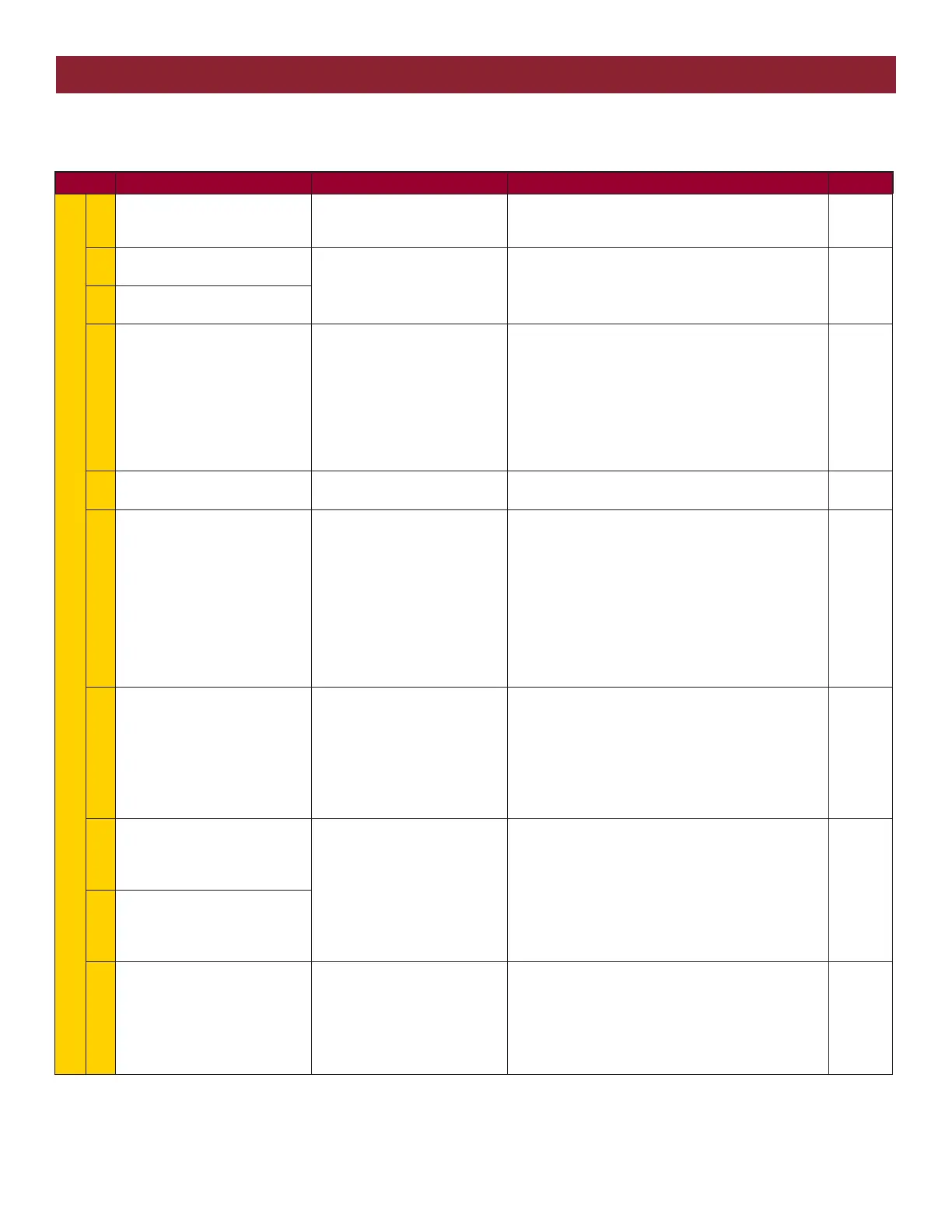
Code Meaning Symptom Solution Saved
LIFTMASTER SYSTEM
31
The main control board has
experienced an internal failure.
Gate operator will not run. Disconnect all power, wait 15 seconds, then reconnect
power (reboot). If issue continues, replace main control
board.
NO
32
Linear Drive Disengaged
(Operator 1)
Gate operator will not run and
the gate moves back and forth
easily.
Disengage, then re-engage operator. Check wiring and
connections.
YES
33
Linear Drive Disengaged
(Operator 2)
34
The operator is not receiving
information from the Absolute
Position Encoder (APE).
The operator will run for a
second or two, then stop (there
are no obstructions). The
diagnostic display shows 34.
• Check the APE sensor for a blocked diode from dust
or debris. Use compressed air to clean the area.
• Check the APE wire harness connections. A wire may
be loose or disconnected from the harness.
• Replace the APE assembly and wire harness if
necessary.
TEST: Attempt to run the operator.
YES
35
Max-Run-Time Exceeded Error The gate stops short of the
programmed limit.
Check for an obstruction, then reprogram the limits.
YES
36
Product ID Error If product ID is not present or
damaged while the gate is
powered it will continue to run
while showing code 36. If power
is lost while product ID is
damaged or broken it will not
run and will also show code 36.
If the board was used in a
different type of operator it code
36 would show as well (example
board out of swing to a slide).
Was the control board just replaced? If so, erase limits,
then set limits again. If not, disconnect all power, wait
15 seconds, then reconnect power before changing
product ID harness.
YES
37
Product ID Failure If product ID is not present or
damaged while gate is powered
it will continue to run while
showing code 37. If power is
lost while product ID is damaged
or broken it will not run and will
also show code 37. The operator
will also not be able to set limits.
Unplug product ID harness then plug back in.
Disconnect all power, wait 15 seconds, then reconnect
power before replacing product ID harness.
YES
38
Hard Stop Limit (Operator 1), the
limit is set too close to a hard
stop and the gate is stopping on
the hard stop instead of the limit.
The gate will reverse
intermittently. The operator may
wind up a lot of tension on the
chain and flex the chassis. For
dual gate installations the gates
may not move in sync. This
could cause a problem later on if
left (nuisance reversals).
Reprogram the limits so they are not close to a hard
stop.
TEST: Run the operator and check for code 38 on the
diagnostic display.
NO
39
Hard Stop Limit (Operator 2), the
limit is set too close to a hard
stop and the gate is stopping on
the hard stop instead of the limit.
40
Battery overvoltage The operator runs faster than
normal and the diagnostic
display shows Code 40.
Too much voltage on the battery. Check harness. Make
sure you are using the recommended batteries for the
operator. Check the battery voltage and battery
harness.
TEST: After checking the batteries, check for code 40
on the diagnostic display.
YES
DIAGNOSTIC CODES





 To Next Page