USER INTERFACE
EN
|
Intelect
®
Mobile 2 ELECTROTHERAPY User Manual
PRINT SCREEN FUNCTION
The Intelect Mobile 2 device has a built in function allowing the user to print screen fro example to print a treatment session this
performed by:
» 1. insert USB drive into the USB port on the back of the Mobile 2 device
» 2. Press the play pause button and the On/O button for around 1 second the screen will flash and the image is
captured on the USB drive.
» 3. in the setting menu eject the USB drive to enable safe removal from the Mobile 2 device.
» 4.The format of the file is a bitmap file and it is date & Time coded in the filename.
Note : The print screen function should not be used during treatment
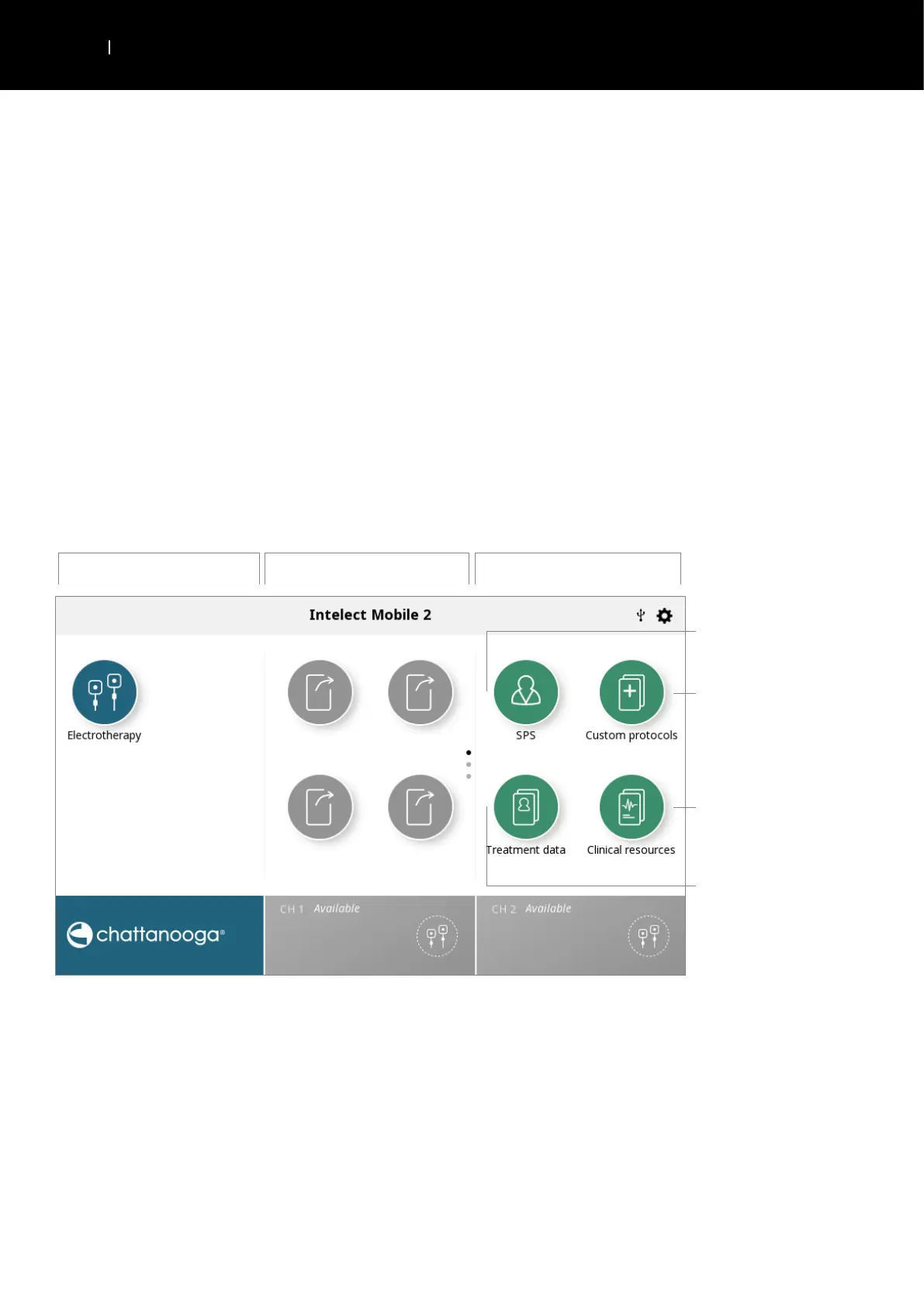
HOME SCREEN
The Intelect
®
Mobile Home screen provides access to all of the system modalities and functions. The Home screen has the
following information:
Modalities Assign or launch Shortcut Libraries
Clinician protocol library
«Suggested Parameter Setup»
Pre-programmed protocol library
Educational library:
· Modality descriptions
· Anatomical images
· Pathological images
Treatment data storage


 To Next Page
 Loading...