EasyManua.ls Logo

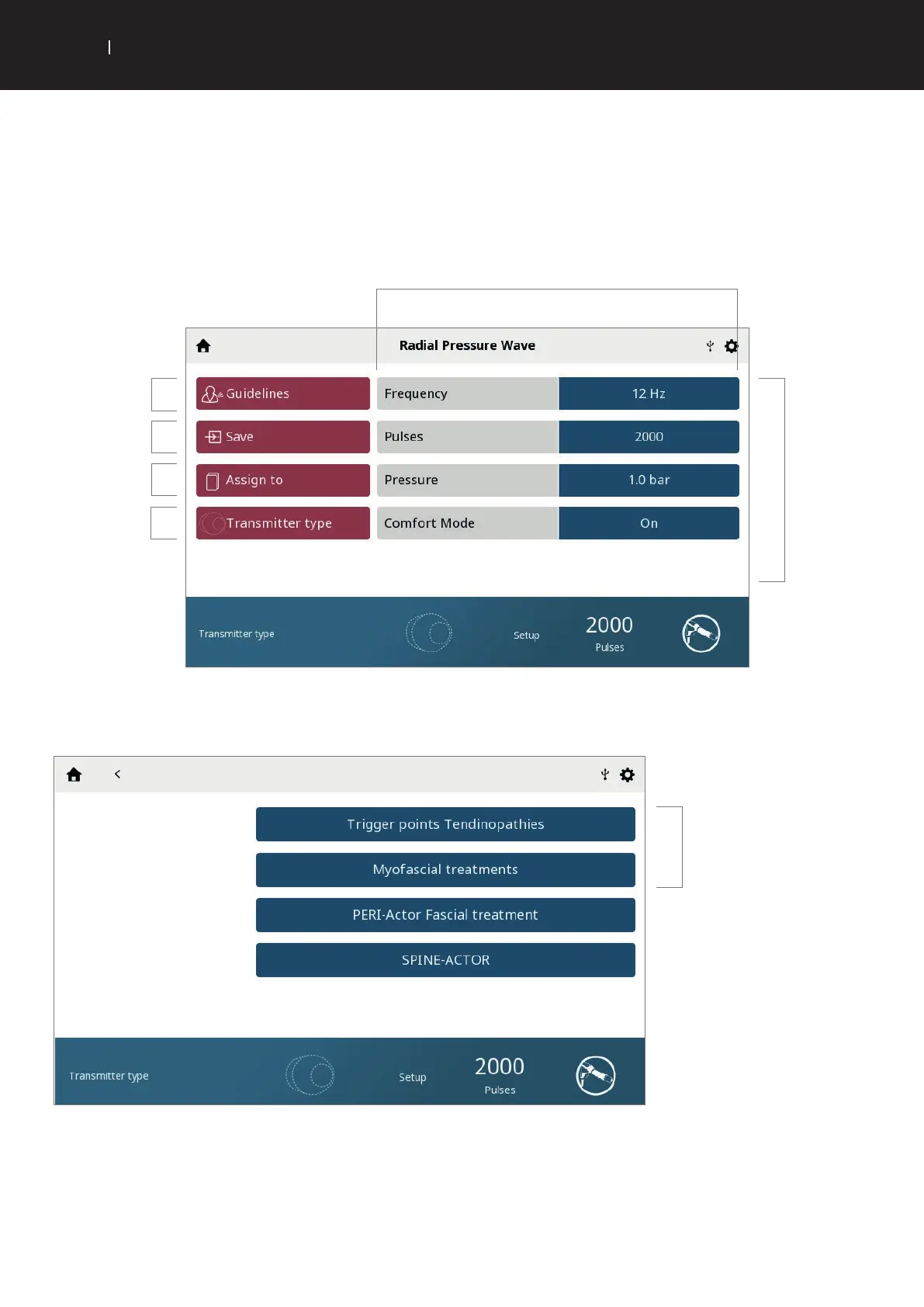
Chattanooga Intelect RPW 2 - Treatment Review Screen; Select Transmitter Sub-Menu

Chattanooga Intelect RPW 2
95 pages
Print Icon
To Next Page IconTo Next Page
To Previous Page IconTo Previous Page
Loading...
31
USER INTERFACE
EN
INTELECT
®
RPW 2 USER MANUAL
TREATMENT REVIEW SCREEN
By selecting Radial Pressure Wave, Vibration Therapy, or the screen will automatically change to the ‘treatment review screen.
The Intelect
®
RPW  Treatment Review screens include the following information:
Save/Overwrite
default settings or
Custom Protocols
Treatment
guidelines
Assign treatment
Parameters
Select transmitter sub menu screen
Select transmitter type
Select
Transmitter
Swipe vertically to see
more parameters
. Touch to activate
Active box surrounded
by black line
. Adjust with
Adjustment dial:
• Clockwise – Increase
• Counterclockwise –
Decrease
Note: When a
parameter is not
adjustable, the
parameter box is faded.

Table of Contents

Related product manuals