Calibration Procedure
4-5
4.3 Current Calibration
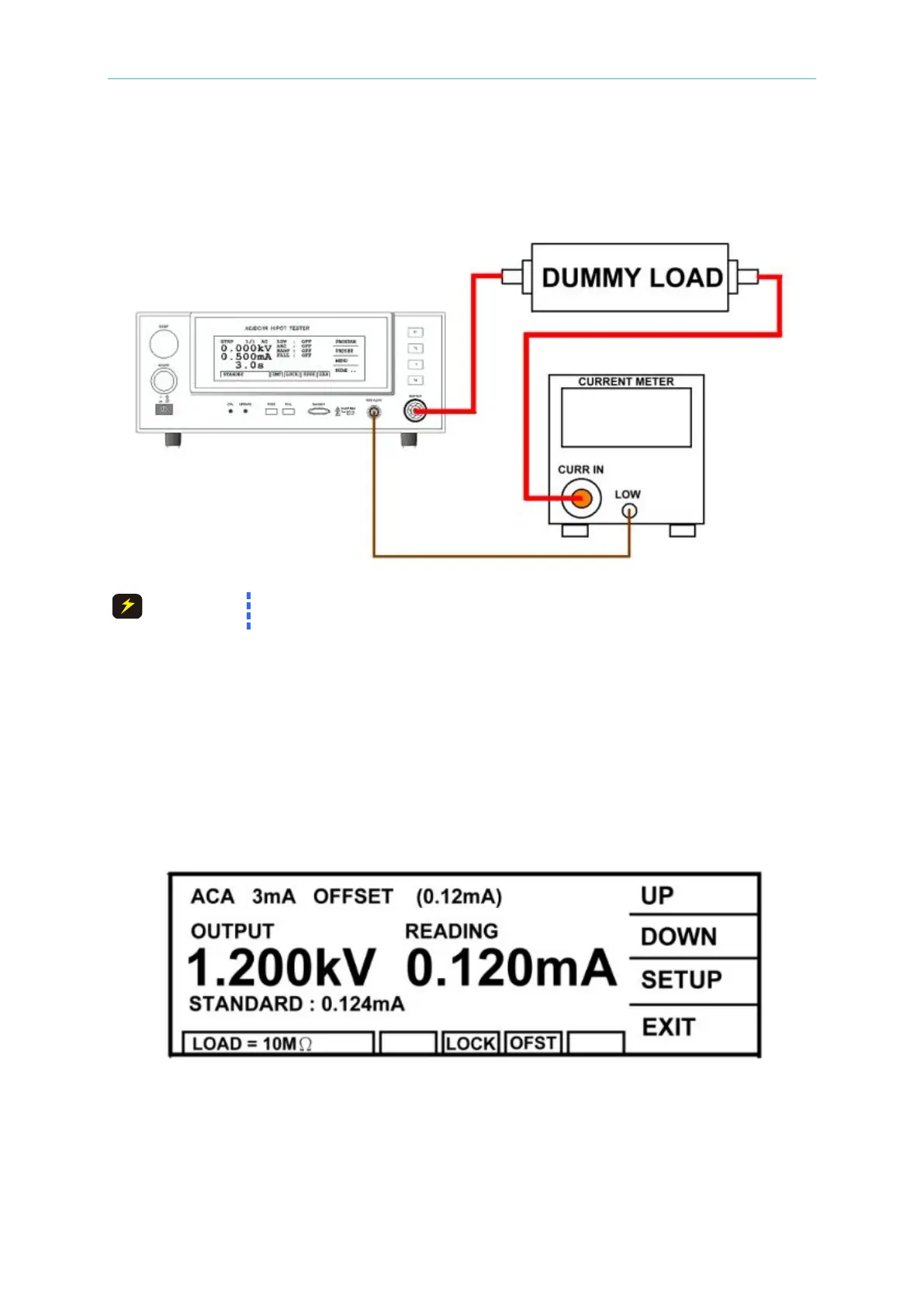
4.3.1 Connection Diagram
The dummy load connected to HiPot terminal contains high voltage. Be
very careful with it as it may cause hazard.
4.3.2 ACA Calibration (AC MODE)
■ Connect a dummy load resistor 10MΩ, 0.5 Watt or higher to the HiPot tester between
high voltage output terminal and AC ammeter input high potential terminal. Connect the
low potential terminal of HiPot tester to the low potential terminal of AC ammeter
inputting.
(1) Press [UP] or [DOWN] to select ACA 3mA range offset calibration.
(2) Press [STOP][START] to read the ammeter value, ex. 0.124mA.
(3) Press [INC.] or [DEC.] until shows 0.124mA and then press [ENTER] for saving.
(4) Press [STOP] to stop ACA 3.0mA range offset calibration.
(5) Press [UP] to change to the next calibration item.
(6) Change the dummy load resistor to 500kΩ 10watt or higher.
(7) Press [STOP][START] to read the ammeter value, ex. 2.450mA.



 To Next Page