HIPOT Tester 19071/19072/19073 User’s Manual
4-6
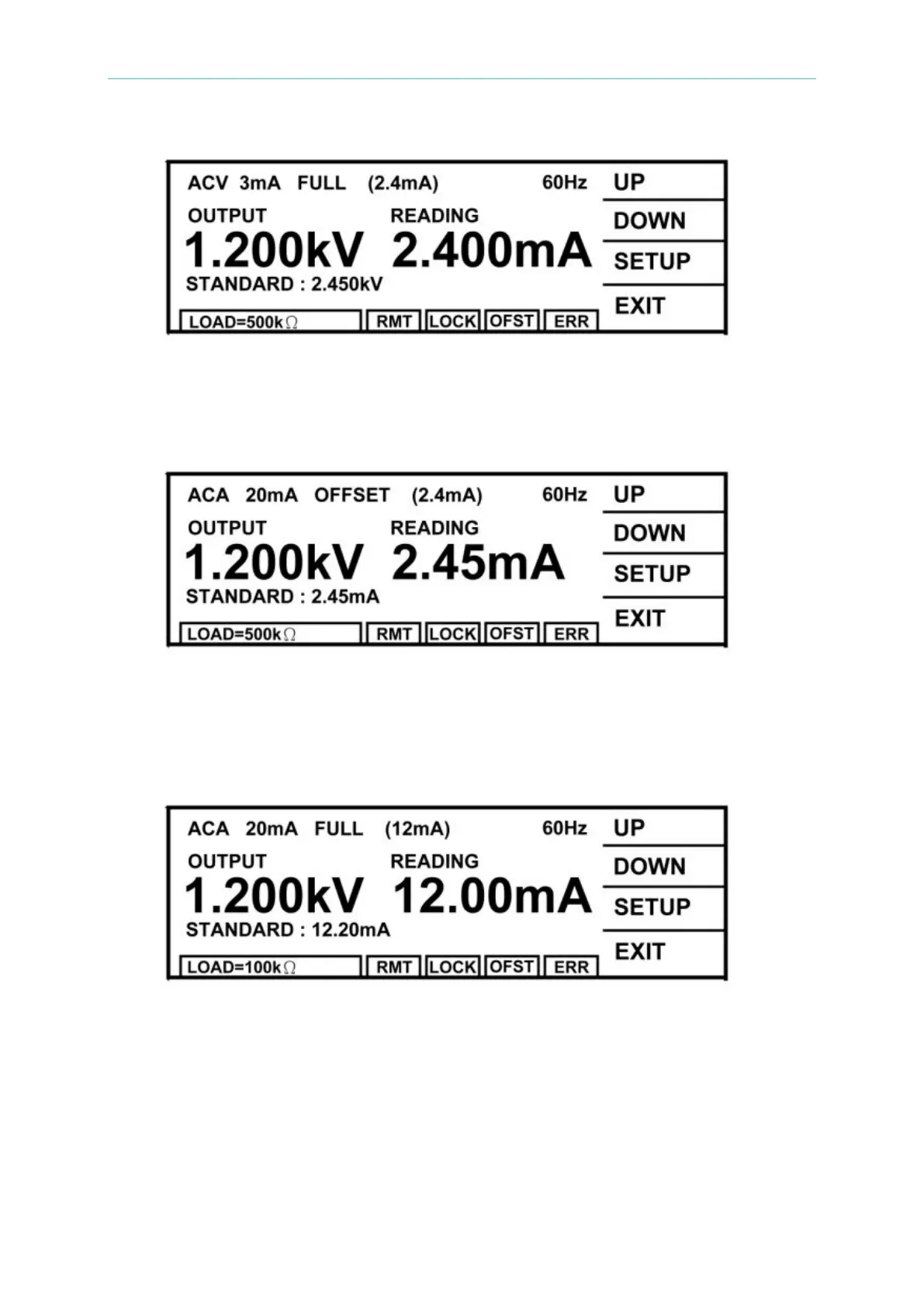
(8) Press [INC.] or [DEC.] until shows 2.450mA and then press [ENTER] for saving.
(9) Press [STOP] to stop ACA 3.0mA range full scale calibration.
(10) Press [UP] to change to the next calibration item.
(11) Press [STOP][START] to read the ammeter value, ex. 2.450mA.
(12) Press [INC.] or [DEC.] until shows 2.450mA and then press [ENTER] for saving.
(13) Press [STOP] to stop ACA 20.0mA range offset calibration.
(14) Press [UP] to change to the next calibration item.
(15) Change the dummy load resistor to 100kΩ 50watt or higher.
(16) Press [STOP][START] to read the ammeter value, ex. 12.20mA.
(17) Press [INC.] or [DEC.] until shows 12.20mA and then press [ENTER] for saving.
(18) Press [STOP] to stop ACA 20.0mA range full scale calibration.
4.3.3 DCA Calibration (DC/IR MODE)
■ Connect a dummy load resistor 10MΩ, 0.5 Watt or higher to HiPot tester between high
voltage output terminal and DC ammeter input high potential terminal. Connect the low



 To Next Page