HIPOT Tester 19071/19072/19073 User’s Manual
4-12
4.6 Ground Continue Calibration
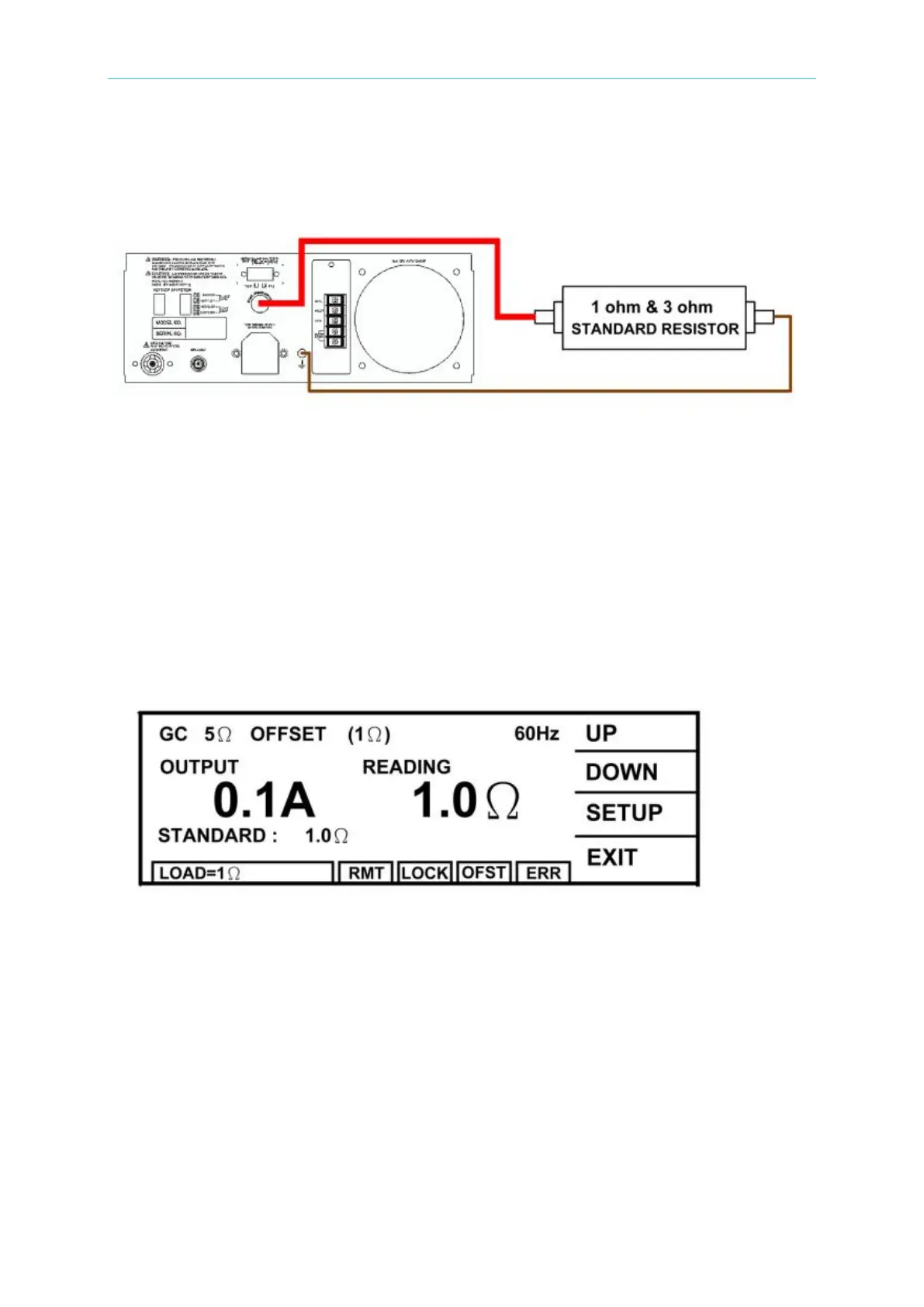
4.6.1 Connection Diagram
4.6.2 Description of Ground Continue Calibration
■ Connect the standard dummy load resistor to the rear panel of HiPot tester which is
between ground continue current output terminal and grounding terminal. Using the
standard 1Ω and 3Ω 1/8 Watt dummy load resistors.
Prepare a standard 1Ω resistor
(1) Press [UP].
(2) Connect resistor to ground and CONT.CHK OPTION terminal of rear panel.
(3) Press [STOP][START] to read GC resistance value 1Ω.
(4) Press [UP] or [DOWN] until the reading is the actual resistance value.
(5) Press [ENTER] for saving the calibration value.
(6) Press [STOP] to stop GC 5Ω Offset calibration.
Change the standard resistor to 3Ω.
(1) Press [UP].
(2) Connect resistor to ground and CONT.CHK OPTION terminal of rear panel.
(3) Press [STOP][START] to read GC resistance value 3Ω.
(4) Press [UP] or [DOWN] until the reading is the actual resistance value.



 To Next Page