Automatic Transformer Test System 3300/3302 User’s Manual
4.4.11 How To Set Up
〝
DEVIATION
〞
Function
When users have their sample transformer to be a standard, the sample must has done the test
of each test parameter data before to be a measured standard, then users can use deviation to
error compensation function, the set up procedure as following:
a. According to above method, the screen show testing display after each parameter is set up.
b. Press
〝
DEVIATION
〞
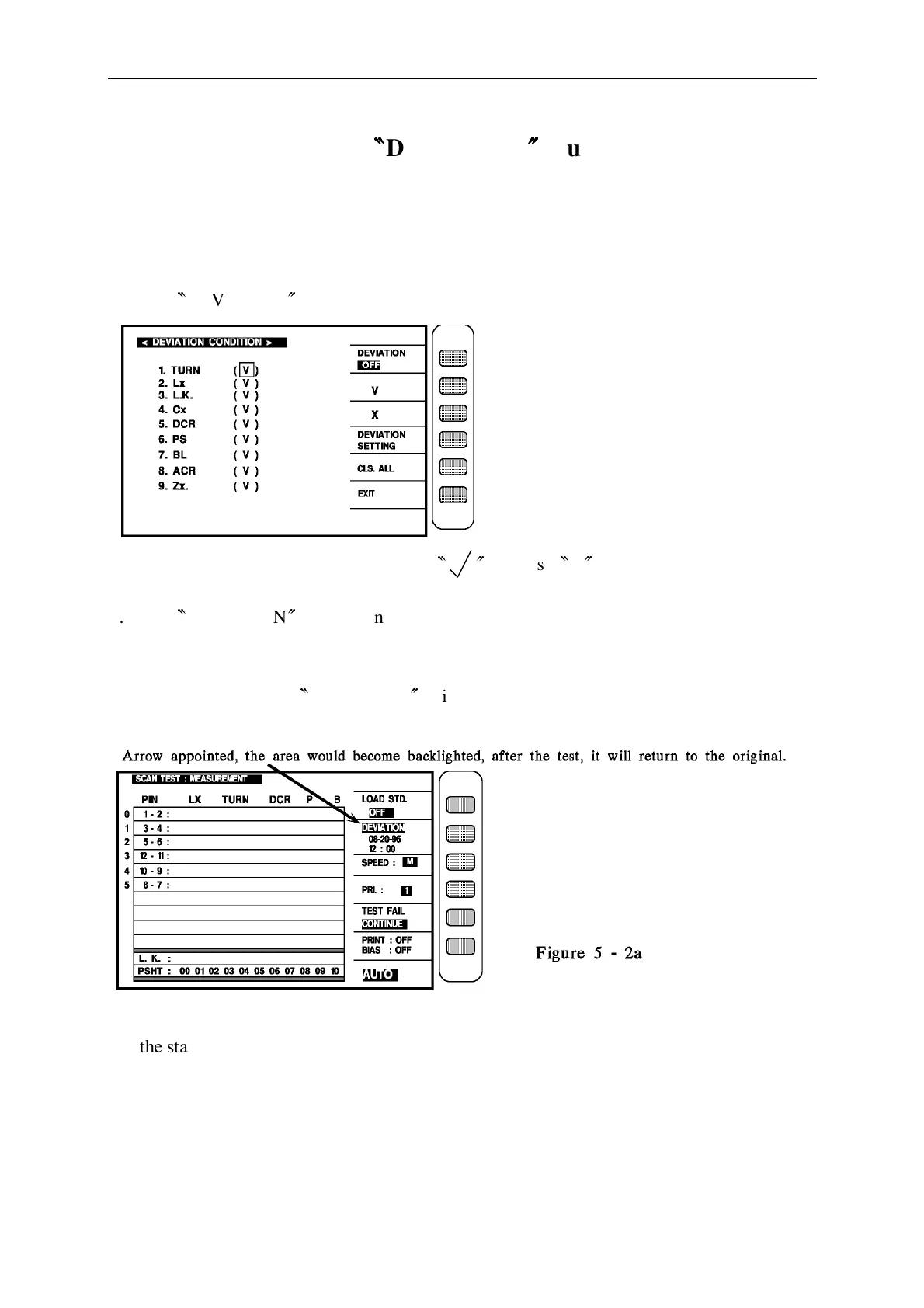
key to ON state on the front panel, the display will be as follow:
c. Make selection of deviation item by tick
〝
〞
& cross
〝
X
〞
key.
d. Press
〝
DEVIATION
〞
key to confirm the function is ON.
SETTING
e. Press EXIT key to enter <SCAN TEST: MEASUREMENT> for auto transformer scanning,
under this state. work
〝
DEVIATION
〞
will become back-lighted shown as figure 5-2a.
(Date show underneath of DEVIATION is what the time users have use this function)
Put the standard transformer on the test fixture and press the key [Start], in first measuring, it
will display standard transformer measured value, and
DEVIATION
back-lighted will
disappear, it means the deviation error compensation is done. In second time you press
[Start] key you will see the value is deviated.



 To Next Page