Automatic Transformer Test System 3300/3302 User’s Manual
Key in
→
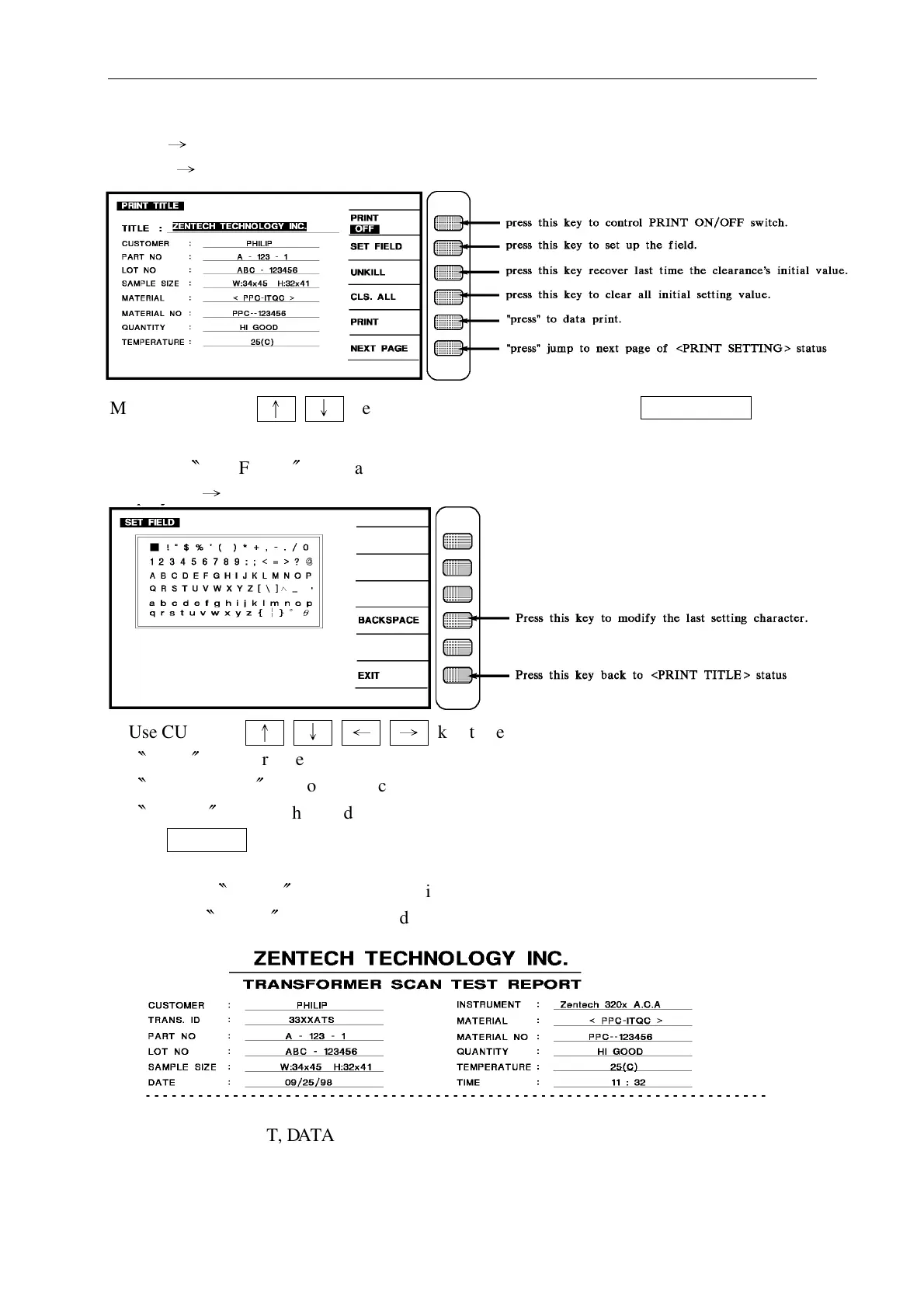
[SET UP] key
Display
→
More the CURSOR
↑
↓
key select the setting data then key in SET FIELD
explanation:
(1) When
〝
SET FIELD
〞
key was pressed, the unit will display as follows:
Display
→
Use CURSOR
↑
↓
←
→
key to select the character which need to change.
〝
TRIG
〞
to ensure the selected characters where valid.
〝
BACKSPACE
〞
to modify the characters which entered.
〝
CLEAR
〞
to clear the word which selected.
Use ENTER key to make sure the setting characters are correct (max. 30 characters)
(2) When the
〝
PRINT
〞
status at on position, then the following table should be print
while the
〝
PRINT
〞
key was pressed.
For INSTRUMENT, DATA, TIME, they are fixed values so user can not change them.
Other then that, user can change under TRANS. ID and TRNASFORMER ID menu.



 To Next Page