To Accelerate For Passing
Press the accelerator as you would normally. When the pedal is released, the vehicle will return to
the set speed.
To Resume Speed
To resume a previously set speed, push the RES button and release. Resume can be used at any
speed above 20 mph (32 km/h).
To Deactivate
A soft tap on the brake pedal, pushing the CANC (cancel) button, or normal brake pressure while
slowing the vehicle will deactivate the speed control without erasing the set speed from memory.
Pushing the on/off button or turning the ignition switch OFF, erases the set speed from memory.
ADAPTIVE CRUISE CONTROL (ACC)
If your vehicle is equipped with Adaptive
Cruise Control, the controls operate exactly
the same as the speed control with only a
couple of differences. With this option, you can
set a specified distance you would like to main-
tain between you and the vehicle in front of
you.
If the ACC sensor detects a vehicle ahead,
ACC will apply limited braking or acceleration
automatically to maintain a preset following
distance, while matching the speed of the ve-
hicle ahead.
If the sensor does not detect a vehicle ahead of
you, ACC will maintain a fixed set speed.
ACC On/Off
• Push and release the Adaptive Cruise Con-
trol (ACC) on/off button. “ACC READY”
will appear in the instrument cluster display
to indicate the ACC is on.
• Push and release the Adaptive Cruise Control (ACC) on/off button a second time to turn the
system off. “ADAPTIVE CRUISE CONTROL (ACC) OFF” will appear in the instrument
cluster display to indicate the ACC is off.
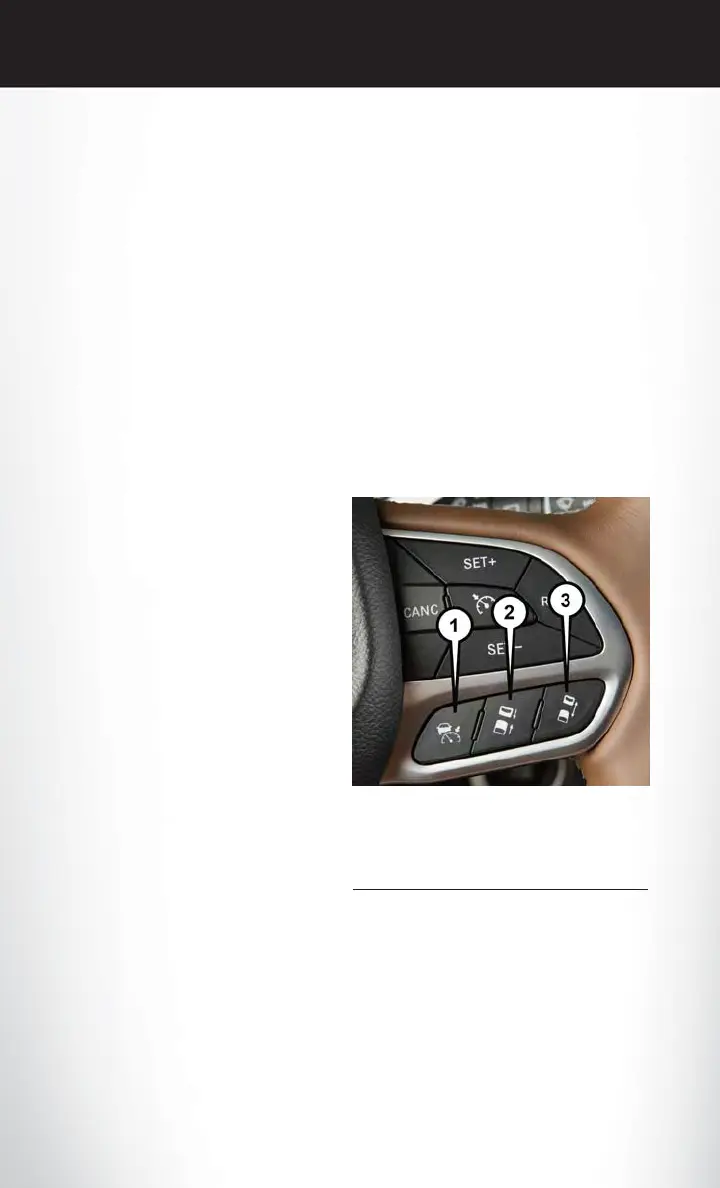
Adaptive Cruise Switches
1 — Adaptive Cruise Control (ACC) On/Off
2 — Distance Setting – Decrease
3 — Distance Setting – Increase
OPERATING YOUR VEHICLE
98














 To Next Page