PARKSENSE FRONT AND REAR PARK ASSIST
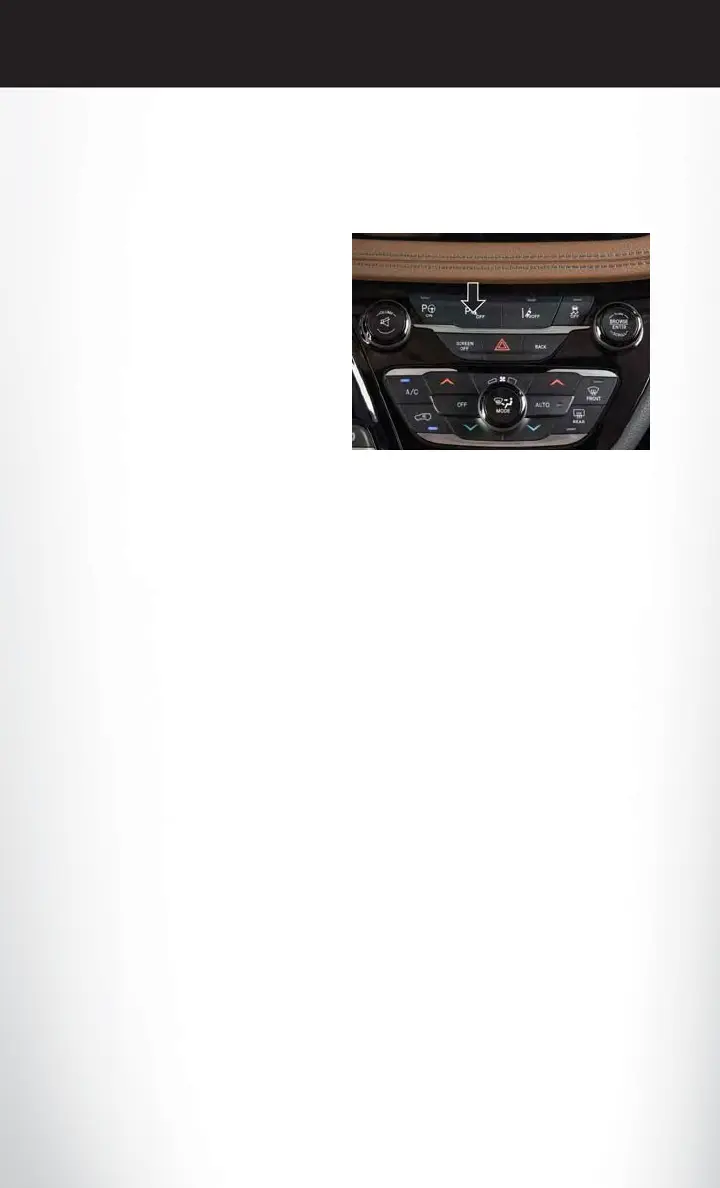
ParkSense can be enabled and disabled by pushing the ParkSense switch located on the switch
panel below the Uconnect display.
The four ParkSense sensors, located in the rear
fascia/bumper, monitor the area behind the
vehicle that is within the sensors field of view.
The sensors can detect obstacles from approxi-
mately 12 inches (30 cm) up to 79 inches
(200 cm) from the rear fascia/bumper in the
horizontal direction, depending on the loca-
tion, type and orientation of the obstacle.
The six ParkSense sensors, located in the front
fascia/bumper, monitor the area in front of the
vehicle that is within the sensors’ field of view.
The sensors can detect obstacles from approxi-
mately 12 inches (30 cm) up to 47 inches (120 cm) from the front fascia/bumper in the horizontal
direction, depending on the location, type and orientation of the obstacle.
When an object is detected within 79 inches (200 cm) behind the rear bumper while the vehicle
is in REVERSE, a warning will display in the instrument cluster display. In addition, a chime will
sound (when Sound and Display is selected from the Customer Programmable Features section
of the Uconnect System screen). As the vehicle moves closer to the object, the chime rate will
change from single 1/2 second tone (for rear only), to slow (for rear only), to fast, to continuous.
Refer to your Owner's Manual on www.chrysler.com/en/owners/manuals for further details.
ParkSense Rear Park Assist — If Equipped
The ParkSense Rear Park Assist system provides visual and audible indications of the distance
between the rear fascia and a detected obstacle when backing up, e.g. during a parking maneuver.
If your vehicle is equipped with this feature, the vehicle brakes may be automatically applied and
released when performing a reverse parking maneuver if the system detects a possible collision
with an obstacle.
The automatic braking function can be enabled/disabled from the Customer-Programmable
Features section of the Uconnect System.
ParkSense can be active only when the gear selector is in REVERSE. If ParkSense is enabled at
this gear selector position, the system will remain active until the vehicle speed is increased to
approximately 7 mph (11 km/h) or above. When in REVERSE and above the system's operating
speed, a warning will appear within the instrument cluster display indicating the vehicle speed is
too fast. The system will become active again if the vehicle speed is decreased to speeds less than
approximately 6 mph (9 km/h).
ParkSense Switch
OPERATING YOUR VEHICLE
114











 To Next Page