NOTE:
Your vehicle may be transmitting data as authorized by the subscriber.
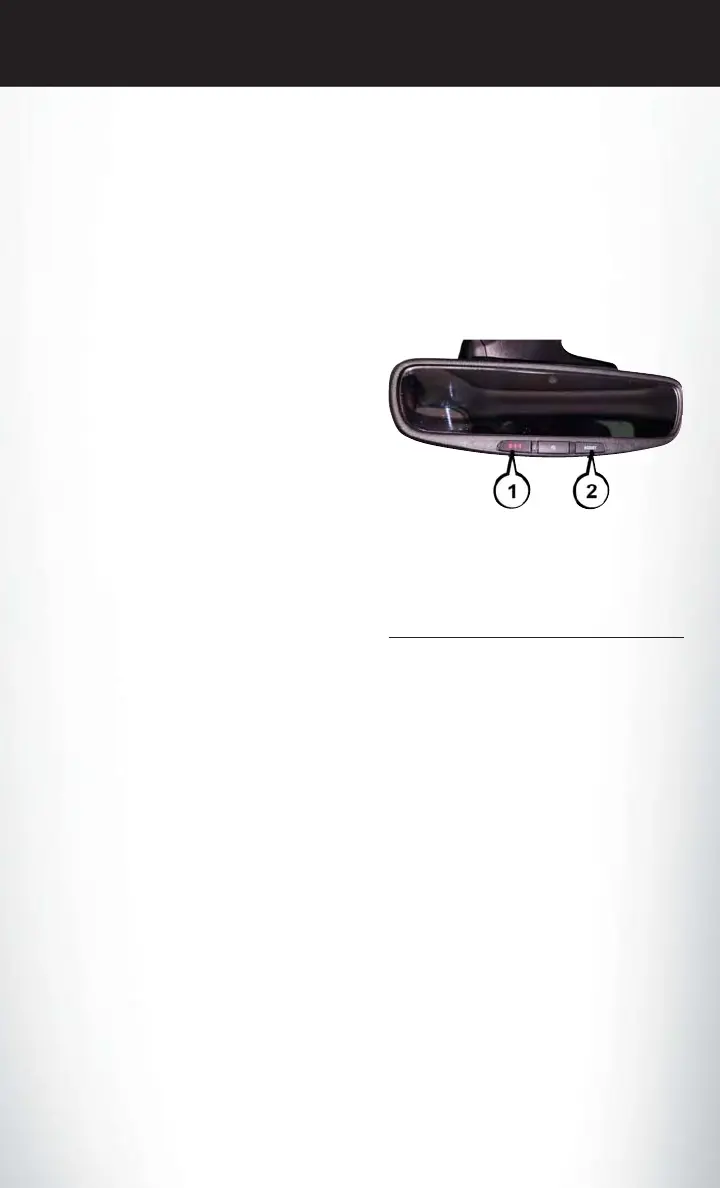
1. Assist Call (8.4/8.4 NAV) — The rearview mirror contains an ASSIST push button, and the
touchscreen contains a Uconnect Access App, which will automatically connect the vehicle
occupants to one of these predefined destinations for immediate support:
• Roadside Assistance Call — If you get
a flat tire, or need a tow, you’ll be con-
nected to someone who can help any-
time. Additional fees may apply. Addi-
tional information in this section.
• Uconnect Access Care — In vehicle
support for Uconnect Access System,
Apps and Features.
• Vehicle Care — Total support for your
FCA US LLC vehicle.
2. Emergency 9-1-1 Call (If Equipped) —
The rearview mirror contains a 9-1-1 button
that, when pushed, may place a call from
your vehicle to a local 9-1-1 operator to re-
quest help from local police, fire or ambu-
lance personnel. If this button is accidentally
pressed, you will have ten seconds to stop
the call. To cancel, push the 9-1-1 Call but-
ton again or press the “Cancel” button shown on the touchscreen. After ten seconds has
passed, the 9-1-1 call will be placed and only the 9-1-1 operator can cancel it. The LED light on
the rearview mirror will turn green once a connection to a 9-1-1 operator has been made. The
green LED light will turn off once the 9-1-1 call is terminated. Have an authorized dealer
service the vehicle if the rearview mirror light is continuously red. On equipped vehicles, this
feature requires a functioning electrical system and an operable 1X (voice/data) or 3G (data)
network connection to function properly. If a connection is made between a 9-1-1 operator
and your vehicle, you understand and agree that 9-1-1 operators may, like any other 9-1-1
call, record conversations and sounds in and near your vehicle upon connection.
3. Roadside Assistance (If Equipped) — If your vehicle is equipped with this feature and has an
operable 1X (voice/data) or 3G (data) network connection, you may be able to connect with
Roadside Assistance by pushing the "ASSIST" button on the rearview mirror. You will be
presented with Assist Care options. Make a selection by pressing the prompts displayed on
the radio. If Roadside Assistance is provided to your vehicle, you agree to be responsible for
any additional roadside assistance service costs that you may incur. In order to provide
Uconnect Services to you, we may record and monitor your conversations with Roadside
Assistance, Uconnect Care or Vehicle Care, whether such conversations are initiated through
the Uconnect Services in your vehicle, your device or via a landline device, and may share
9-1-1 Button And ASSIST
1 — 9-1-1 Button
2 — ASSIST Button
ELECTRONICS
135












 To Next Page