13.14. programme
delays
13.15. regulate the speed
of mixers
13.16. choose the
quantity of break
numbers
13.17. determine the
suction fan time
13.18. time tests
13.19. coffee brewer
phase
13.20. tune the water
flow for instant products
13.21. install a payment
system
13.22. return some
material under guarantee
(if accepted) dispensing starts as soon as the user presses a
selection key; the order in which instant products are poured into
the cup depends upon the values of delays (e.g. the one, the delay
value of which is zero, will be dispensed before the one, the value
of which is 40, dispensed four seconds after the user has pressed
the selection key); pay special attention when programming the
delays in dispensing a product and the water diluting it in the
mixing bowl; except for the instant coffee product, for which just
the opposite is applicable, it is recommended to dispense water
before the product to enable the latter to drop on the water film
already present in the mixing bowl for a better mix; espresso is
dispensed before and after any instant product by programming
the variable “coffee sequence”;
the rotation speed of the motors of product mixers can be adjusted
between 15,000 r.p.m. and 5,000 r.p.m.; the drink quality of
instant products depends a lot upon the action of the fans of
mixers: instant chocolate generally requires a long mixing time at
the maximum speed for
dissolution in water whereas instant tea
shall not be mixed to get a drink quality without any bubble on the
surface;
if instant products can be hardly dissolved in water, it may be of
use to stop the product dispensing cycle from the product canister
for a short time; the water flowing into the mixing bowl will have
the time necessary to remove any product build-up;
to remove the residual powder of instant products from inside the
machine, it is recommended to use the value in minutes you have
already programmed (three); if you should use particularly volatile
products, increase the time to five (and more) minutes;
to check the rotation time of a product motor and a mixer fan or
the activation time of a solenoid valve during the programming
phase, when the display shows “PRODUCT N” or “WATER N time”
or “MIXER N”, press the “PROG” key: the device will be activated
for the programmed time;
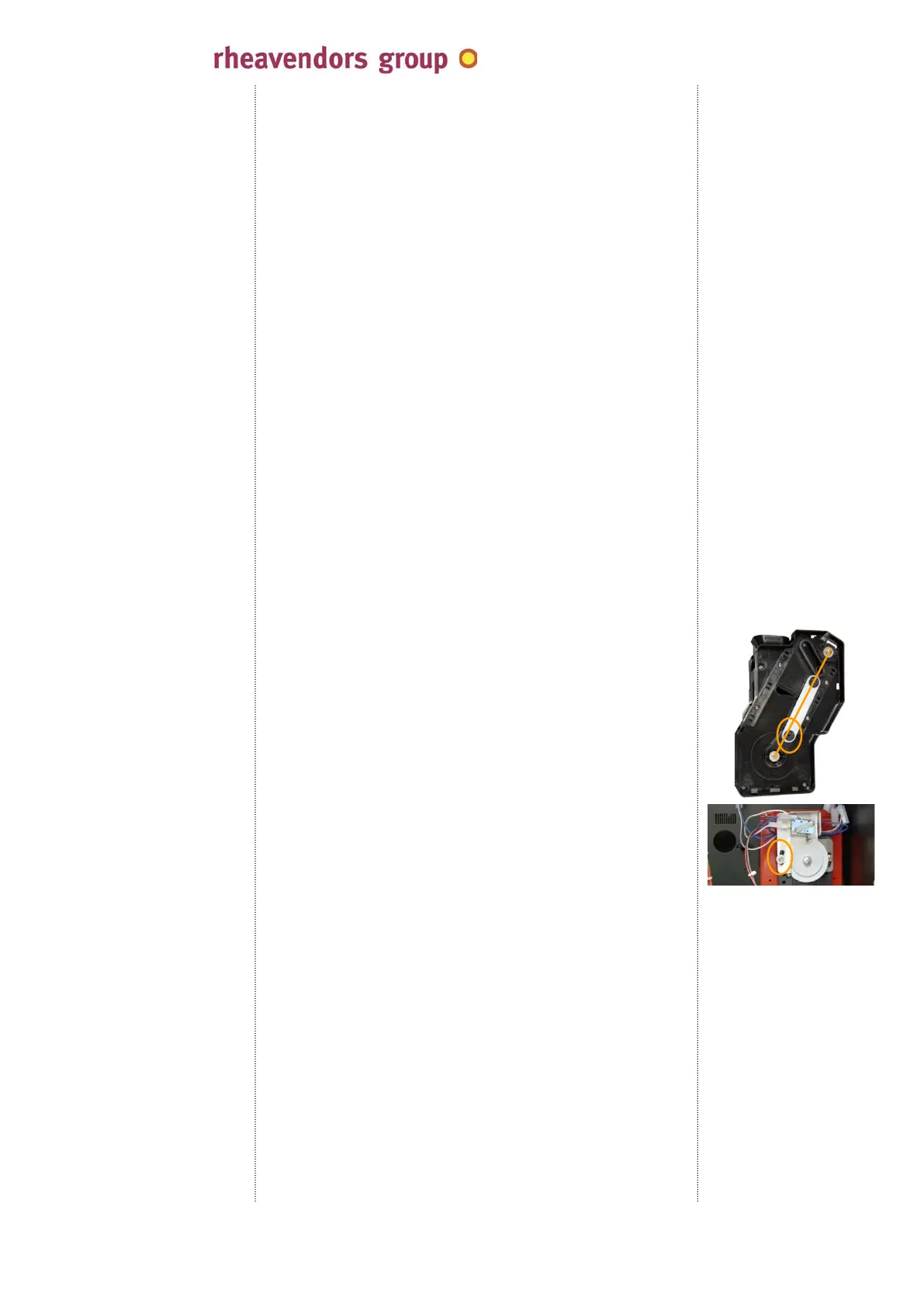
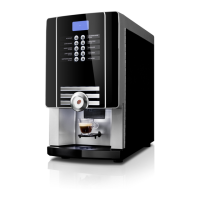
the right phase of the coffee brewer that shall be positioned just as
in the picture at the time of brewing is calibrated by means of the
unit rotation control switch (see 05.17.)
;
the central articulation of the connecting rod shall be moved
“backward” by some degrees, compared to the ideal line joining the
rotation axis of the unit and the upper end of the connecting rod;
to achieve this result:
- access the rear side of the machine;
- loosen the Allen wrench;
- regulate the switch position by rotating the support, i.e. by
advancing or delaying the action of the cam on the lever;
- screw the Allen wrench again;
regulation is admitted for boiler pumps within the +/-30%
maximum limits only when the programmed water flow is
“average”; when it is “low”, it can be only increased (max. by 30%)
whereas – when it is “high” - the flow can be only reduced (max.
30%);
there is a kit including all the parts necessary to install a payment
system in cino eC; after having installed the components of this
kit, refer to the above to programme the system functionality;
Rheavendors Services S.p.A. is at disposal for any kind of support
and information on the installation of payment systems; (see
02.03.);
if you should return any material under guarantee that is either
defective or not in compliance with your requirements, fill in the
form “MOD. PO 19.01/2B Materials under guarantee –
Authorisation to return” and send it to the fax number above to
apply for authorisation; only after having received the authorisation
form signed and numbered, you are permitted to send the goods at
your expenses to the address specified by the form;
see 09.01.a.
see 09.01.a.
see 09.01.a.
see 09.01.f.
see 09.01.a.
see 09.01.q.
cino eC by
MAN1010105 rel. 03 dated 12.02.2014 page no. 48 of 50 page
www.rheavendors.com tel: 0039 02 966 551 fax: 0039 02 96 55 086 e mail: rheavendors@rheavendors.com
rheavendors group's sole property


 To Next Page