To Next Page

H
herrerasteveSep 3, 2025
How to fix a blank screen on a Cisco IP Phone?
- MMonica WilliamsSep 3, 2025
If your Cisco IP Phone screen is blank, wake the touchscreen by pressing it, lifting the handset, or pressing any button.

How to fix a blank screen on a Cisco IP Phone?
If your Cisco IP Phone screen is blank, wake the touchscreen by pressing it, lifting the handset, or pressing any button.
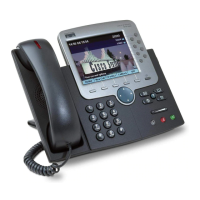
What to do if the softkey I want doesn't appear on my Cisco 7970?
If a softkey is missing on your Cisco IP Phone, try these steps: First, press the 'more' button to see if additional softkeys are available. Second, change the line state by going off-hook or managing a connected call. Lastly, the phone might not be configured to support the feature associated with the softkey.
Why can't I hear a dial tone on my Cisco IP Phone?
There are several reasons why you might not be able to hear a dial tone or complete a call on your Cisco IP Phone. You might need to log into the Extension Mobility service, or you may have to enter a client matter code or forced authorization code after dialing. Additionally, your phone could have time-of-day restrictions that prevent certain features from working during specific hours.
Why does CallBack fail on my Cisco IP Phone?
CallBack might fail on your Cisco IP Phone if the other party has call forwarding enabled.
What to do if I cannot hear a dial tone or complete a call on my Cisco 7970?
If you cannot hear a dial tone or complete a call on your Cisco IP Phone, you may need to log into the Extension Mobility service. It is also possible that you must enter a client matter code (CMC) or forced authorization code (FAC) after dialing a number, but this applies to SCCP phones only. Another possibility is that your phone has time-of-day restrictions that prevent you from using some features during certain hours of the day.
Why Barge fails and results in a fast busy tone on my Cisco IP Phone?
Barge on your Cisco IP Phone might fail, resulting in a fast busy tone because you cannot barge an encrypted call if the phone you are using is not configured for encryption. When your barge attempt fails for this reason, your phone plays a fast busy tone.
Why the softkey that I want to use does not appear on my Cisco 7970?
If the softkey that you want to use does not appear on your Cisco IP Phone, you may need to press the 'more' button to reveal additional softkeys. Alternatively, you might need to change the line state by going off-hook or having a connected call. It's also possible that your phone is not configured to support the feature associated with that softkey.
How to fix a blank screen on my Cisco 7970 IP Phone?
To wake up a blank Cisco IP Phone screen, try pressing the touchscreen, lifting the handset, or pressing any button.
Explains guide usage and points to common sections.
Covers power outages and external device impacts on phone performance.
Details product's cryptographic features and export law compliance.
Instructions for connecting the Cisco Unified IP Phone to the network.
Step-by-step guide to remove the hookswitch clip from the phone.
Covers adjusting handset rest and footstand for optimal use.
Identifies and describes the phone's buttons and hardware components.
Explains icons indicating line and call states.
Provides methods for placing calls via handset, speakerphone, or headset.
Details various methods for answering incoming calls.
Explains how to end calls using different methods.
Describes how to put calls on hold and resume them.
Explains how to set up and use speed dial features.
Covers methods for parking and retrieving calls.
Explains how to use barge features to join shared line calls.
Explains how to handle urgent or critical calls using MLPP.
Covers temporarily configuring a phone to your user profile.
Explains how to use handset, headset, and speakerphone with the phone.
Describes how to enable and use the AutoAnswer feature for incoming calls.
Details customizing ring tones and voice message indicators.
Explains adjusting touchscreen brightness, angle, and background.
Covers viewing, erasing, and dialing from call logs.
Explains using corporate and personal directories for dialing.
Covers setting up and using PAB and Fast Dials.
Guides on logging into and navigating User Options web pages.
Describes configuring phone features and services via web pages.
Details managing line settings like call forwarding and message indicators.
Guides on configuring phones and access lists for mobile connectivity.
Overviews configuration options for handling more calls, lines, or speed dials.
Discusses features for collaboration like Call Park, Pickup, and Shared Lines.
Provides solutions for common phone issues like no dial tone or blank screen.
Guides on accessing network, status, and model info for troubleshooting.
Explains using QRT for reporting performance problems.
Outlines the terms and conditions of the hardware warranty.
 General
| Protocols | SIP, SCCP |
|---|---|
| Ethernet | 10/100 Mbps |
| Power | IEEE 802.3af PoE or AC adapter |
| Headset Port | Dedicated headset port |
| Speakerphone | Full-duplex |
| Audio Codecs | G.711, G.729a, iLBC |