Step 4 After you have unpacked the system, verify that you have received all of the required components, including all the
accessory items. Using the packing list as a guide, verify that you have received all the equipment listed in your order,
and ensure that the configuration matches the packing list.
Checking the Shipping Container Contents
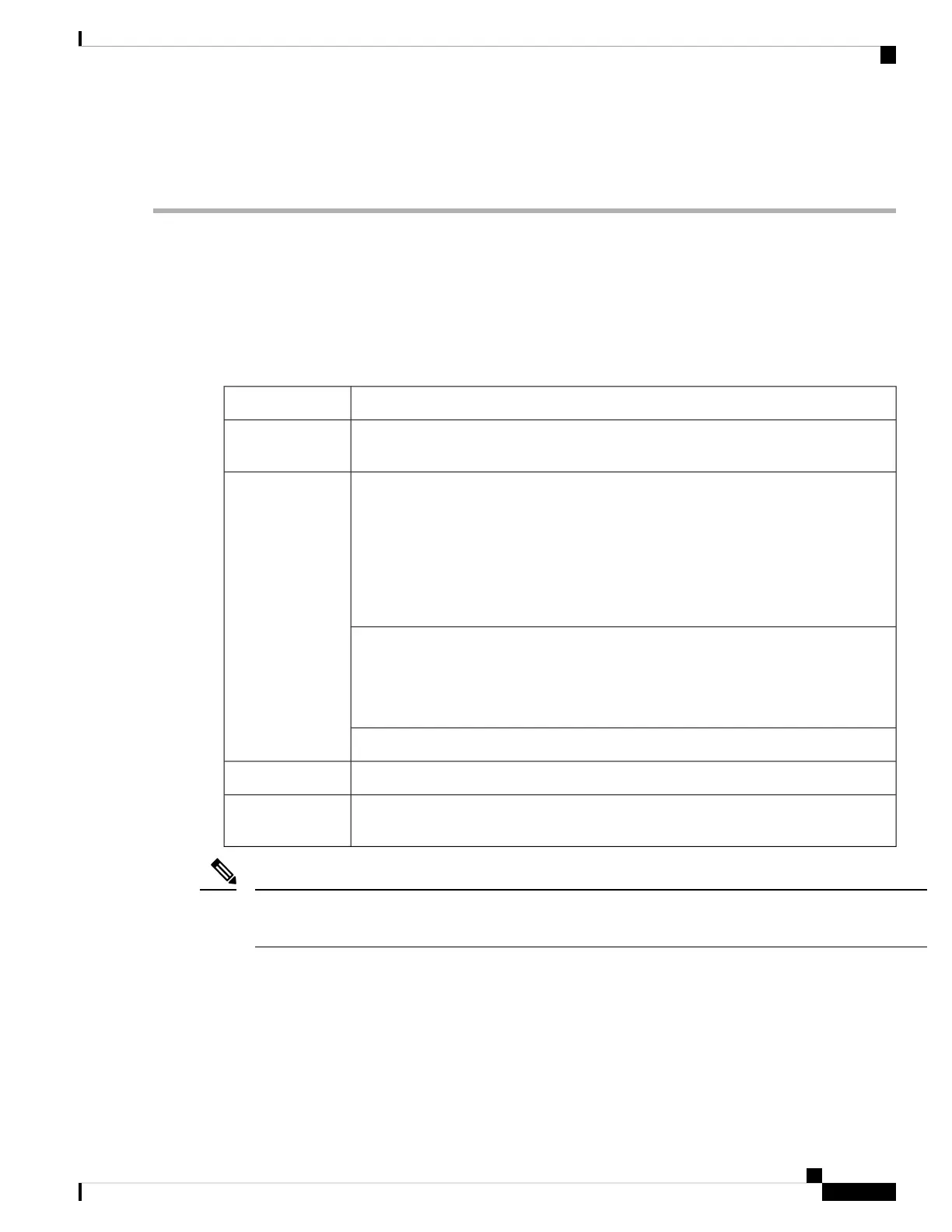
Use the components list shown in the following table to check the contents of the Cisco Catalyst CW9800H1
Wireless Controller or the Cisco Catalyst CW9800H2 Wireless Controller shipping container. Do not discard
the shipping container. You need the container, if you move or have to ship the controller in the future.
Table 16: Cisco Catalyst CW9800H1 and CW9800H2 Wireless Controllers Shipping Container Contents
DescriptionComponent
Cisco Catalyst CW9800H1 Wireless Controller or the Cisco Catalyst CW9800H2
Wireless Controllers are configured with dual AC or DC power supplies and an EPA.
Chassis
Front 19-inch rack-mount brackets.
Rear rack-mount brackets are not included.
Note
Rear spare PID (C8500-4PT-KIT=) contains the rear rack-mount bracket to secure the
rear side of the chassis.
You can order the PID as a spare only.
Note
Accessories Kit
Three sets of screws, one each for:
• Front rack-mount brackets (use the black screws)
• Cable-management brackets (use the package with the 4 screws)
One cable-management bracket with U-feature design devices attached.
Pointer Doc
Documentation
Powercord if an AC power supply was shipped. There are none for the DC power supply
units.
Optional
Equipment
You must order the Accessories Kit separately if you order the Cisco Catalyst CW9800H1 Wireless Controller
or the Cisco Catalyst CW9800H2 Wireless Controller chassis as a spare.
Note
Installation Checklist
To assist you with your installation and to provide a historical record of what was done by whom, print or
photocopy the installation checklist below. Use this to record when each procedure or verification is completed.
When the checklist is completed, place it in your site log along with the other records for your new controller.
Cisco Catalyst CW9800H1 and CW9800H2 Wireless Controllers Hardware Installation Guide
45
Preparing Your Site for Installation
Checking the Shipping Container Contents















 To Next Page