25
Cisco TelePresence System Codec C60/C40 and Profiles using C60/C40 Administrator guide
D14636.06 Profile C60-C40 and Codec C60-C40 Administrator Guide TC4.2, July 2011.
Copyright © 2010-2011 Cisco Systems, Inc. All rights reserved.
www.cisco.com
Making a call from the web
interface
Sometimes, e.g. when you are configuring the system from a
remote location, it is convenient to be able to make calls from
the video system to ensure everything works as expected.
Making a call
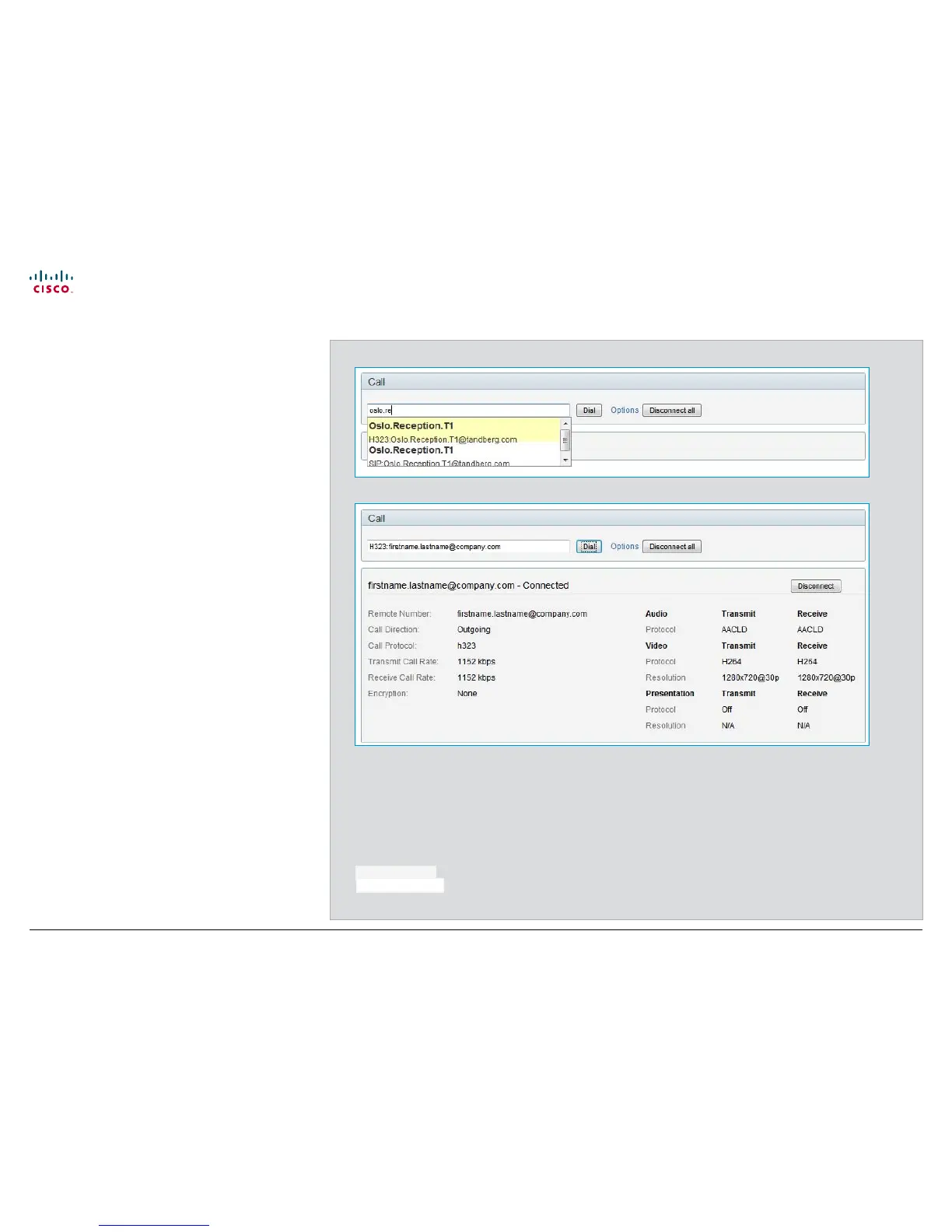
Input field: Enter one or more characters in the input field until
the name you want to call appears in the dynamic search list
or, enter the complete name or number.
Dial: Press Dial to initiate the call.
Disconnect all: Press Disconnect all to end all calls.
Options: Click Options to change the bit rate for this call.
Select the bit rate you want in the Call rate drop down list.
The call status page
You will find the following information on the call status page
when you are in a call:
• Remote number
• Call direction: Incoming/Outgoing
• Call protocol: H323/SIP
• Transmit and receive call rate
• Encryption
• Audio: Transmit and receive protocols
• Video: Transmit protocol and resolution, and receive
protocol and resolution
• Presentation: Transmit protocol and resolution, and receive
protocol and resolution
Conference Control
Call











 To Next Page