30
Cisco TelePresence System Codec C60/C40 and Profiles using C60/C40 Administrator guide
D14636.06 Profile C60-C40 and Codec C60-C40 Administrator Guide TC4.2, July 2011.
Copyright © 2010-2011 Cisco Systems, Inc. All rights reserved.
www.cisco.com
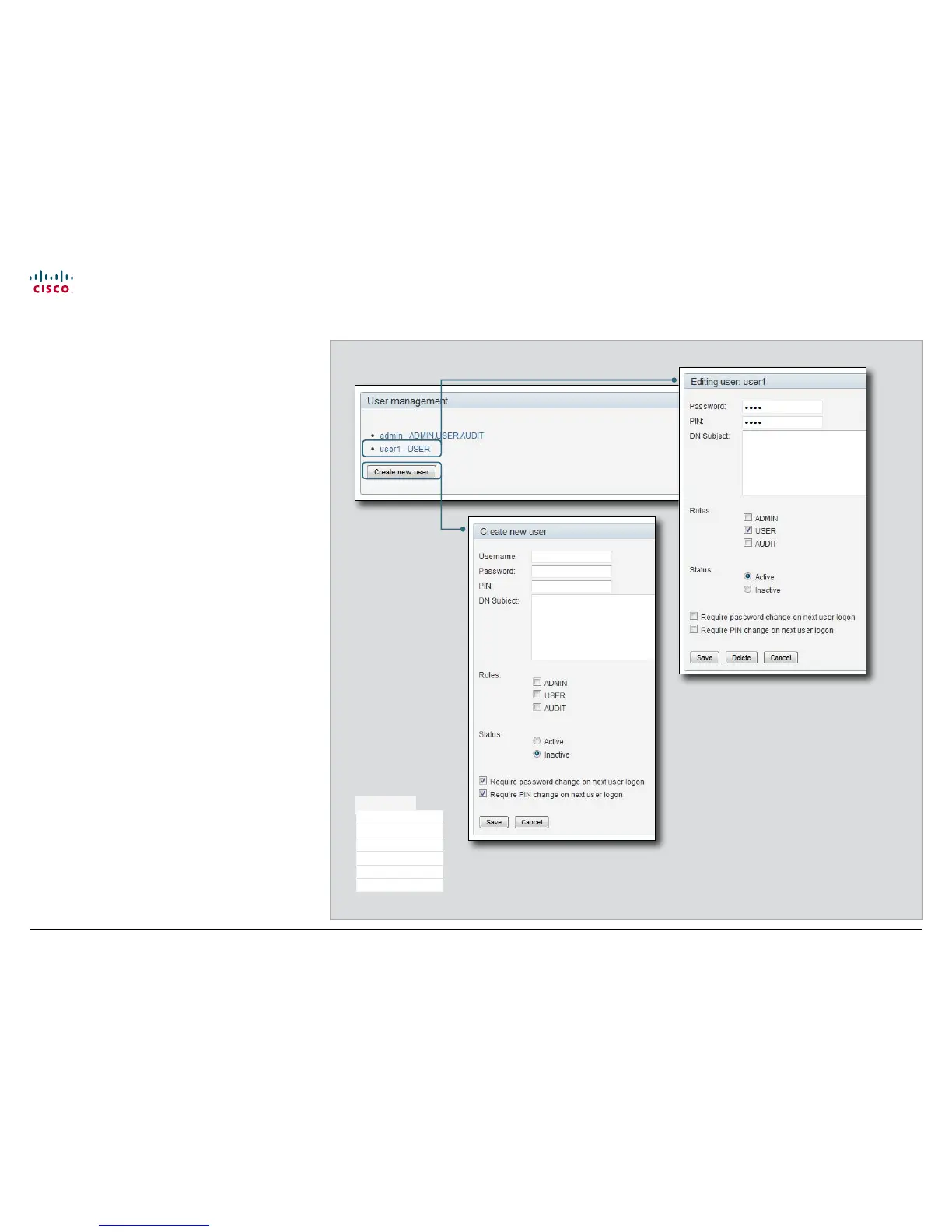
Creating a new user account
1. Press Create new user.
2. Fill in the Username, Password and PIN code, and select
the user role(s) for this user account.
As a default the user have to change the password and PIN
code when signing in for the first time.
Do not fill in the Distinguished Name (DN) Subject field
unless you want to use certificate login on https.
3. Set the Status to Active to activate the user.
4. Press Save to save the changes.
Editing user details
1. Select the name of an existing user to open the Editing
user window.
2. Edit the details.
3. Press Save to save the changes or Cancel to go back one
step without storing the information.
Deactivating a user account
1. Select the name of an existing user to open the Editing
user window.
2. Set the Status to Inactive.
3. Press Save to save the changes.
NOTE: Always keep at least one user with ADMIN rights Active.
Deleting a user account
1. Select the name of the user to open the Editing user
window.
2. Press Delete.
NOTE: Always keep at least one user with ADMIN rights.
Maintenance
Upgrade Software
Certificate Management
Audit Certificate
User Administration
Change Password
Restart











 To Next Page