www.cisco.com
17
Cisco IP Video Phone E20 Administrator guide
D143 30.12 Administrator guide Cisco IP Video Phone E20, TE4.1 November 2011.
All contents are Copyright © 2010–2011, Cisco Systems, Inc. All rights reserved.
Incoming calls with multiple lines
In the Advanced settings you may dene how the E20 will respond to an incom-
ing call. This is called IncomingCallAlertLevel. This feature may come in handy
when the E20 is set up in shared lines enviroments. You may select between
Discreet, Regular and Silent. The setting may be set separately for Idle and
In-call situations. Note that access to Advanced settings may have been pass-
word protected by the system administrator.
When your unit has been congured with multiple lines you may, of course,
receive more than one call as well.
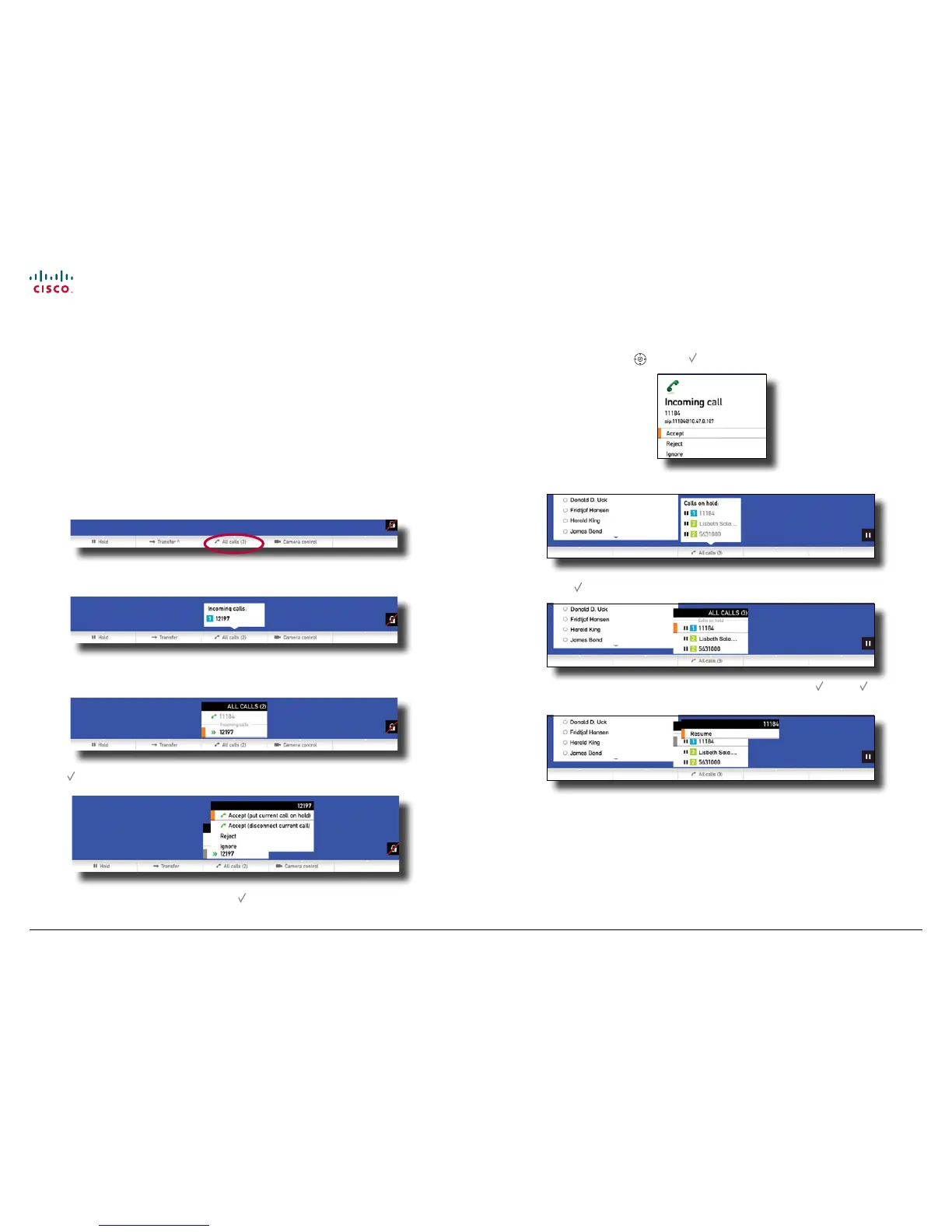
If you are in a call and another call comes in, the response will be in accordance
with the alert level setting. If this is set to Silent the only indication will be along
the bottom line of the screen as outlined below.
If set to Discreet, it will appear as outlined below.
In both cases press the key corresponding to the center softbutton to open the
menu and then navigate down to the incoming call:
Press to gain access to the options:
Navigate to make your choice and press to put your choice into eect.
If the alert level has been set to Regular, another incoming call will appear as
outlined below. Use the
and the to make your choices.
You may have put several incoming calls on hold. An example is shown below.
Press Press to gain access to the options:
Navigate to the one to resume communication with and press . Press again
to put your choice into eect.
If your E20 is hooked up to Multiway, you may resume more than one call and
thereby initiate a video conference (some of the participants may be audio only,
but they may still participate in the conference).



 To Next Page