2-22
Cisco IE 3000 Switch Hardware Installation Guide
Chapter 2 Switch Installation
Verifying Switch Operation
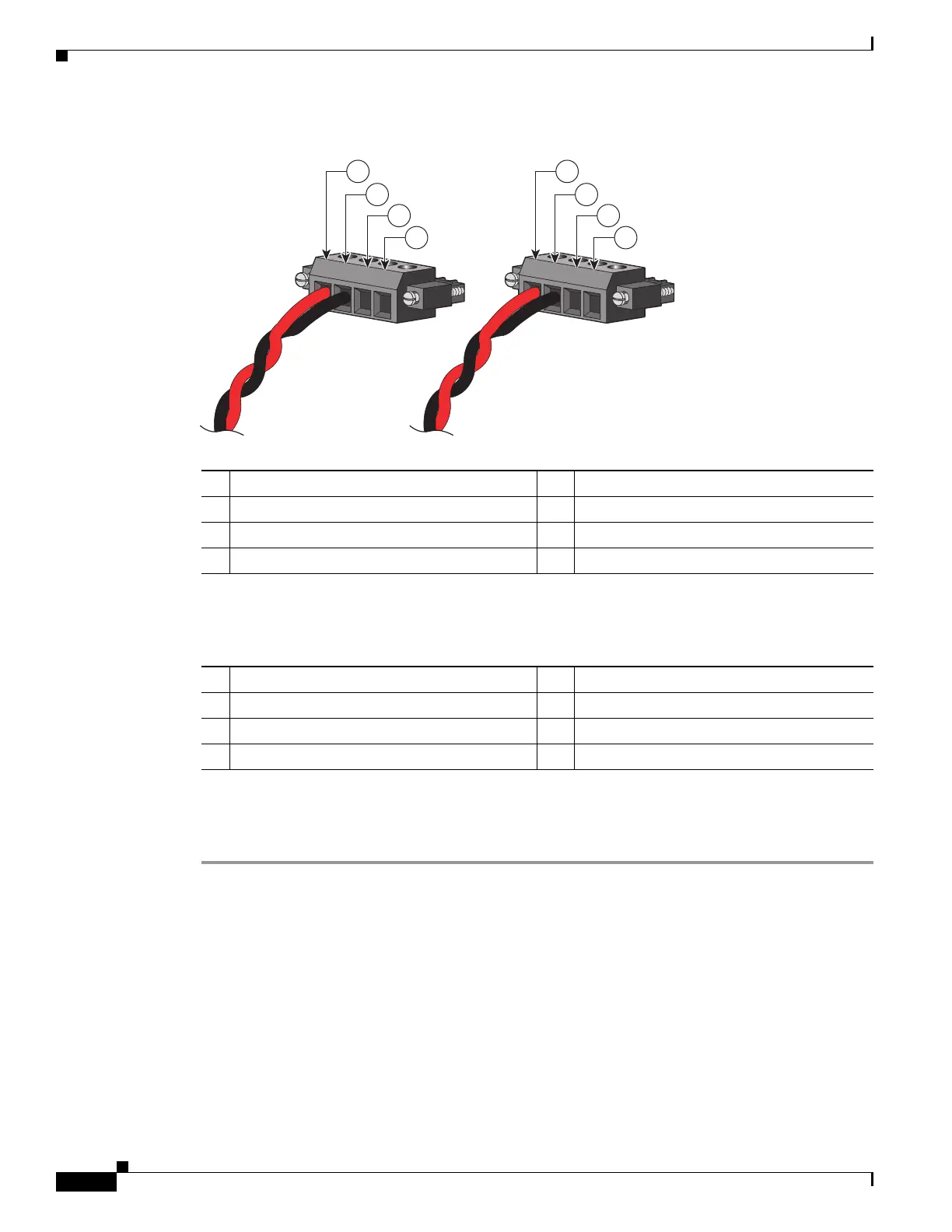
Figure 2-16 Completed DC Power Connections on the Power and Relay Connector
If your power source is –48 VDC, the following table descibes the your wiring connections for
Figure 2-16.
Step 8 (Optional) If you plan to connect external alarm devices to the alarm relays and the switch is already
installed, go to the “Wiring the External Alarms” section on page 2-37. Otherwise, go to the “Verifying
Switch Operation” section on page 2-13.
1 Power source A positive connection 5 Power source B positive connection
2 Power source A return connection 6 Power source B return connection
3 External device 1, relay wire connection 7 External device 2, relay wire connection
4 External device 1, relay wire connection 8 External device 2, relay wire connection
201818
RT
A
V
A
RT
A
V
A
1
2
3
4
5
6
7
8
1 Power source A return connection 5 Power source B return connection
2 Power source A –48 VDC connection 6 Power source B –48 VDC connection
3 External device 1, relay wire connection 7 External device 2, relay wire connection
4 External device 1, relay wire connection 8 External device 2, relay wire connection






 To Next Page