Chapter 5 Integrating Cisco CallManager with Voice Mail Systems Using SMDI
Choosing a Configuration Option
5-8
Cisco VG248 Analog Phone Gateway Software Configuration Guide
OL-1209-02
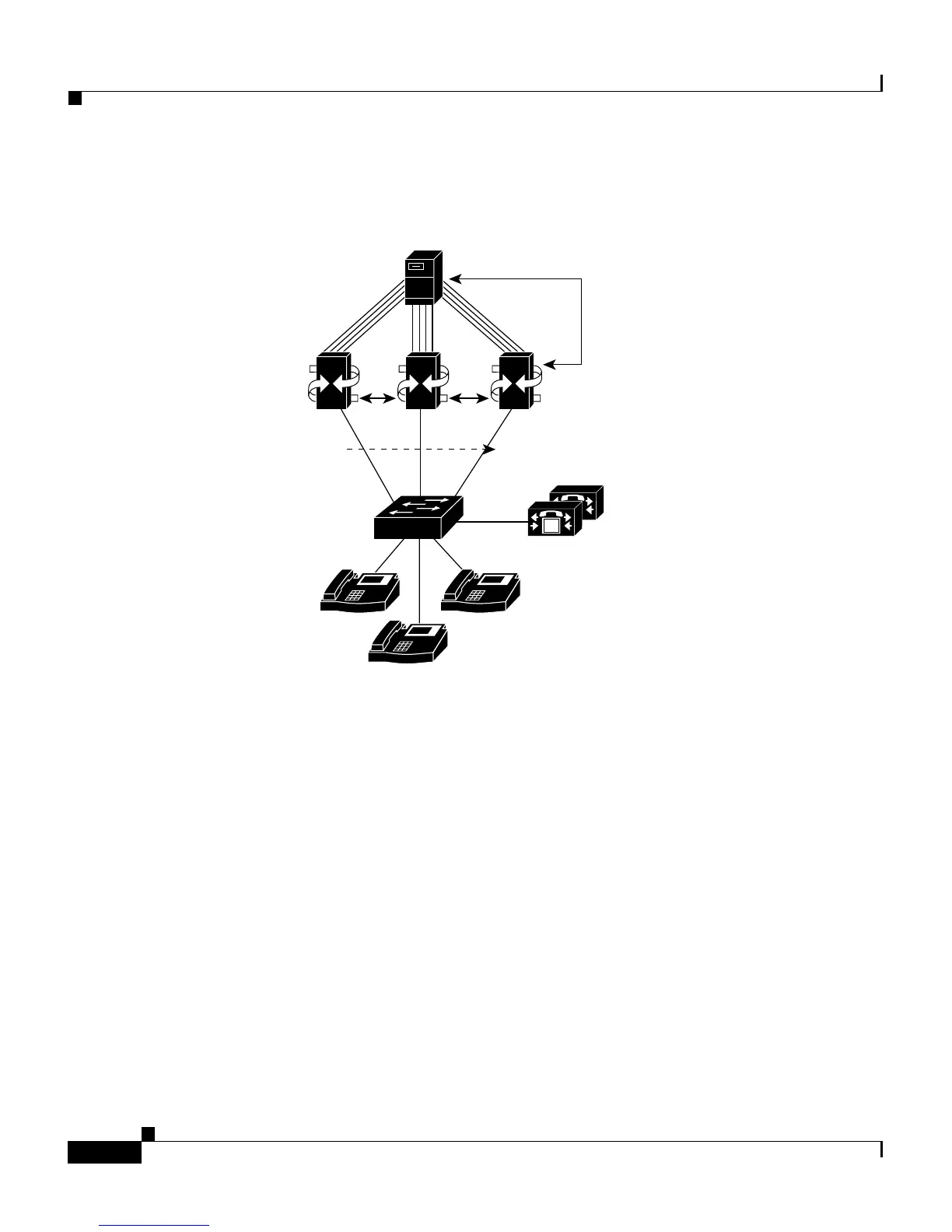
Figure 5-2 Chained Configuration of VG248 SMDI Integration
Multiplexing Configuration
This method enables you to share a single voice mail system with multiple
Cisco CallManager systems or another PBX system. Using the multiplexing
configuration, you can integrate SMDI with multiple PBX systems, including:
• Multiple Cisco CallManager clusters (see Figure 5-3)
• Legacy PBX system and Cisco CallManager (see Figure 5-4)
Configuration Tips
When integrating SMDI links from more than one PBX system, refer to these tips.
Note, however, that this is not a complete list of the items you must configure;
these are tips specific to the multiplexing configuration. Refer to the “Configuring
SMDI Settings on the VG248” section on page 5-19 for a description of all SMDI
configuration tasks.
SMDI SMDI
M
M
IP IP
IP
Legacy
voice mail
Analog
SMDI
MDI passed
etween VG248s
Cisco CallManager
68460
VG248


 To Next Page