34 NX405E
English
English
Owner’s Manual
English
12. Bluetooth
®
AUDIO PLAYER OPERATIONS
Some Bluetooth cellular phones have audio features,
and some portable audio players support the Bluetooth
feature. These devices will be called as “Bluetooth audio
players” in this manual. This system can play audio data
stored in a Bluetooth audio player.
Note:
• This system will not operate or may operate
improperly with some Bluetooth audio players.
• For detailed information on the playable Bluetooth
audio players, see our home page: www.clarion.com
Selecting the Bluetooth Audio Mode
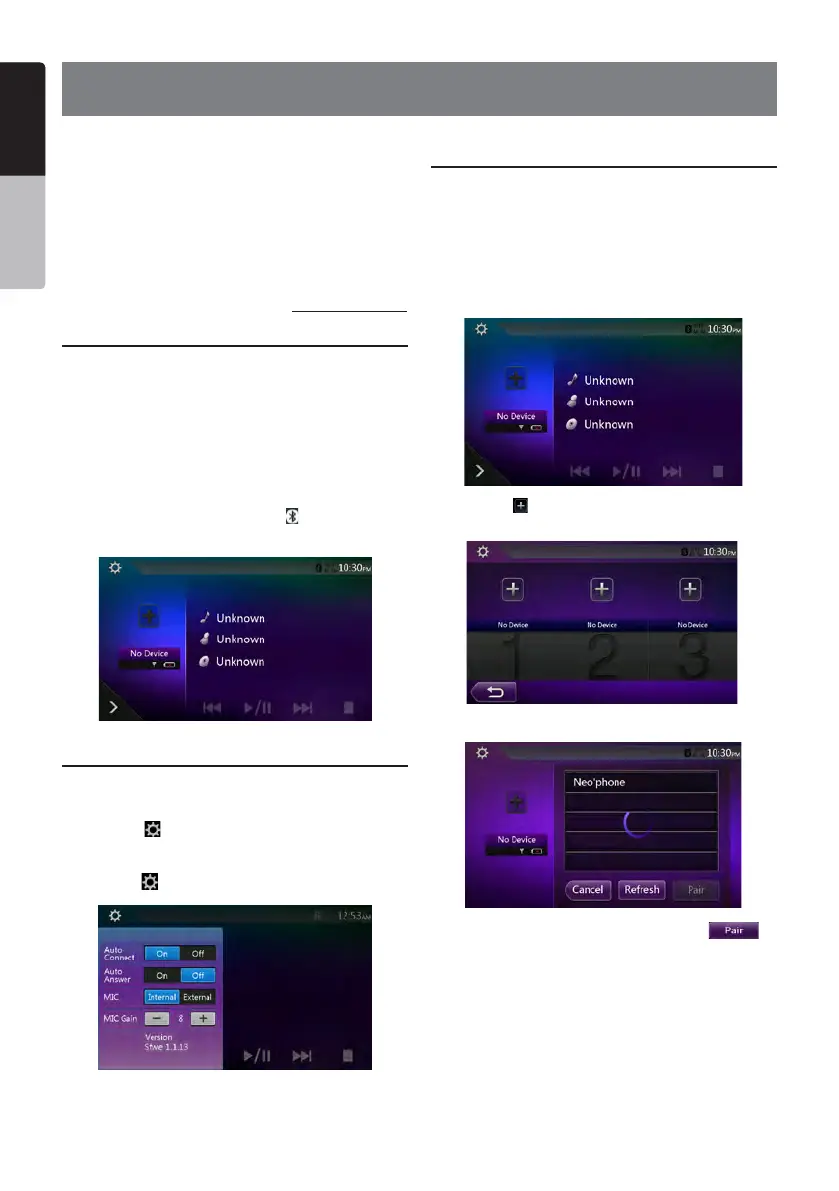
1. Touch the [BT Audio] button to select the Bluetooth
Audio mode.
The system changes to the Bluetooth mode. If the
connection with a Bluetooth audio player has been
already established, you may select the Music function.
2. Press MENU button on Operational Panel to return to
the Main Menu.
• When the connection with blue icon a Bluetooth audio
player has been established, the [
] icon is
displayed at the top of the screen.
Bluetooth Audio Player Settings
You can conrm various information concerning about
the Bluetooth Interface features.
1. Touch the [
] button to display the information on the
screen.
2. When you nish conrming the Bluetooth information,
touch the [
] button to return to the previous screen.
Registering Your Bluetooth Audio Player
(Pairing)
You can register up to 3 Bluetooth audio players.
Your mobile phone Bluetooth version is under 2.0.
Please input PIN code “0000”.
1. Turn on the power of the Bluetooth audio player you
wish to register.
2. Touch the Device button to display the Device Select
screen.
3. Touch the [ ] button to display the Inquiring Device
screen.
4. Touch your desired device button and touch [
]
button to register for the Bluetooth audio player. Then
select an image of this device.


 To Next Page