21
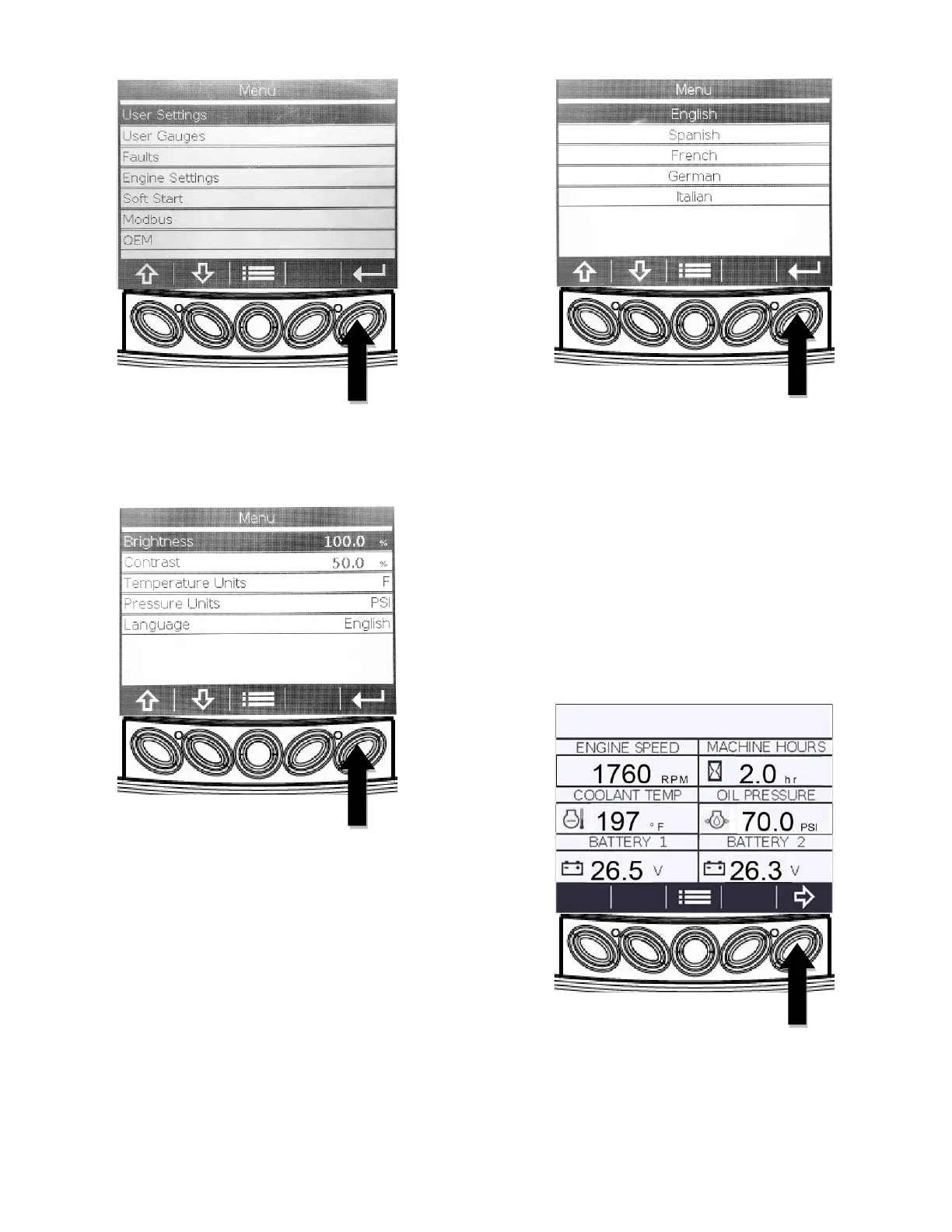
2. The following screen will appear. This allows
user adjustment of Brightness, Contrast,
Temperature Units, Pressure Units, and
Language.
3. Each of these parameters can be adjusted by
highlighting the item with use of the “Arrow”
(A&B) keys and then pressing the “Enter” (E)
key to bring up the adjustment screen. See
below for an example of adjusting the
“Language”.
4. The “Arrow” (A&B) keys highlight the
“Language” selection. Press the “Enter” (E)
key to store the selection.
5. Press the “Menu” (C) key to return to the six-
up display.
User Gauges Adjustment
1. Aside from the six-up default display, there is
an “Auxiliary Parameters” screen that displays
additional engine and system performance
data.
2. Starting at the six-up display, press the “Arrow
Right” (E) key.
3. The following “Fire Pump Parameters” screen
will appear. This screen will not be populated
with data unless the engine is a Clarke PLD
(Pressure Limiting Driver).



 To Next Page