27
IMPORTANT: Ignoring active trouble codes can
result in severe engine damage.
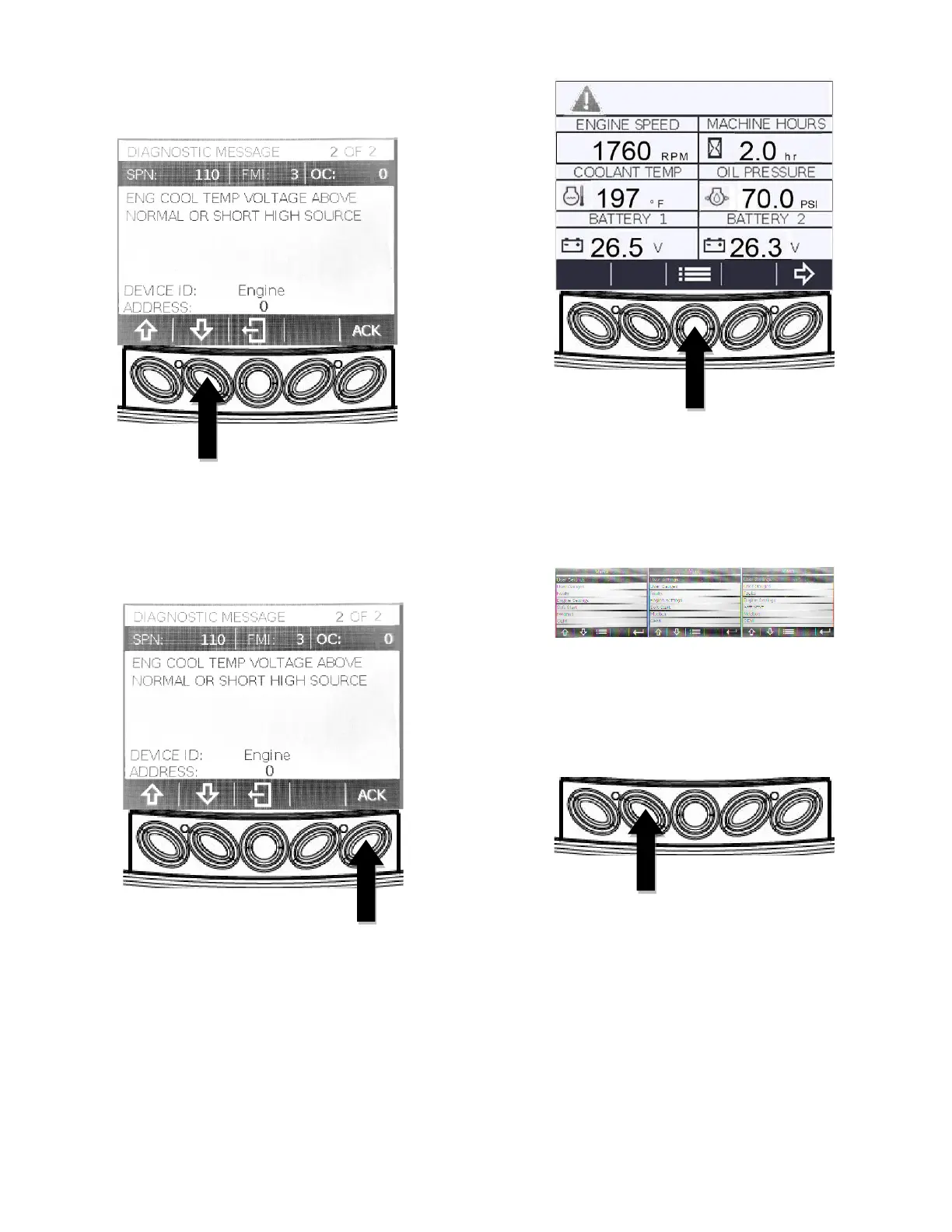
3. If the arrows appear above keys A&B, there
are more trouble codes that can be viewed by
using the arrow keys to scroll to the next
trouble code. It will also indicate multiple
“Diagnostic Messages” at the top of the screen.
Ex. (1 of 2 instead of 1 of 1.)
4. To acknowledge and hide the code and return
to the six-up display, press the “Enter” Key.
5. The screen will return to the six-up display, but
the display will contain the warning icon. The
yellow LED will also remain illuminated. The
warning icon and yellow LED will remain in
place until the fault condition is corrected.
6. To view the active code(s) again, press the
“Menu” (C) key to display the “Main Menu”.
7. Press the “Down Arrow” (B) key two times to
highlight the “Faults” option. Then press the
“Enter” (E) key to access the “Faults Menu”.



 To Next Page