Classeq Under Counter Range - User Manual
24
8. Custom Settings
Your warewasher comes with factory pre-set value and updated
value during your commissioning of the machine. In event of any
change in circumstances (e.g. language, change of chemical,
hardness etc) your warewasher has a provision to updates those
values.
Refer below instructions to customise your settings:
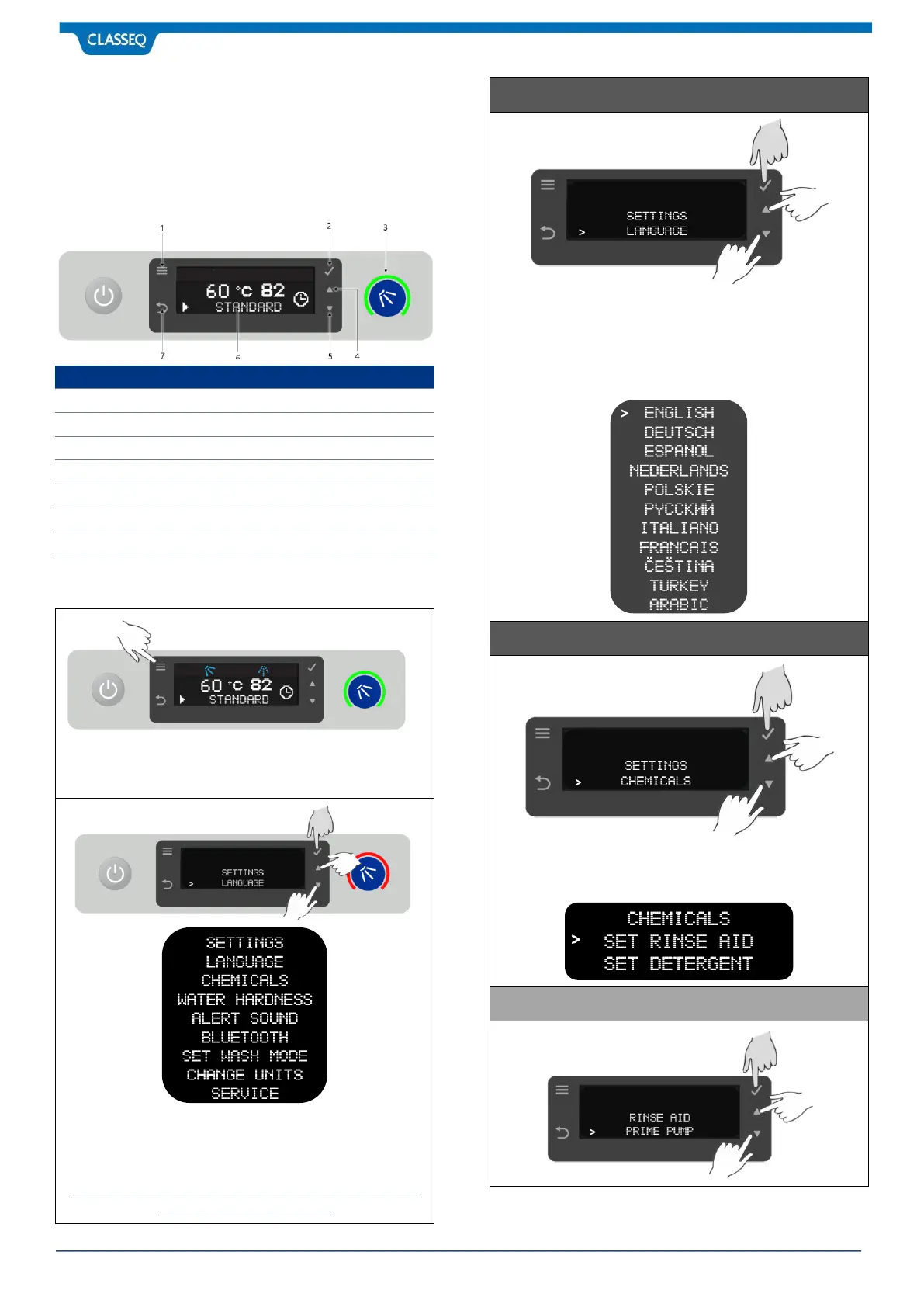
Press Menu Button (1) when warewasher is ON to enter the
Setting Mode from Normal Mode. LED indicator (3) light colour
changes to RED to notify warewasher is in Setting mode.
By pressing UP Button (4) and DOWN Button (5) parameters
under settings can be scroll. To select your specific parameter
press Select Button (2) to change the value. Press Back Button
(7) to come out of Setting Mode.
Please Note only qualified technician or engineer should get
access to SERVICE Parameter.
Press Select Button (2) to enter the language options. Press UP
Button (4) & DOWN Button (5) to select your choice of
Language. Confirm your selection by pressing Select Button (2).
To come out of Setting Mode press Back Button (7).
Available languages are:
Press Select Button (2) to enter the chemicals options. Press UP
Button (4) & DOWN Button (5) to select your choice of Chemical
Pump. Confirm your selection by pressing Select Button (2).



 To Next Page