1. Start/turn of your robot
2. Operate the robot movement remotely
3. Recharging of the robot
Remote control and the charging
station
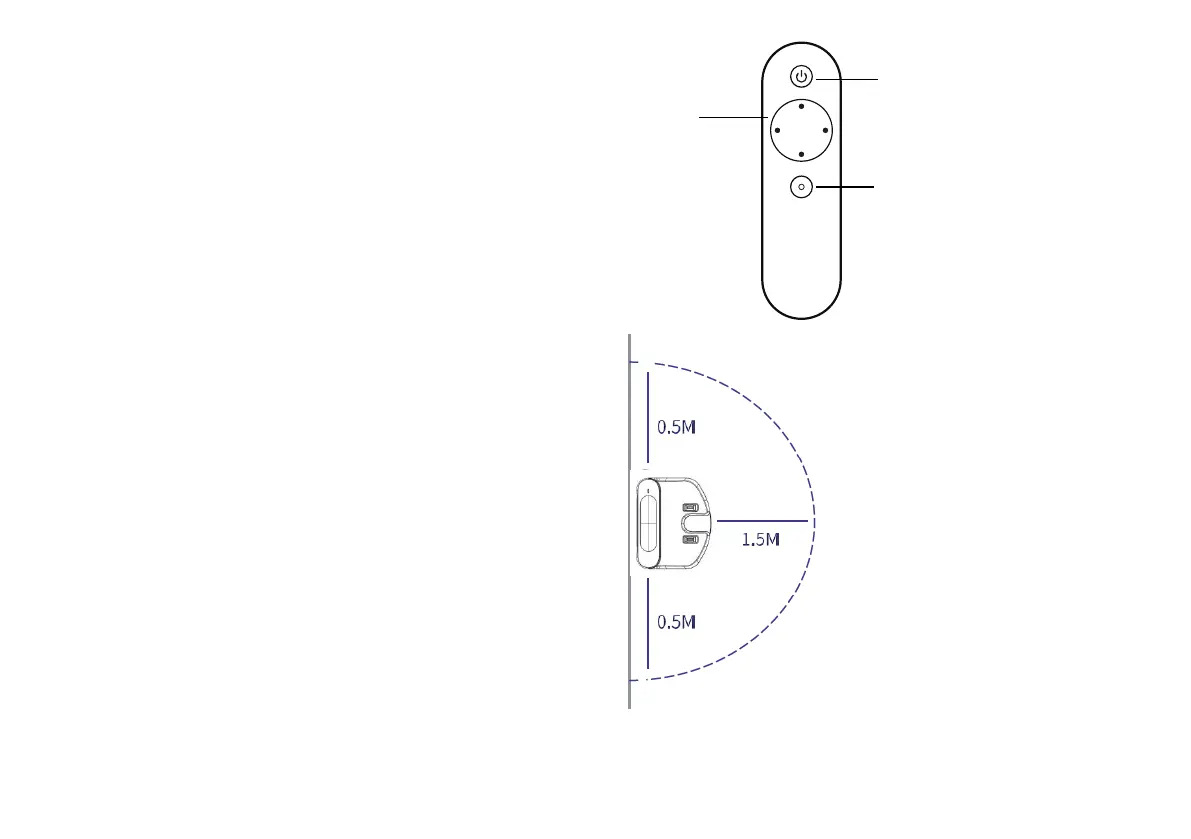
The remote control
1. ON/OFF -
switch
2. Direction
buttons for the
robot
3. Recharge the
robot
15
The charging station
Battery Charging with charging station and placing
of the station.
Select a suitable place, connect the power-adapter
and put the charging station against the wall and
place it with free space on both sides, 1.5 meters
left and 1.5 meters above the front.
Please note that the charging station can't be used
in combination with the dust collector
Note: if the robot is switched off, then switch on the
robot first before charging. 2, Charge the robot in
either way as shown:
You can use the remote
control to operate your robot
A, Plug one end of the
adapter into the robot and
the other end into the
power socket
B, Press “Re-charge”
button on APP to
operate the robot looking
for the charging
station automatically.



 To Next Page