2.
3.
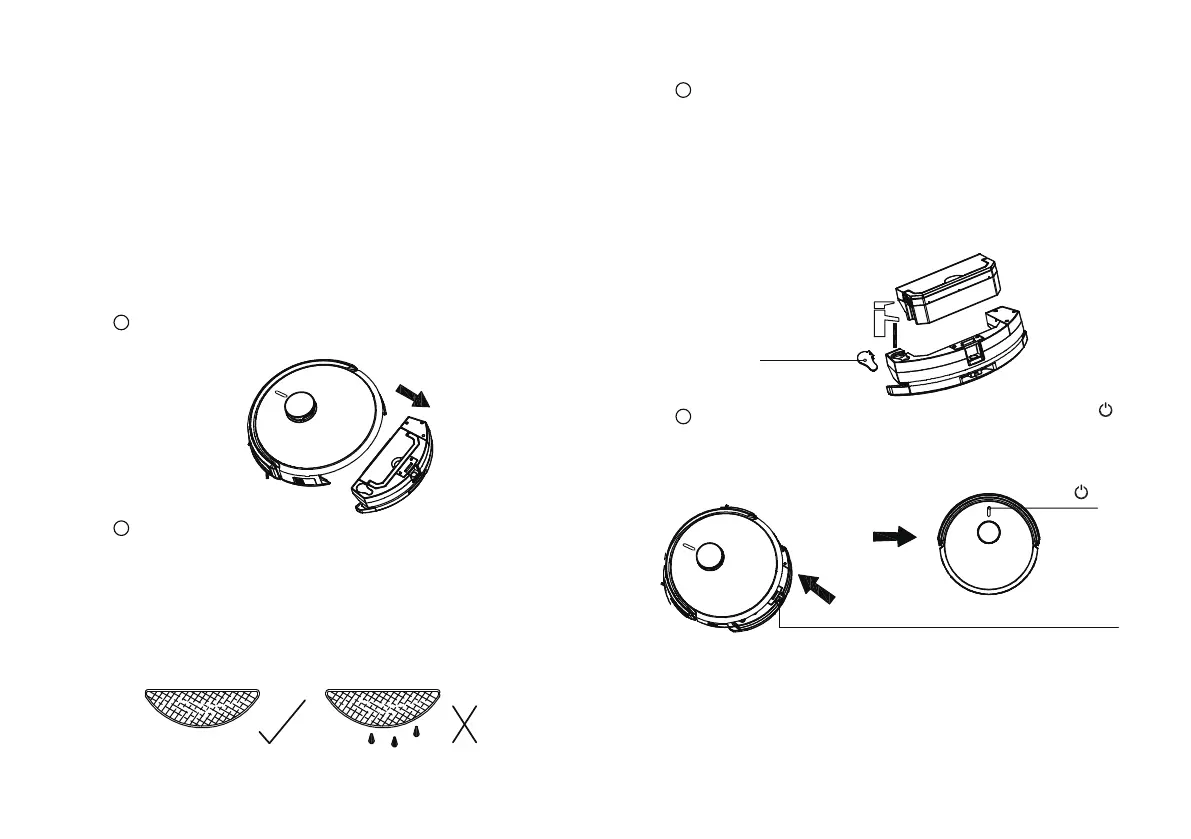
* In order to prolong the service life, it is recommended to
use purified water or demineralized water. (Fasten the
water tank plug after adding water)
* Do not immerse the tank unit in water. Only fill the tank
with tap water
Do not switch the mopping mode in the APP before installing
When you hear a "click", the installation is successful.
Click “ ”
Press the lock to install the watertank
Tank plug
* Water tank component need to be affixed with washable
dishcloth before use
* When placing a washable cloth, stick the smooth side on
the water tanks under side. Wet the mop and twist it until it
does not drip.
Before installing the water tank, please ensure that the
contact pieces of the water tank are dry to prevent electric
leakage.
Do not use the mopping function on carpets.
Take of the preinstalled water tank assembly
of the robot
1
3
Filling of water in the tank
The water tank is integrated with the small dust box
assembly. Please take out the small dust box assembly
before water injection
Install the water tank assembly,and click" "
to start cleaning the floor
4
2
Place the washable mop cloth
21
Start cleaning with watertank
Mopping the floor: select the water tank with the dust
box
Tip:
1. The water tank assembly wipes the floor and vaccum at the
same time
Note: when using the watertank the automatic dust
collection is inactivated. Please empty the dust bin
manually



 To Next Page