ClonerAlliance ViewPro User Manual
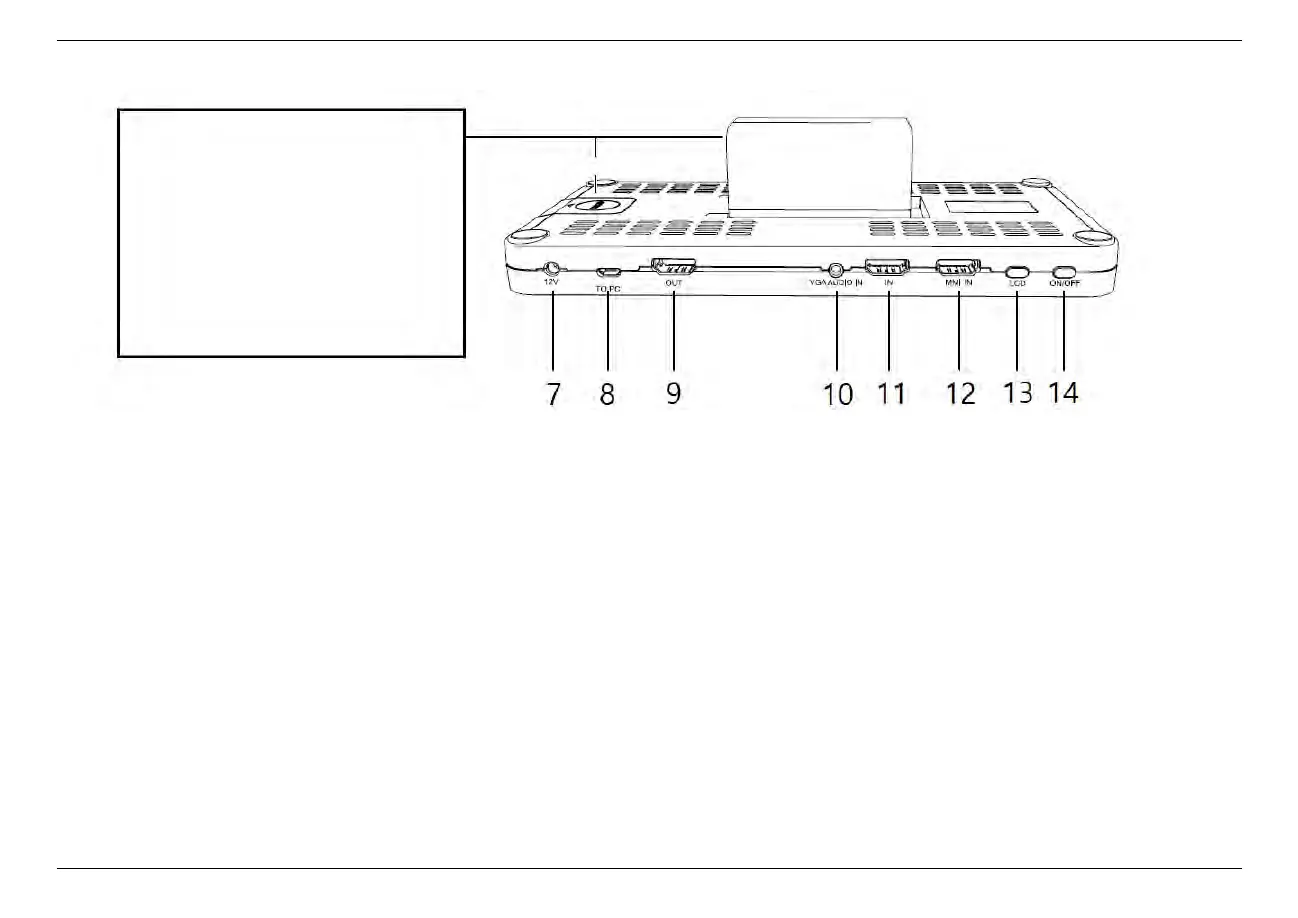
7. Power socket of 12V
8. To PC: Connect the USB-A to Micro-B Cable between
PC and ClonerAlliance ViewPro for recording videos
to PC.
9. OUT: Connect an HDMI cable between ClonerAlliance
ViewPro and TV.
10. VGA AUDIO IN: Connect audio inputs for VGA sig-
nals.
11. IN: Connect an HDMI Cable between the video player
and ClonerAlliance ViewPro.
12. MMI: MMI input(AV, VGA, YPbPr) port. Please don’t
connect HDMI device.
13. LCD: Switch LCD ON/OFF.
14. ON/OFF: Press it to turn on. Press and hold it for 3
seconds to turn off.
1.2. Product Diagram 3
Batteries Slots:
Either using a power adapter or batteries,
we strongly recommend that you
also install a button battery (CR2032)
to prevent the system time from being
reset due to power outages.
Button battery: CR2032
Compatible battery models:
NP-550/F750/F950
/F960/F970



 To Next Page