MAN.234 Rev.6 ENG - Use and maintenance manual S19HD page 23 of 126
It is not possible to use two different con-
trol station at the same time.
The system will select as actual control station the
first one that will be used by the operator. Once the
AUTEC radio control station is connected, it will be-
come the actual control station, and in order to se-
lect a different control station you need to turn off
and back on the system by the ignition key or any of
the emergency buttons on the machine (except the
one on AUTEC radio control).
3.2.1 Platform (operating) control sta-
tion
The main platform (operating) control station con-
sists of the AUTEC radio control.
It can be activated only by carrying out the connec-
tion procedure described below (radio control acti-
vation directly excludes the basket control station).
Radio control link procedure:
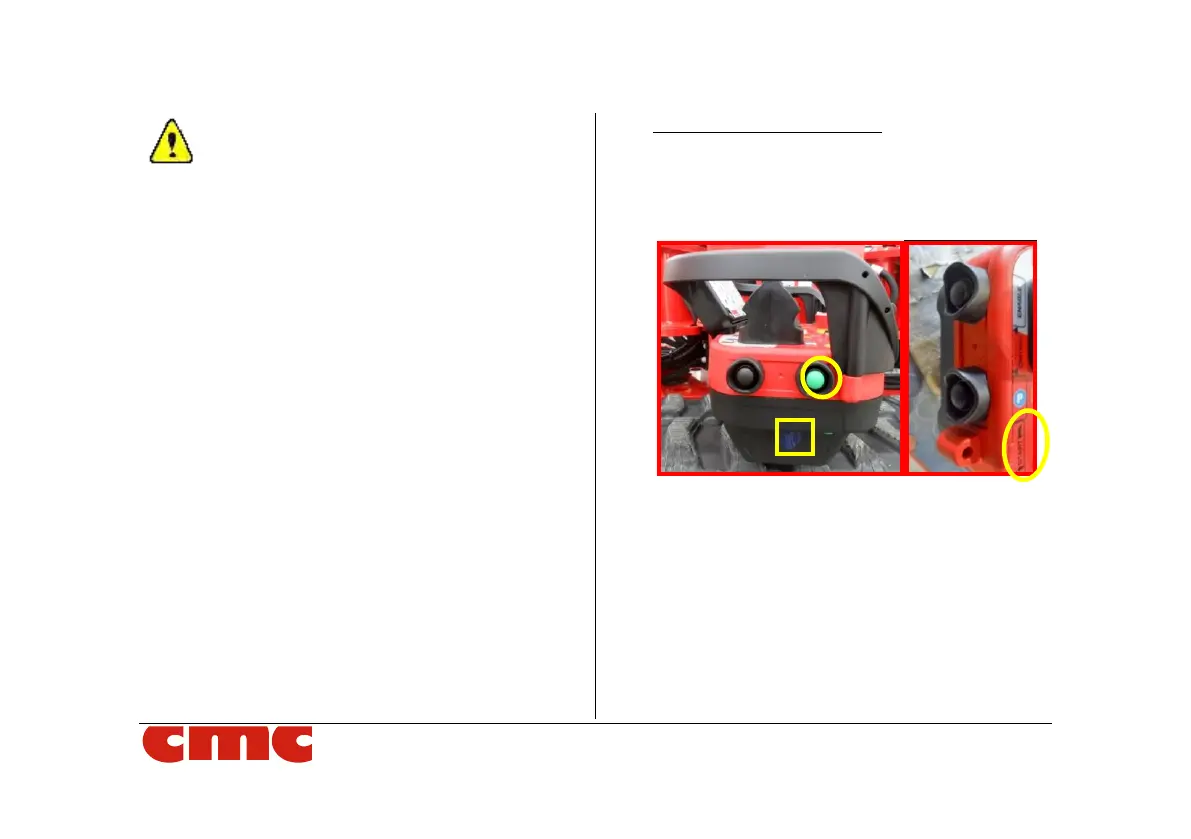
1. To connect the radio control, press the green
Start/Link button SL (Picture 7) down on the
left side.
Picture 7: start/link button on radio control.
2. if the radio control is not correctly connected to
the machine, the green led on the upper right
side of the LED panel flashes intermittently
and a buzzer on the electric box emits an in-
termittent acoustic signal.
3. press the start/link button again: when the
connection is complete, the buzzer stops and
the green led starts to light up at the rate of
two flashes interspersed with a pause.



 To Next Page