OPERATING MANUAL
800.749.2761 www.coachcomm.com
27
Using the Super Clamp
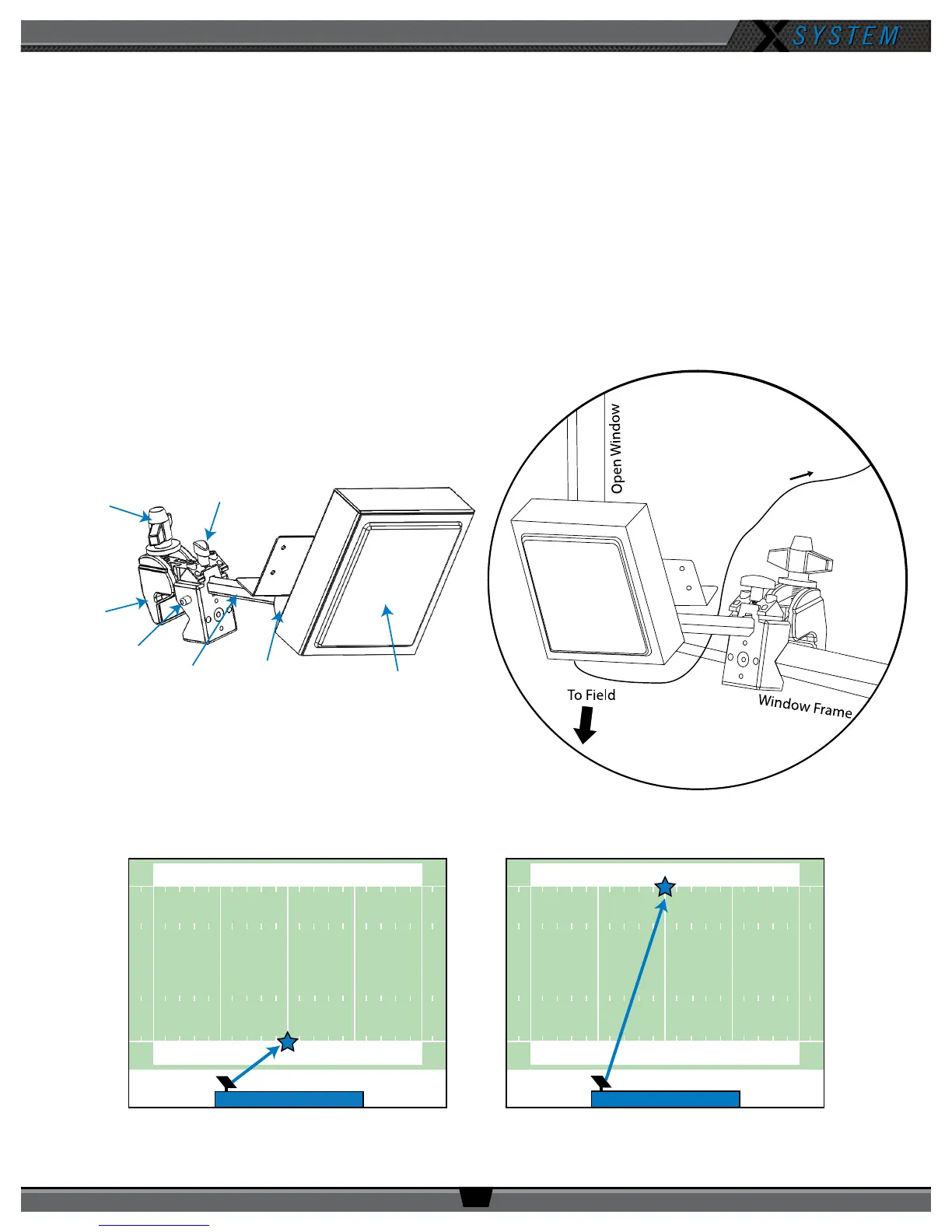
1. Loosen the clamp’s small screw.
2. Press the clamp’s side button as you insert the Antenna’s hex standoff into the opening and tighten it. Release the
button once the standoff is fully seated.
3. Tighten the clamp’s small screw.
4. Fasten the clamp to the desired location, such as a railing or the side of a table, using the clamp’s larger screw to
loosen and tighten it.
5. Point the front of the Antenna toward the center of your team’s coaches’ box. (Loosen the ball mount knob to
adjust the angle of the Antenna, if needed.)
6. Connect a Cat 5 cable to the X-NET IN port on the Antenna. Connect the other end of the Cat 5 cable to the FIELD
ANTENNA(S) port on the Press Box Rack Unit’s rear panel.
50 4040
5040 40
50 4040
5040 40
Your Sideline
Your Sideline
OR
Small Screw
Side Button
Hex
Standoff
Ball Mount
Knob
RT Front
Clamp
Figure 31: Single-Mounted RT with Clamp
To Press Box
Rack Unit
Figure 32: Clamp-Mounted RT
Figure 33: Center of Your Coaches’ Box



 To Next Page