DIGIMINI AMERICAS REPEATERS
PRODUCT DESCRIPTION AND USER’S MANUAL
Cobham Wireless – Coverage Date: 6-Jul-17 www.cobham.com/wireless
Document number: 00031UM Rev. 6.3
Page |5-4
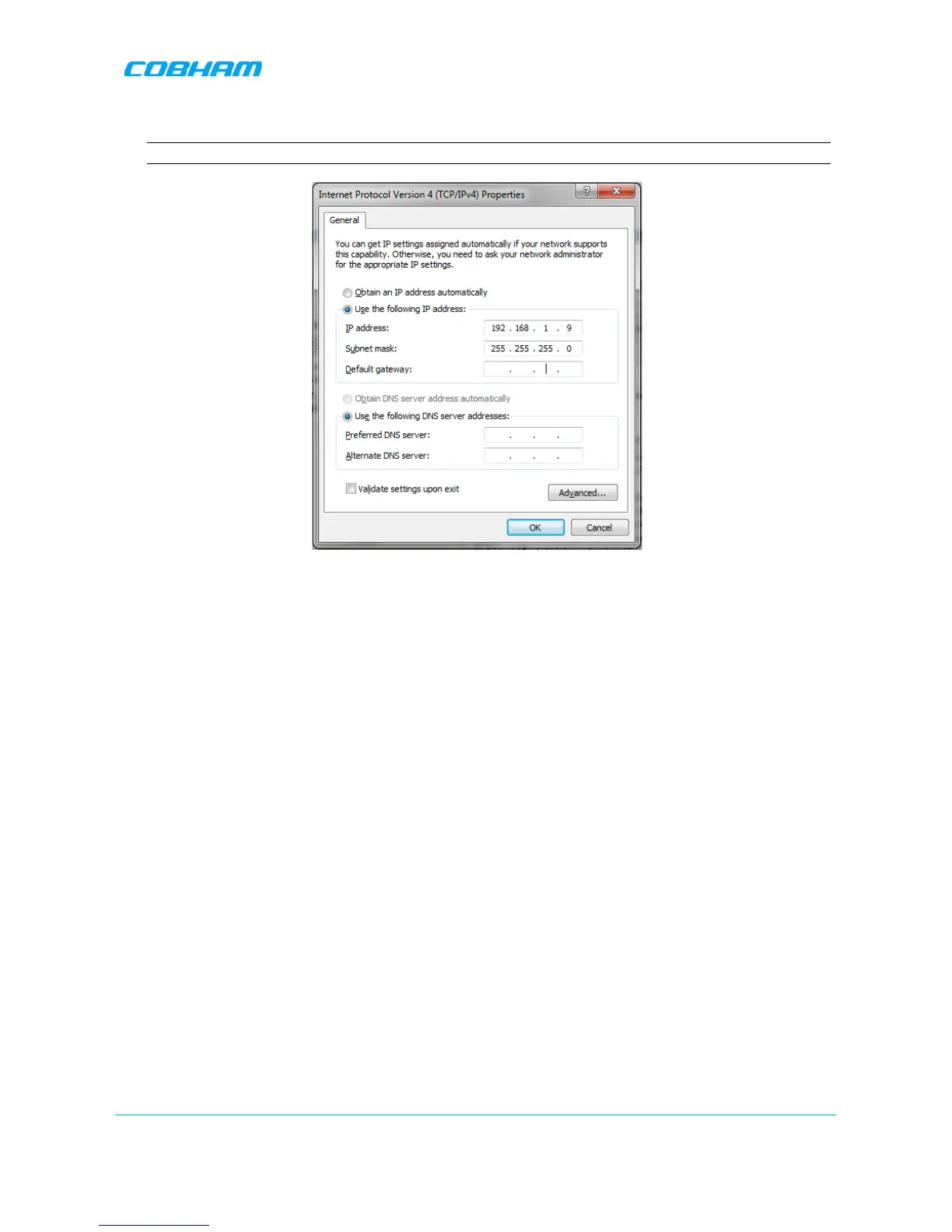
The Internet Protocol Version 4 (TCP/IPv4) Properties dialog appears.
Note: The Repeater is supplied with the default IP address 192.168.1.253.
Figure 5-4 IPv4 Properties dialog
3. Assign your computer an IP address in the same subnet, in order to communicate with the unit.
• In the IP address area:
• Enter the IP address 192.168.1.x, where ‘x’ can be any number between 2 and 250 inclusive. For
example, (192.168.1.9)
• Define the subnet mask as shown (255.255.255.0)
• Click OK. The computer communication parameters are now defined and you can open a session to
the Repeater.


 To Next Page