DIGIMINI AMERICAS REPEATERS
PRODUCT DESCRIPTION AND USER’S MANUAL
Cobham Wireless – Coverage Date: 6-Jul-17 www.cobham.com/wireless
Document number: 00031UM Rev. 6.3
Page |5-10
To adjust the signal levels and configure the channels:
1. In the left pane (Topology Tree), select the
bands
item (e.g. 850-1900) which includes the Band item
whose sub-bands are to be configured.
2. Click the Control and Params tab. For dual/quad band configurations,
click the required band
for
configuration and the corresponding pane appears.
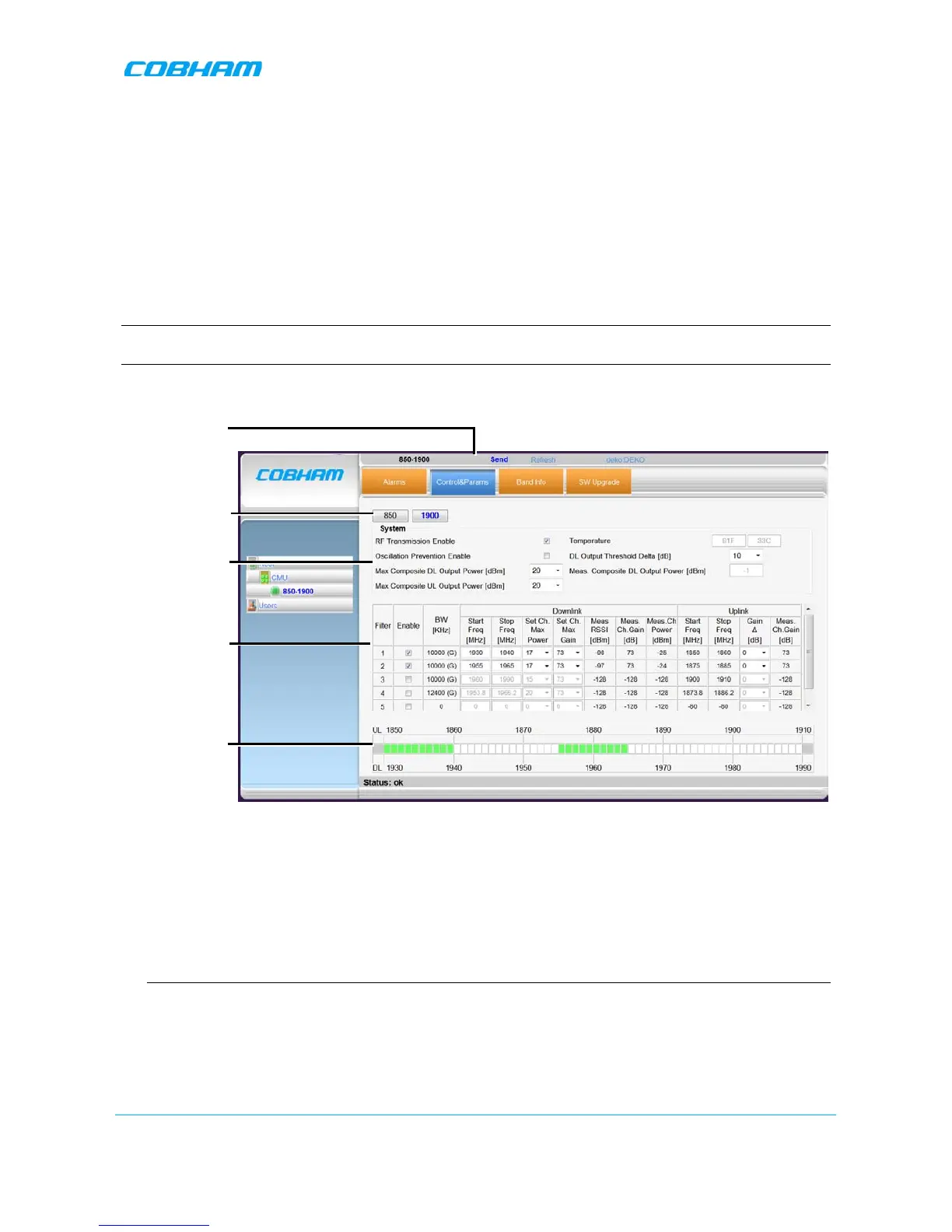
The window is divided into the following areas:
• System – overall parameters for the
selected service.
• Filter definitions – used to define up to eight sub-bands and their RF parameters.
• Sub-bands view – graphical display of defined sub-bands for the service.
NOTE: You may define a total of eight sub-bands for both bands; e.g. 2 sub-bands for the 850MHz band
and 6 sub-bands for the 1900MHz band (see section 5.3.2 for details).
Figure 5-9. Control and Params Tab (example shows dual-band)
3. Set the System Level parameters:
• Verify that the RF Transmission Enable parameter is checked.
• Set the Max Composite DL Output Power according to your site requirements and click Send.
The Measured Composite DL Output Power is displayed in the adjacent field.
If the composite output power exceeds the defined value, the Smart ALC feature begins working.
• Set the Max Composite UL Output Power according to your site requirements.
Additional parameters (not required for initial setup) are:
• Oscillation Prevention Enable - Enables oscillation detection mechanism that maintains repeater
functionality.
• Temperature - Displays Repeater ambient temperature.
• DL Output Threshold Delta (dB) - the delta from the set Composite Output Power, below which the
alarm 'Donor power is too low' is activated.


 To Next Page