Code Blue
•
259 Hedcor Street
•
Holland, MI 49423 USA
•
800.205.7186
•
www.codeblue.com
GU-137-Hpage 22 of 67
IP1500 and IP2500 Series
Administrator Guide
VLANConguration
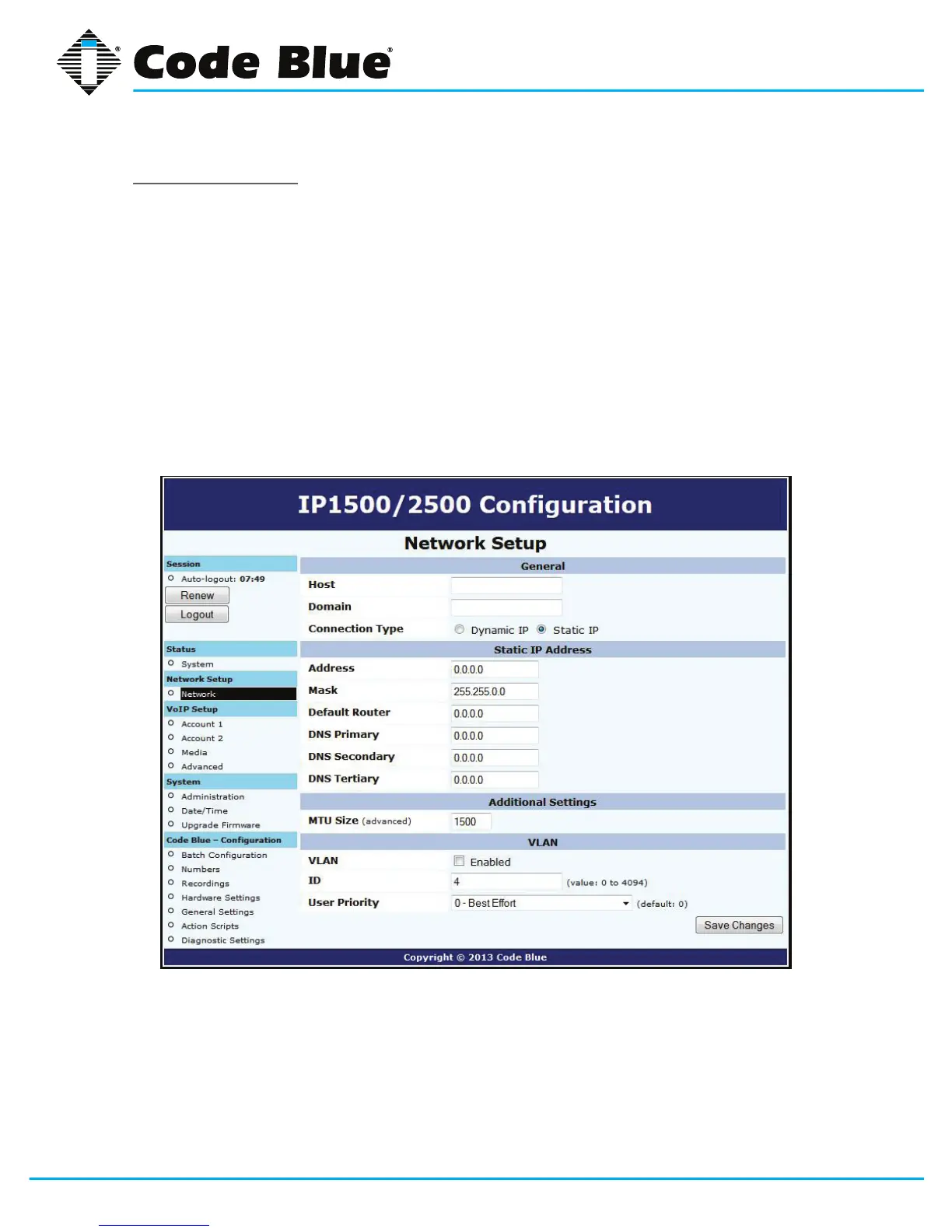
ThespeakerphoneiscapableofperformingIEEE802.1Qframetagginganduserprioritysettings.
1. Click on the Network menu item under Network Setup(seefarleft-handcolumn).
2. Then click on the VLAN EnabledcheckboxintheVLANsectionandselectyourdesired
VLANIDandUserPriority.
3. Onceyouhaveenteredyoursettings,clickonSave Changes.
NotethatifyourPCcannotaccessthenewVLAN,youwillhavetocorrectthisproblembefore
continuingconguration,asyouwillloseaccesstothespeakerphone.IfyouwishtodisableVLAN
supportandcannotreachthespeakerphoneonitsconguredVLAN,factory-resettheunittoclear
networkconguration.



 To Next Page