Code Blue
•
259 Hedcor Street
•
Holland, MI 49423 USA
•
800.205.7186
•
www.codeblue.com
GU-137-Hpage 59 of 67
IP1500 and IP2500 Series
Administrator Guide
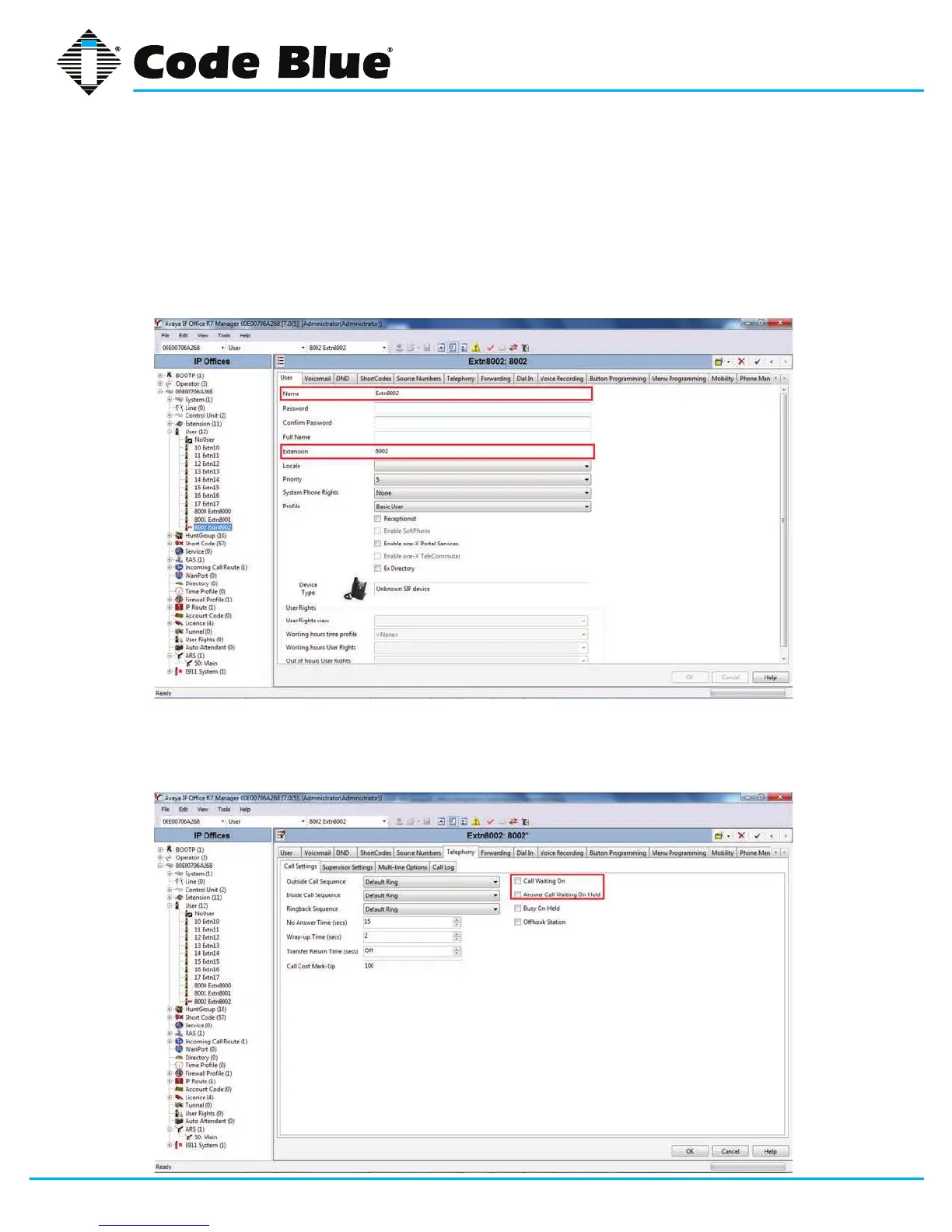
11. Enterthefollowingeldstocreateanewuser;
• Name: Thiswillbedisplayedastheuser’snameinIPOfceManager,andis
usedastheusernameforSIPregistrationwhenconguringthe
IP1500/2500/5000 Series Phone.
•
Extension: This should match the Base ExtensionconguredfortheSIPexten-
sioninStep8.Thisisalsousedasthephonenumberwhenconguringthe
IP1500/2500/5000 Series Phone.
12. Select the Telephony tab and then the Call Settings sub-tab. Disable Call
Waiting On and Answer Call Waiting on Hold.Callwaitingisnotsupportedon
the IP1500/2500/5000 Series Phone.



 To Next Page