17
a
d
b
c
6) SIP settings
The SIP settings configuration procedure is only to be used when you wish to channel a door entry phone communication to a
SIP digital telephone line (PSTN/GSM).
It is possible to purchase up to 15 SIP phone lines to be shared between all the apartments. Each phone line is a
communication channel: when a call is received from an external unit to landline or mobile phone, the first available SIP line is
used.
Purchase the desired number of SIP phone lines (max 15) from a SIP services provider: each phone line is
a valid account on the SIP server used to make telephone calls; the user settings and password are to be
entered in the “SIP phone lines” screen.
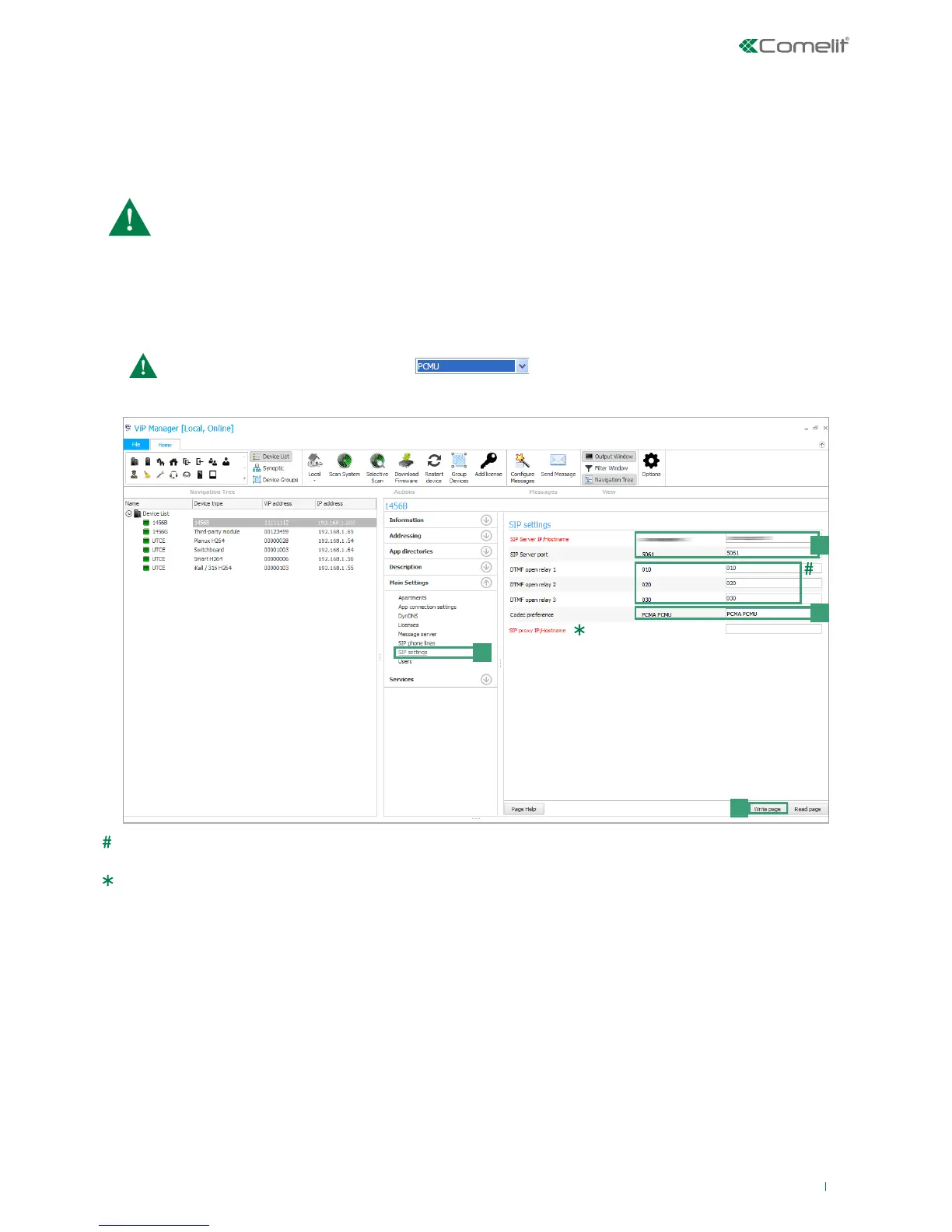
1. Select the device 1456B and select Main Settings/SIP settings [a].
2. Enter the IP address/hostname of the SIP service provider (for example: sip.messagenet.it) and the UDP port of the server
supplied by the service provider (for example: 5061) [b].
3. Leave the parameter "Codec preference"[c] ( for audio encoding/decoding) on the default setting: PCMA/PCMU.
US users only, select the codec PCMU.
4. Press Write page [d] to save the current settings.
DTMF relay opening 1/2/3: sequence of keys to press (minimum 3, maximum 6) to send a command to activate the relay
from a telephone (the default values can be changed)
Proxy SIP address (secondary SIP server): normally not necessary, can be left blank.



 To Next Page