18
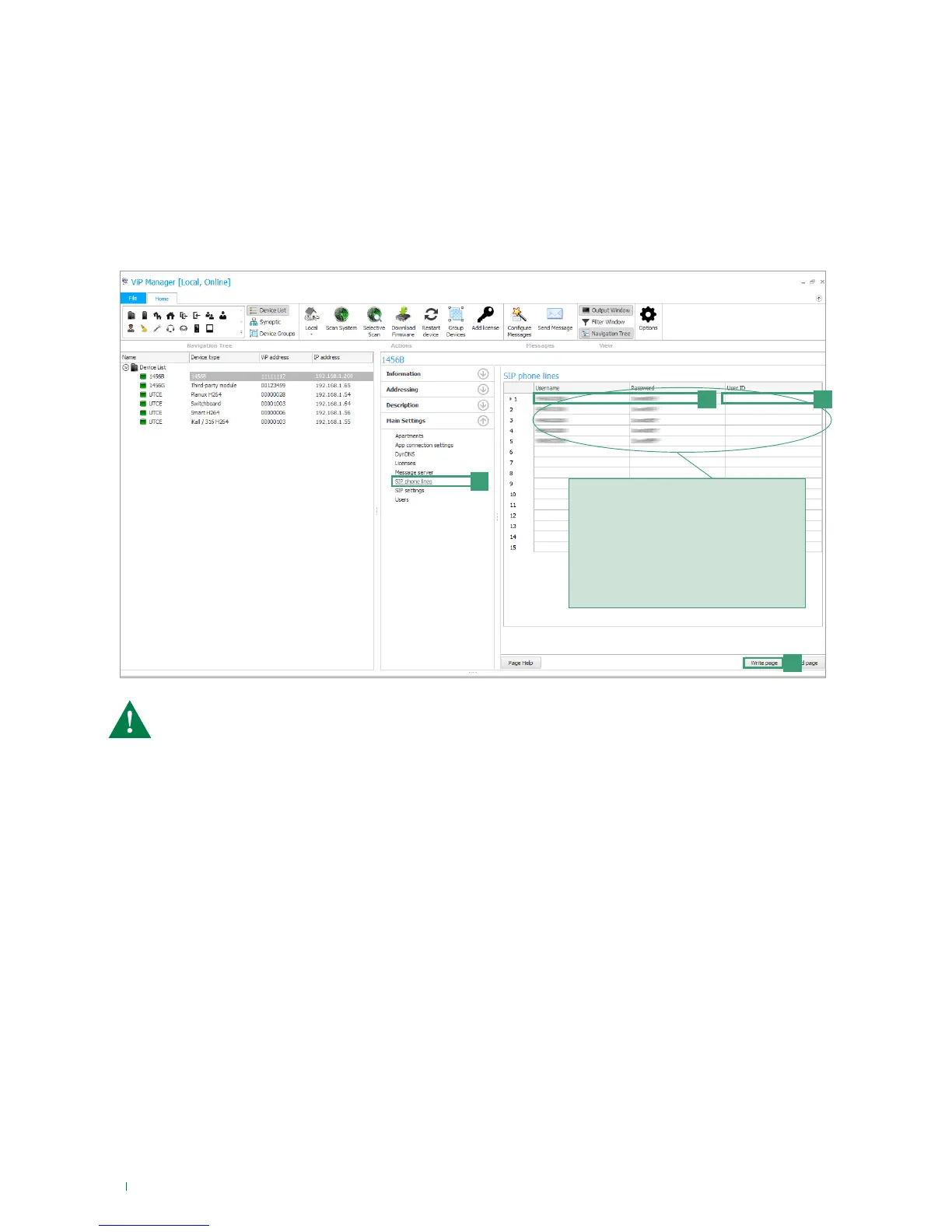
a
d
b
c
If the username, the password and the user
ID supplied by the SIP services provider are
valid for more than one SIP phone line, re-
enter the username, password and user ID in
the subsequent rows for all the phone lines
purchased.
For example: if 5 SIP phone lines have been
purchased for which you have 1 username,
1 password and 1 user ID, enter the same
credentials in each of the first 5 rows.
7) SIP phone lines configuration
Access to the SIP lines is controlled by the username and password supplied by the SIP services provider when the line is
purchased. Some providers also provide a User ID (which can be variously designated "User authentication", "user auth" or
"user ID". The procedure for phone lines configuration is described below.
1. Select the device 1456B and select Main Settings/SIP phone lines [a].
2. For each SIP phone line purchased, enter the respective username and password [b].
3. For each SIP phone line purchased, enter the user ID [c] only if this has been provided by the SIP services provider,
otherwise leave the field blank.
4. Press Write page [d] to save the current settings.
A maximum of 15 SIP phone lines may be enabled.
The lines are shared by all the system users connected to the device 1456B and are managed according to
the rule “First come, first served”.



 To Next Page